•
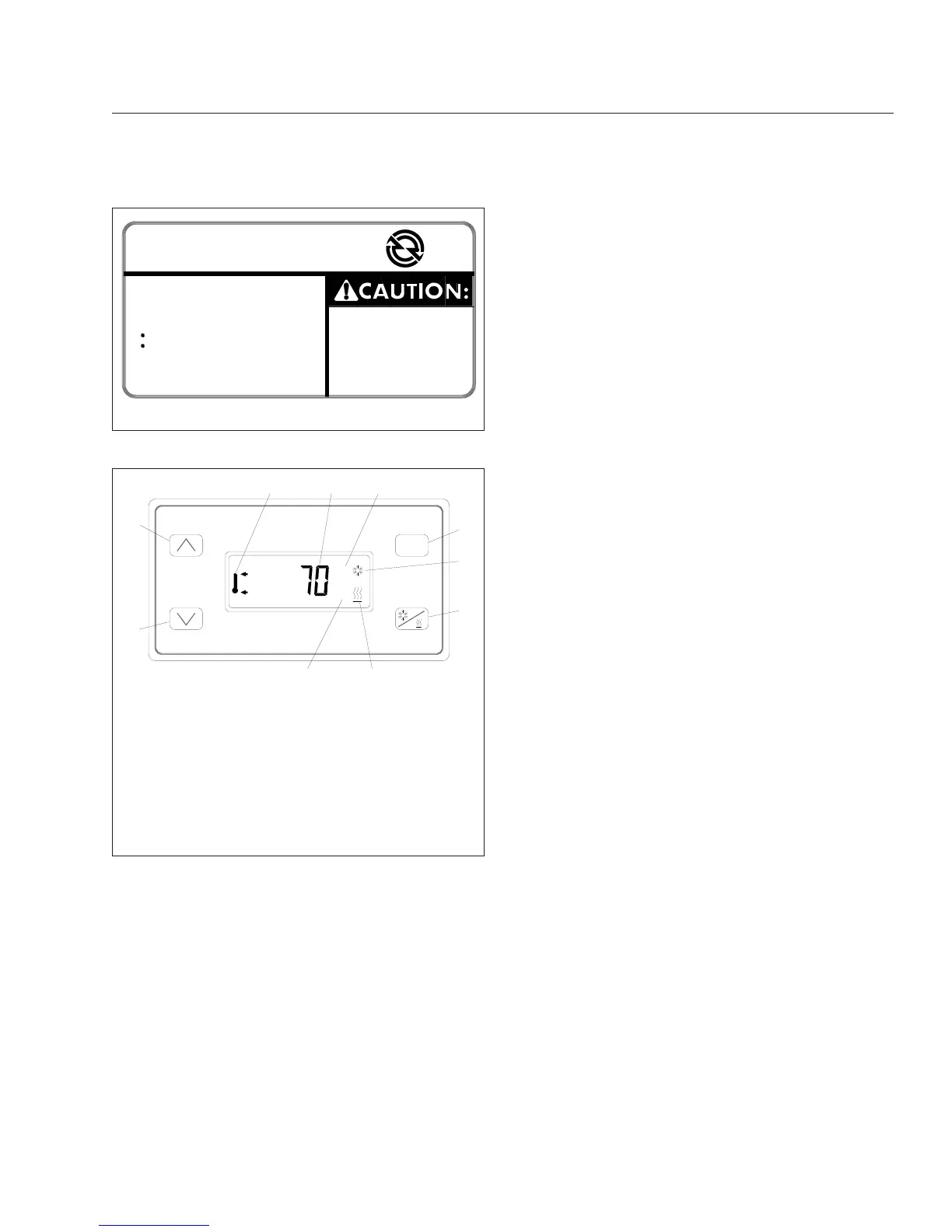
Down Button: decreases the set point and
comfort zone.
•
Cool/Heat Button: detects either cooling or
heating operation.
•
Mode Button: scrolls through the various func-
tions. It can also be used to set desired tem-
perature values.
1.
Activate Optimized Idle (engine mode).
1.1
Set the parking brake.
1.2
If it is tilted, close and secure the hood.
1.3
Start the engine and let it idle.
1.4
Put the transmission in neutral.
1.5
Turn on the cruise control.
The dash light will begin blinking, indicat-
ing that Optimized Idle is active. The sys-
tem is now in the engine mode and after
an initial phase, in which the idle speeds
up to 1000 or 1500 rpm (depending on the
outside temperature), the engine will stop
and start automatically to keep the battery
charged and the engine oil warm. The
dash light stays on and shines steadily at
this point.
IMPORTANT: The cruise control must be
turned on after the engine is idling. If it was
previously turned on, turn off the cruise con-
trol, then turn it on again.
2.
Activate the thermostat mode (if so equipped).
NOTE: When the system is in the thermostat
mode, it is also in the engine mode. It will
continue to operate in the engine mode even
if the thermostat mode is turned off.
2.1
With the system in the engine mode, set
the cab and sleeper heater or air condi-
tioner controls to the highest setting.
2.2
Turn on the thermostat by touching any of
the four buttons. See
Fig. 10.7.
The display will flash the current sleeper
temperature and the previous mode (cool-
ing or heating) selected. If the cab needs
to be cooled or heated, the cool/heat icon
will flash.
2.3
Choose either cool or heat by pressing the
Cool/Heat button. Make sure the selection
matches that of the cab controls.
IMPORTANT: If the heat or cool selection of
the thermostat does not match that of the
cab, the system will idle and cycle exces-
sively.
2.4
Select Fahrenheit or Celsius by pressing
and holding the Mode button until either
the "F" or "C" is displayed.
11/13/96
f080062
TO AVOID
UNINTENTIONAL
VEHICLE MOVEMENT,
DO NOT MOVE SHIFT
LEVER OR RANGE
SELECTOR WHEN
OPTIMIZED IDLE IS ON
OPTIMIZED IDLE
TM
TO USE:
− IDLE ENGINE
− CLOSE HOOD
− ENGAGE PARKING BRAKES
− PUT TRANSMISSION IN
NEUTRAL AND
HI RANGE (IF EQUIPPED)
− THEN, MOVE CRUISE SWITCH
FROM OFF TO ON
− IF DESIRED, TURN CAB
THERMOSTAT ON (IF EQUIPPED)
Fig. 10.6, Optimized Idle Dash Label
MODE
°F
°C
11/08/96
1
2
3
4
5
6
7
8
9
10
f601250
1. Down Button
2. Up Button
3. Upper/Lower Temperature Icon
4. Temperature Display
5. Degrees Fahrenheit Indicator
6. Mode Button
7. Cooling Icon
8. Cool/Heat Selection Button
9. Heating Icon
10. Degrees Celsius Indicator
Fig. 10.7, Optimized Idle Thermostat
Optional Engine Systems
10.6








 To Next Page