ATC Normal Mode
In normal mode, the system will engage the brakes
on the wheel or side that the wheel slip is occurring
to help the vehicle gain traction. The point at which
the traction control will actuate the braking system
increases with throttle: low throttle allows the system
to brake the wheels earlier; heavy/full throttle raises
the point of the acceptable wheel slip.
Adhere to the following points when driving in ATC
normal mode:
•
If using Automatic mode in soft soil and/or
sand, maintain the engine speed between
1000 and 1300 rpm to prevent unnecessary
upshifting.
•
If using Manual mode in soft soil and/or sand,
do not attempt an upshift and try to maintain
the current gear.
•
If the vehicle comes to a stop in the sand it
may be necessary to back up prior to attempt-
ing forward movement.
ATC Mud/Snow Mode
To select the mud/snow mode, depress the ATC
switch (see
Chapter 5). This mode raises the wheel
slip speed that is allowed before the traction control
activates. The point at which the traction control will
actuate the braking system increases with throttle:
low throttle allows the system to brake the wheels
earlier; heavy/full throttle raises the point of the ac-
ceptable wheel slip.
Load-Based Shifting
The UltraShift PLUS system is adaptive and will
change the shift points based on grade, engine RPM,
throttle position, and vehicle load. After changing
loads or powering up, the system needs to relearn
these inputs for the first few shifts to make the
proper adjustments.
Coasting
When coasting to a stop on level terrain, the Ultra-
Shift PLUS system may not downshift into the lower
gears. It will select a gear after the throttle is applied.
Eaton Fuller UltraShift DM
Automated Transmissions
General Information, UltraShift DM
Eaton® Fuller® UltraShift
™
DM is a heavy-duty fully
automated transmission. No clutch pedal is required
to operate the vehicle.
UltraShift DM uses a dry clutch system which is of-
fered only on this automated transmission system.
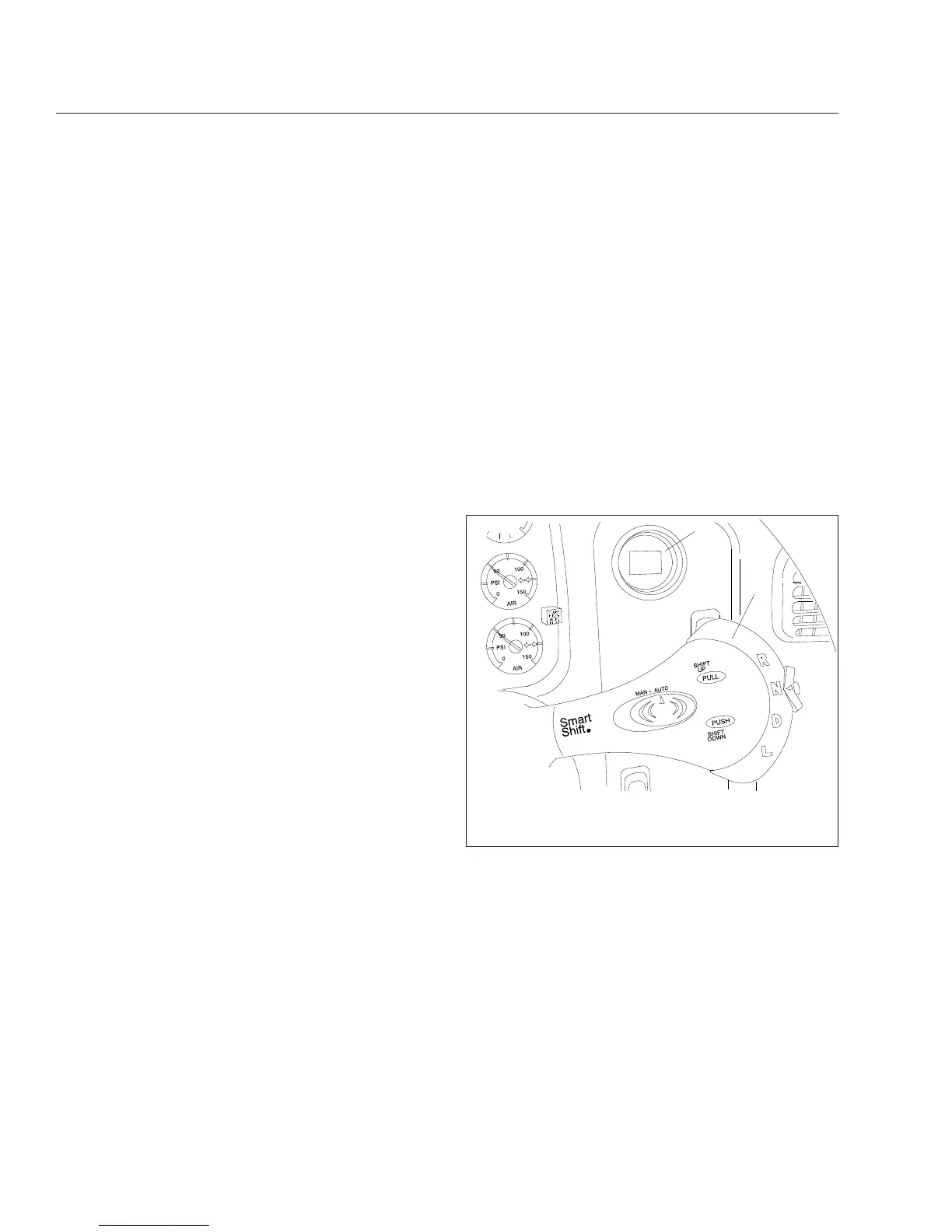
The UltraShift transmission uses the four-position
SmartShift lever on the steering column to select
gears. The current gear is displayed on the indicator
on the right-hand control panel as shown in
Fig. 14.2. All forward shifts can be made either
manually or automatically, at the driver’s choice.
Operation, UltraShift DM
Power Up
1.
With the parking brake set, select neutral (N) by
moving the selector switch to the N position.
2.
With the transmission in neutral, turn on the igni-
tion switch. The CHECK TRANS and TRANS
TEMP telltale lights come on and go out again
(bulb check).
12/22/2003
f270079a
1
2
1. Current Gear Indicator
2. SmartShift Control
Fig. 14.2, Shift Controls and Indicators, UltraShift
Transmissions
Automated and Automatic Transmissions
14.5








 To Next Page