291
Home > Fax > PC-FAX > PC-FAX for Windows
®
> Receive Faxes on Your Computer (Windows
®
) > Receive
Faxes Using PC-FAX Receive (Windows
®
) > Run Fuji Xerox's PC-FAX Receive on Your Computer
(Windows
®
) > Set Up Your Computer for PC-FAX Receiving (Windows
®
)
Set Up Your Computer for PC-FAX Receiving (Windows
®
)
1.
Double-click the (PC-Fax Receive (Ready)) icon in your computer task tray.
The PC-FAX Receive window appears.
2.
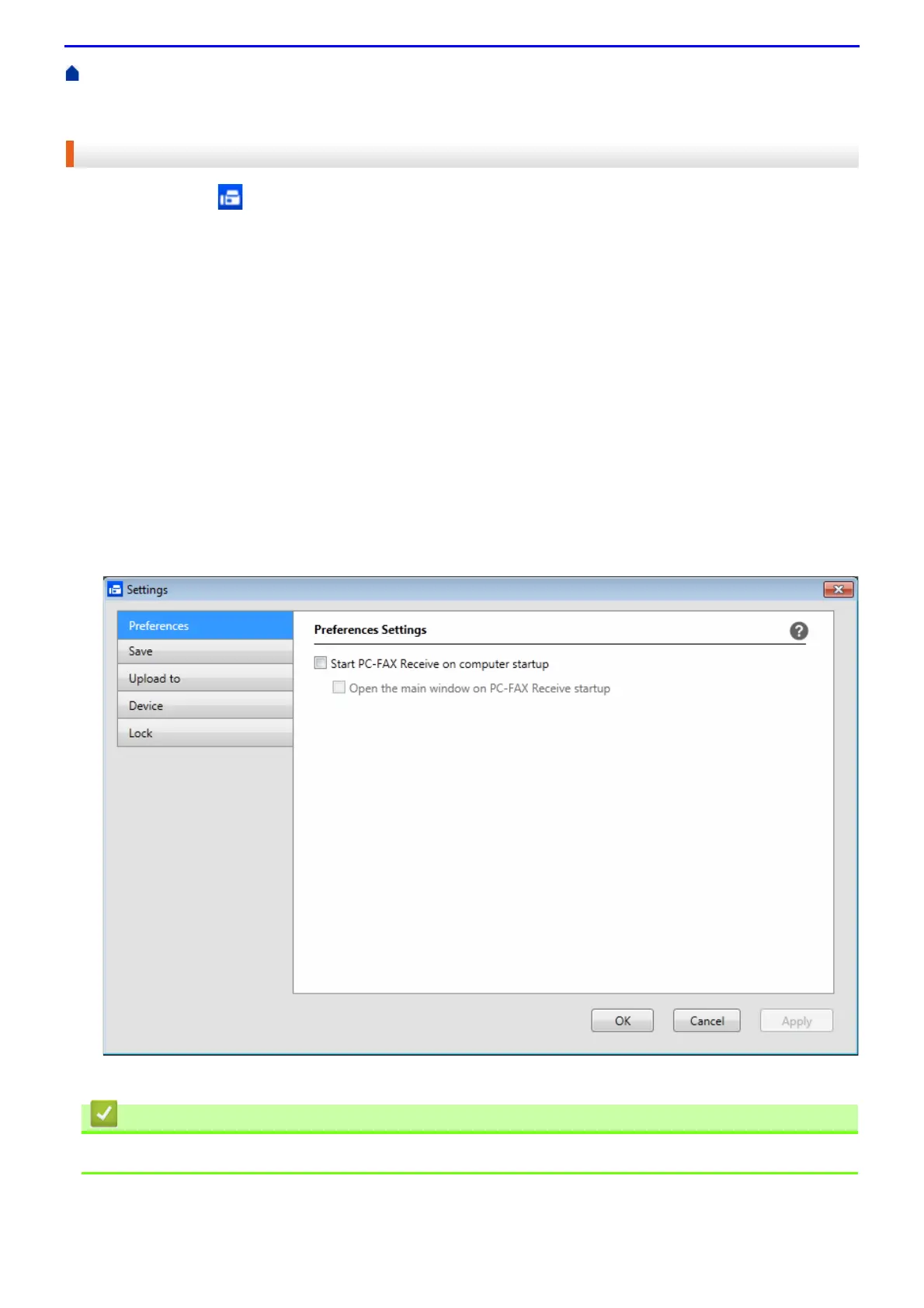
Click Settings.
3.
Configure these options as needed:
Preferences
Configure to start PC-FAX Receive automatically when you start Windows
®
.
Save
Configure the path to save PC-FAX files and select the received document format.
Upload to
Configure the path to the SharePoint
®
server and select the option to upload automatically or manually
(available only for Administrators).
Device
Select the Fuji Xerox machine that you want to receive PC-FAX.
Lock(available only for Administrators)
Restrict users who do not have administrator privileges from configuring the settings options shown above.
4.
Click OK.
• Run Fuji Xerox's PC-FAX Receive on Your Computer (Windows
®
)



 To Next Page
 Loading...