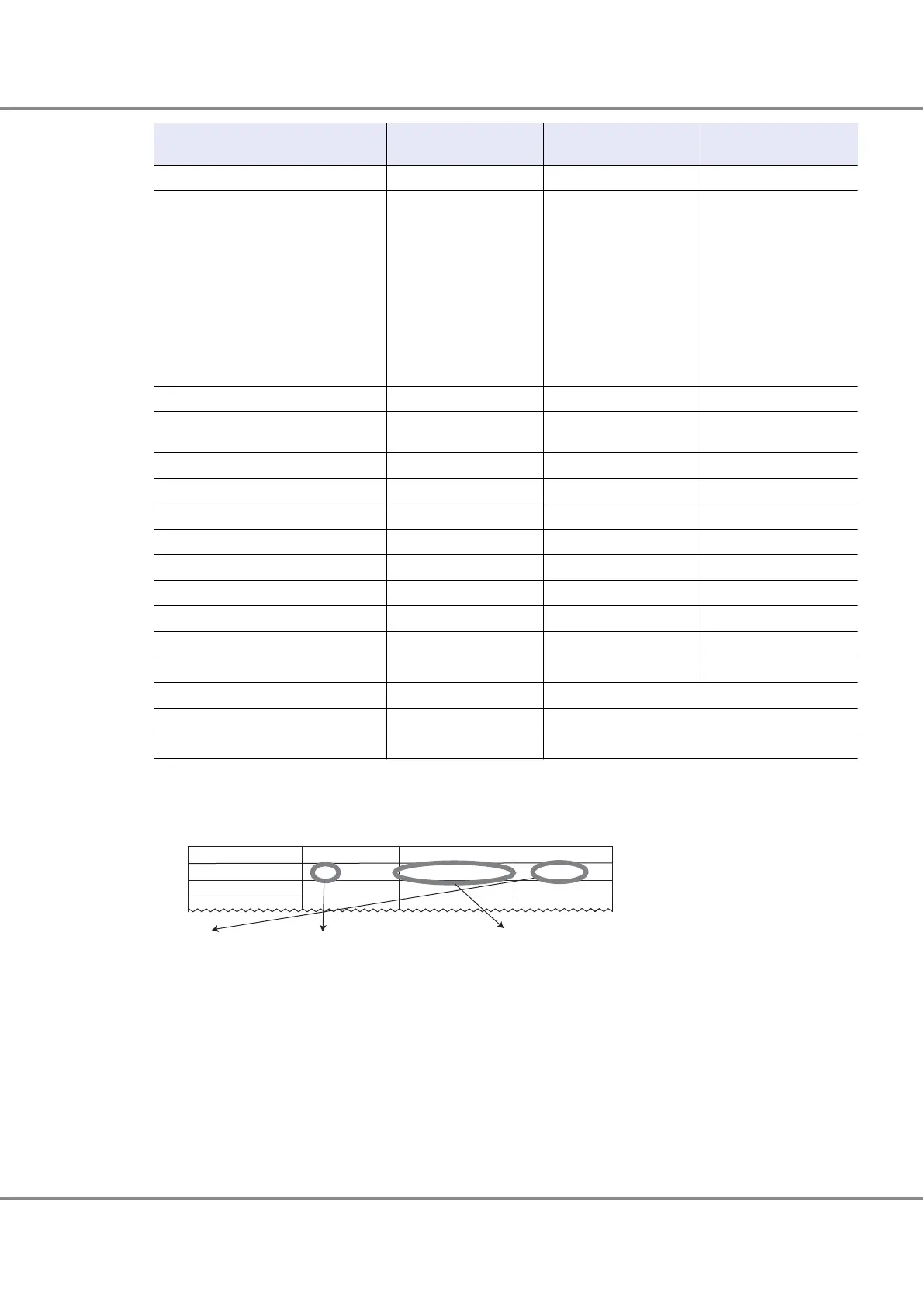
Parameter
Setting value (for direct
connection)
Setting value (for switch
connection)
Remarks
hbaX-fc-tape 0 0 Non-default value
hbaX-fc-data-rate 1, 3, 4, 5, or 6 0, 1, 3, 4, 5, or 6 (*3)
The following values may
be used:
0 g 1Gbit/s fixed
1 g 2Gbit/s fixed
2 g Auto (default)
3 g 4Gbit/s fixed
4 g 8Gbit/s fixed
5 g 16Gbit/s fixed
6 g 32Gbit/s fixed
hbaX-pci-latency-timer 0x40 0x40 —
hbaX-pci-x-max-memory-read-byte-
count
0 0 —
hbaX-link-down-error 1 1 —
hbaX-link-down-timeout 60 60 —
hbaX-persistent-binding-configuration 0 0 —
hbaX-persistent-binding-by-port-ID 0 0 —
hbaX-fast-error-reporting 0 0 —
hbaX-extended-logging 0 0 —
hbaX-queue-full-retry-count 16 16 Non-default value
hbaX-queue-full-retry-delay 2 2 —
hbaX-security-protocols 0 0 —
hbaX-FDMI-support 0 0 —
hbaX-VPD-support 0 0 —
hbaX-AIF-support 0 0 Non-default value
*1: Set as follows:
hbaX-SCSI-target-id-<X>-fibre-channel-port-name="<Storage WWPN>";
Check the target binding table for the Storage WWPN setting.
Channel Adapter name
SCSI T-ID
Alias name (WWN)
Instance name
CM0CA0Port0
CM1CA0Port0
16
16
202000e000cb0001
203000e000cb0001
hba0
hba1
hba0-SCSI-target-id-16-fibre-channel-port-name="202000e000cb0001"
hba1-SCSI-target-id-16-fibre-channel-port-name="203000e000cb0001"
*2: Recommended value = 512 ¸ (number of Fibre Channel ports that are connected to a single CA port)
(Round the result down)
Use the value of "8" if the actual result is lower.
Chapter 3 Setup Procedure for QLogic Fibre Channel Cards
3.5 Required Driver Parameters
67
FUJITSU Storage ETERNUS DX, ETERNUS AF Configuration Guide -Server Connection- (Fibre Channel) for Oracle Solaris
Copyright 2017 FUJITSU LIMITED
P3AM-6312-18ENZ0










 To Next Page