61
Editing
EN
Guide to the editing on this unit
The following editing menus are three different
methods depending on how you edit the titles.
- Add or delete chapter marks manually. (See page
62.)
- Create a Playlist, scene delete, combine or divide
of the title. (See pages 63, 66, 70 and 71.)
- Edit from the Title List (delete, edit title name or
protect of the title, etc.). (See pages 65, 68, and
69.)
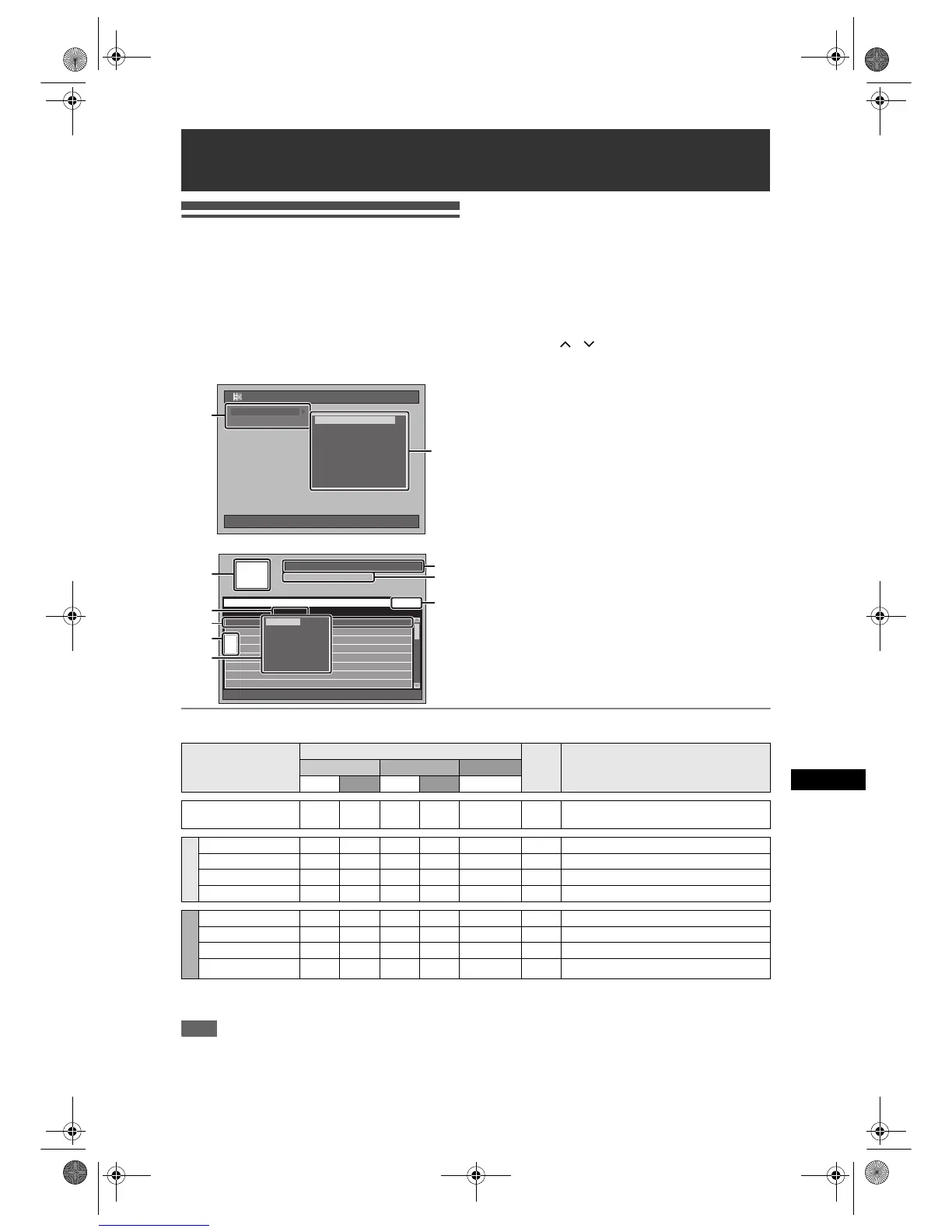
1 Editing Menu
2 Items of Editing Menu
• Items vary between “Playlist” and “Original”.
3 Selected device (HDD or DVD)
4 Channel, starting time, the length of recording
time and Rec Mode of the selected title
5 The number of the current Title / the total number
of the Title
Use [SKIP F] to jump to the next page. Use
[SKIP B] to jump to the previous page. Use
[Cursor
/ ] to move among titles one by
one.
6 Preview window
7 Selected list type (Original or Playlist for HDD or
VR mode DVD-RW only)
8 Selected title
• Title name
• Only the highlighted title will be played back in
the preview window.
• Protect icon will appear only when the title is
protected (Original only).
9 Unplayed titles (HDD only)
10 Pop-up window
Available Editing Menus
{
: Available
× : Not available
Note
• You can edit a disc recorded using the PAL system. It is impossible to edit discs recorded using the NTSC
system.
Editing
10/04/06(Mon) 19:34
Editing
PlaylistEditingPlaylistEditing
Original
Playlist
HDD Playlist (New)HDD Playlist (New)
[HDD PL] Scene Delete[HDD PL] Scene Delete
[HDD PL] Title Combine[HDD PL] Title Combine
[HDD PL] Title Divide
[DVD PL] New
[DVD PL] Scene Delete
[DVD PL] Title Combine
[DVD PL] Title Divide
[HDD PL] New
2
1
HDD
HDD Remain 72h00m(SP)
Page 1/4
Remain 76:13(SP)
001/016
Title Name Recording Date
P01 11:19 (0:00:06) SP 12/04/06(Wed)
P01 11:22 (0:14:13) XP 11/04/06(Tue)
P02 09:19 (0:22:40) SP 12/04/06(Wed)
P01 12:22 (1:04:40) XP 10/04/06(Mon)
Title Name 1 12/04/06(Wed)
Title Name 2 12/04/06(Wed)
Title Name 3 12/04/06(Wed)
Title Name 4 12/04/06(Wed)
P01 12:22 (1:04:40) XP
Title Delete
Selected Delete Title
Edit Title Name
Title Sorting
Play From Start
New
New
3
5
4
6
8
7
9
Title Delete
Multiple Title Delete
Edit Title Name
Protect
Title Sorting
Play
10
Item
Media
Page DescriptionHDD
VR mode DVD-RWs
Video Mode DVDs
Original Playlist Original Playlist Original
Add/Delete Chapter Mark
Manually
{{{{
×
62
To add or delete the chapter marks to the title.
From Setup
New
×
{
×
{
×
63
To add a title to the Playlist.
Scene Delete
{{{{
×
66-68 To delete a part of the title.
Title Combine
×
{
×
{
×
70
To combine two titles into one.
Title Divide
{{
×
{
×
71 To divide a title into two titles.
From Title List
Title Delete
{
{
{{ {
65 To delete a title.
Multiple Title Delete
{{{{ {
65 To delete selected titles.
Edit Title Name
{{{{ {
68
To edit title names.
Protect
{
×
{
×
{
69 To protect/undo protect the title.
E2B21BD_E2B28BD_EN.book Page 61 Monday, August 21, 2006 5:05 PM



 To Next Page