Shutdown Procedures for the PC and MUT-III System
17
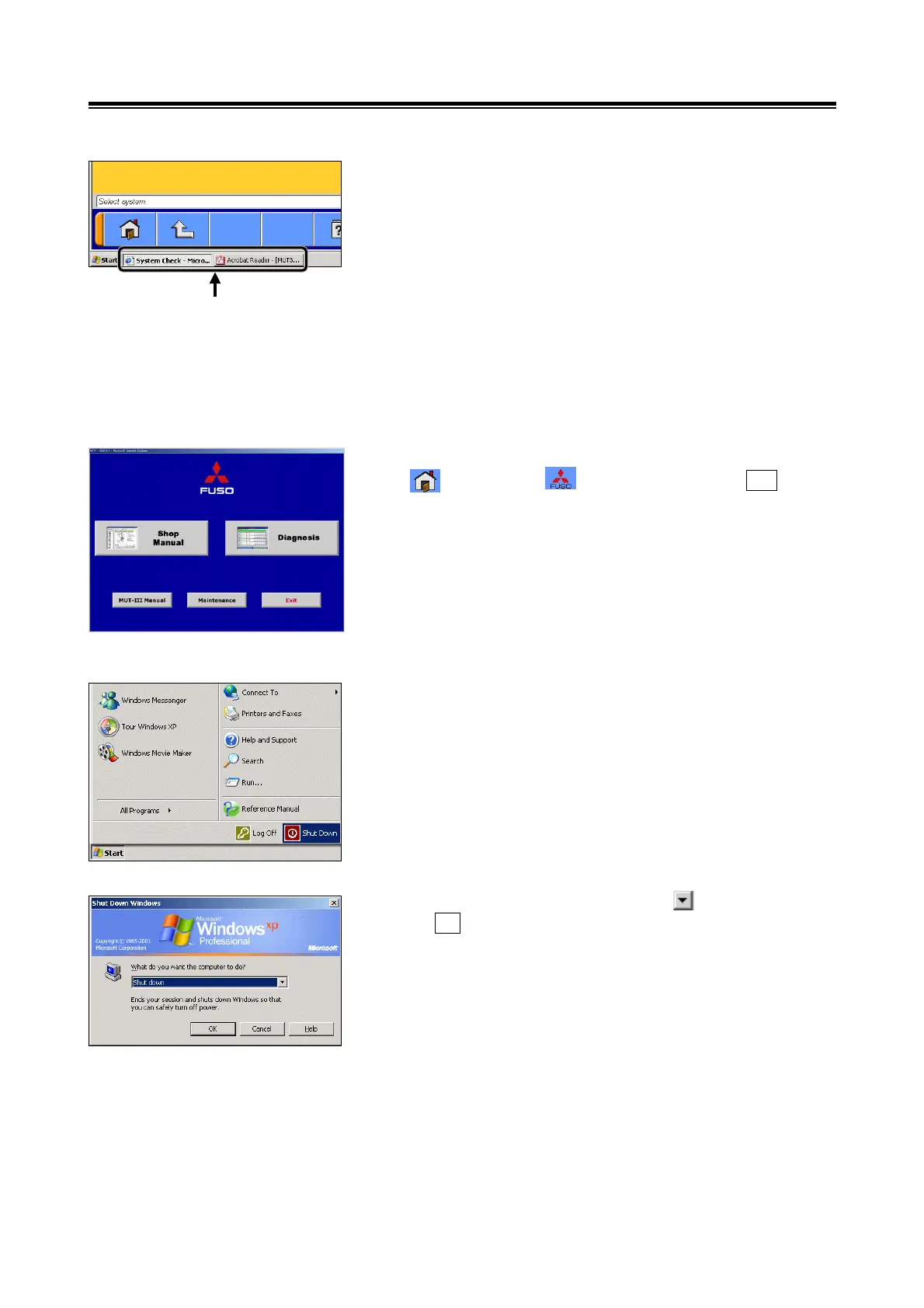
(3) While the instruction manual is open, the display can be
switched between the MUT-III system and the instruction
manual by selecting the task bar icon, located at the
bottom of the screen.
This function facilitates MUT-III operation, as it allows the
user to make simultaneous reference to the instruction
manual.
3-5. Shutdown Procedures for the PC and MUT-III System
3-5-1. Shutdown Procedures for the MUT-III System
Return to the MUT-III start-up screen by selecting either the
icon or the icon, then touch the Exit button,
located in the bottom right corner of the screen.
3-5-2. Shutdown Procedures for the PC
(1) After confirming that MUT-III has been shut down, touch
the [Start] button, located in the bottom left corner of the
screen and select [Shut Down].
(2) Select [Shut down] by touching the button then select
the OK button.
(3) After the PC has been shut down, the power indicator on
PC will no longer be illuminated.
Task Bar Icon


 To Next Page