Operating Procedures for the Data List
24
4-2-2. Saving and Regenerating the Data List
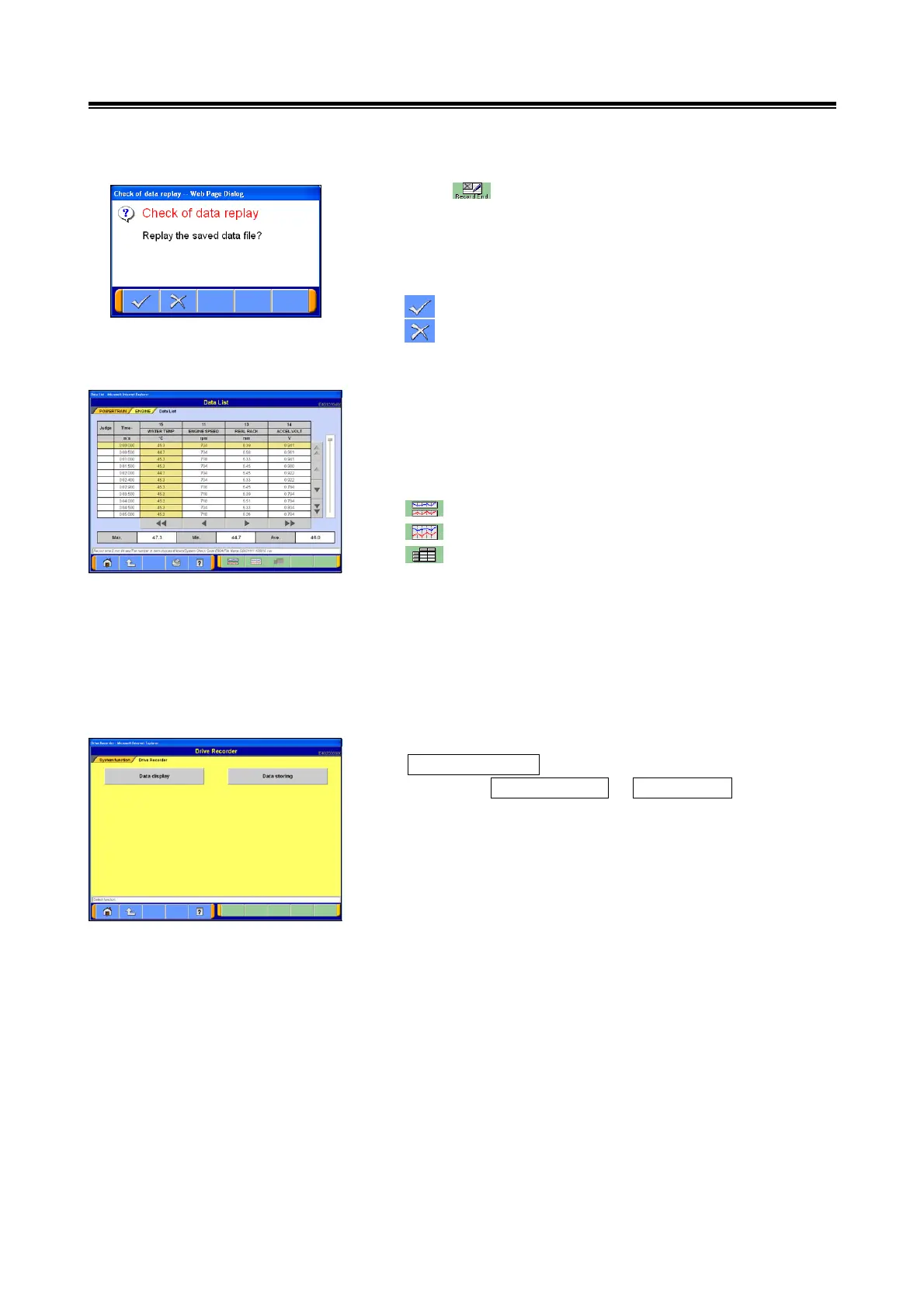
(1) If the button is selected during the Data List graph
operation, only the data for the items currently displayed in
the graph will be saved.
A prompt will be displayed to confirm the regeneration of
saved data.
--- OK: go to section (2).
--- Cancel: the data will not be regenerated and the
screen will return to the Data List display.
(2) Regenerating Saved Data
The data saved immediately after the recording will be
displayed.
The display format can be changed by using the following
buttons:
--- Graph View 1
--- Graph View 2 (overlay graph view)
--- Text View
<Note>
• The order in which items are displayed can be changed:
refer to section 4-2-4.(1).
• The data range can be changed to user-specified values
while the graph is displayed: refer to section 4-2-4.(2).
4-2-3. Displaying the Data List Saved Previously
(1) In order to display the previous Data List, select:
Special Function from the function selection menu screen,
then select Drive Recorder -> Display Data.
For this operation, the V.C.I. does not need to be
connected to the vehicle.


 To Next Page