Operating Procedures for Language Switching
82
7-7 Operating Procedures for Language Switching
7-7-1. Language Switching
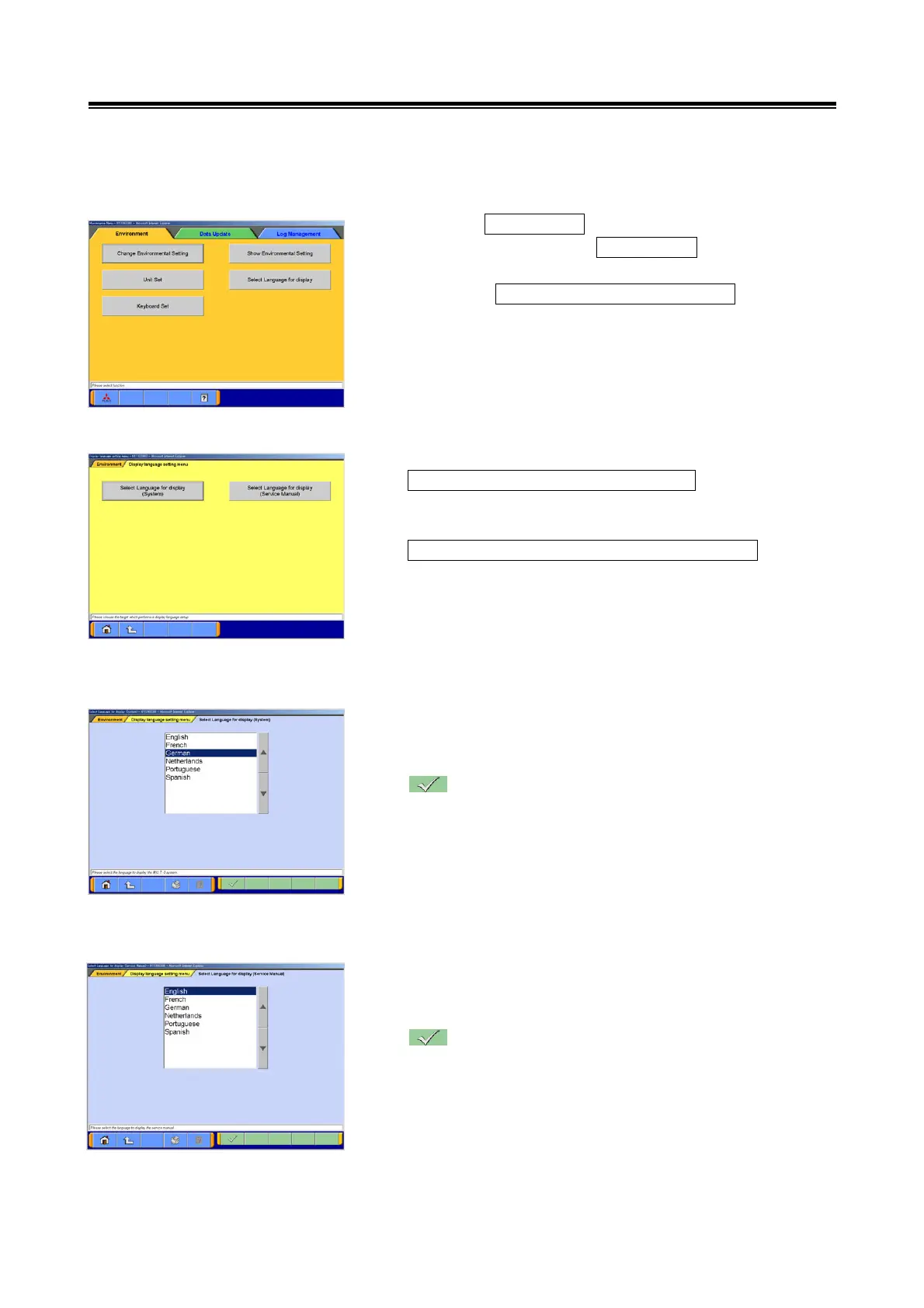
(1) Select the Maintenance button from the Start-UP Screen.
Change the screen to the Environment by selecting its tab
located on the upper side of Maintenance screen, and
select the Select Language for Display button from
Environment-related menu.
(2) Display language setting menu
Select Language for Display(System)
Language switching for Display(System) is performed.
→ go to section (3).
Select Language for Display(Service manual)
Language switching for Display(Service manual) is
performed.
→ go to section (4).
(3) Select Language for Display(System)
Select the desired Language to be used for
Display(System).
--- Setting the selected Language to be used for
Display(System).
(4) Select Language for Display(Service manual)
Select the desired Language to be used for
Display(Service manual).
--- Setting the selected Language to be used for
Display(Service manual)


 To Next Page