Operating Procedures for the Data List
27
4-2-4. Group registration
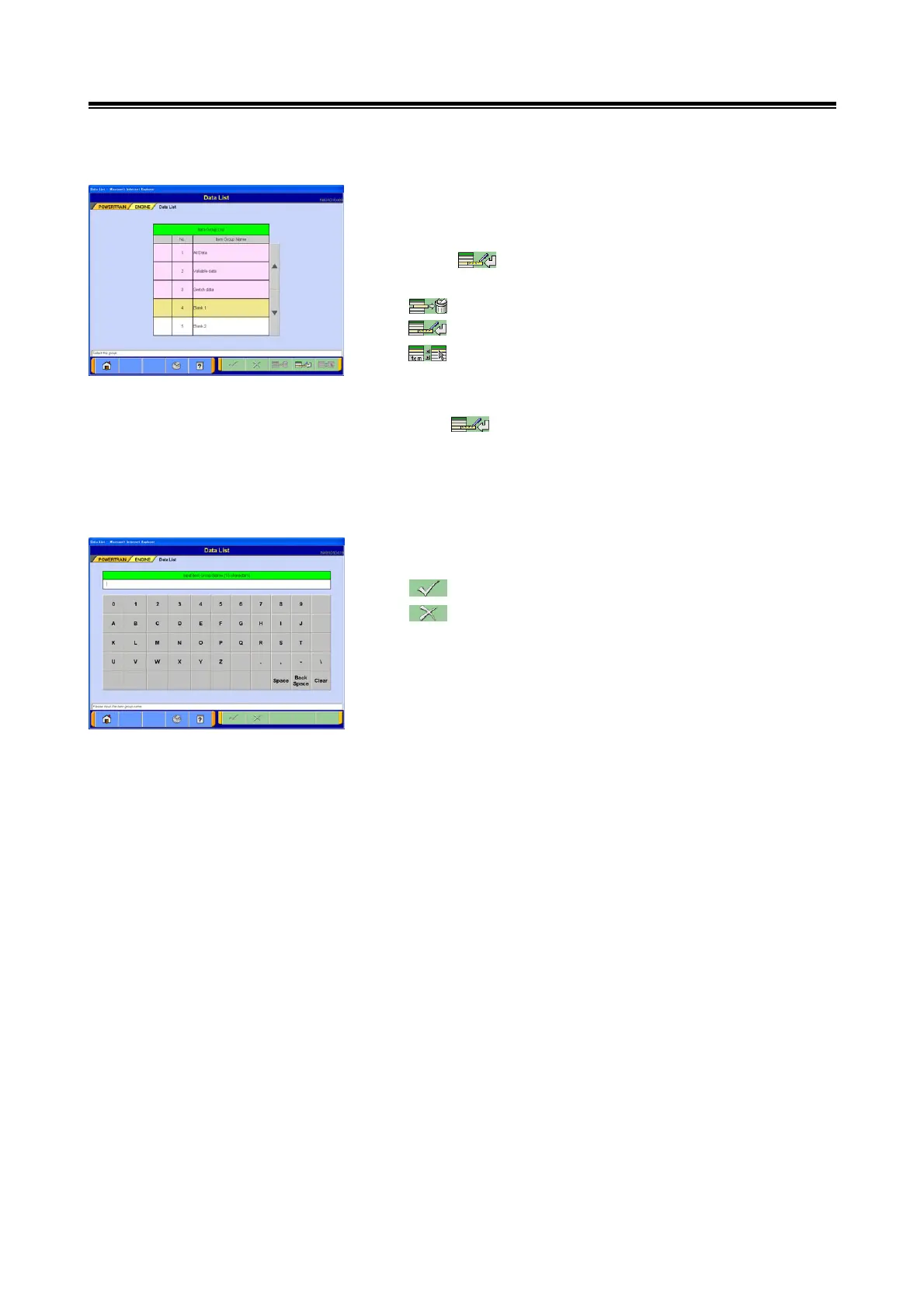
(1) Group registration
Up to 5 new groups, which is the combination of
user-specified items, can be registered.
Click button after selecting the line (No.4 – No.8)
to be registered as group.
--- Registered group is cleared.
--- Group registration: go to section (2)へ
--- Select display item: refer to section 4-2-1.(6)
<Note>
• Registered contents can be corrected if you press
the button after selecting the registered item group.
• Registered item group can be used for [Displaying the
Data List Function], [the Actuator Test Function
(simultaneously displaying the Data List)] and [Drive
recorder Function (selecting the recorded item)].
(2) Input Item Group Name
Enter up to 16 characters of group name to be registered.
--- OK: go to section (3).
--- Cancel: go to section (1).
<Note>
As the PC keyboard is connected, the information may be
entered either directly from the PC keyboard or from the
keyboard shown on the screen.


 To Next Page