Description of Buttons on the Operating Screens
13
3-3. Description of Buttons on the Operating Screens
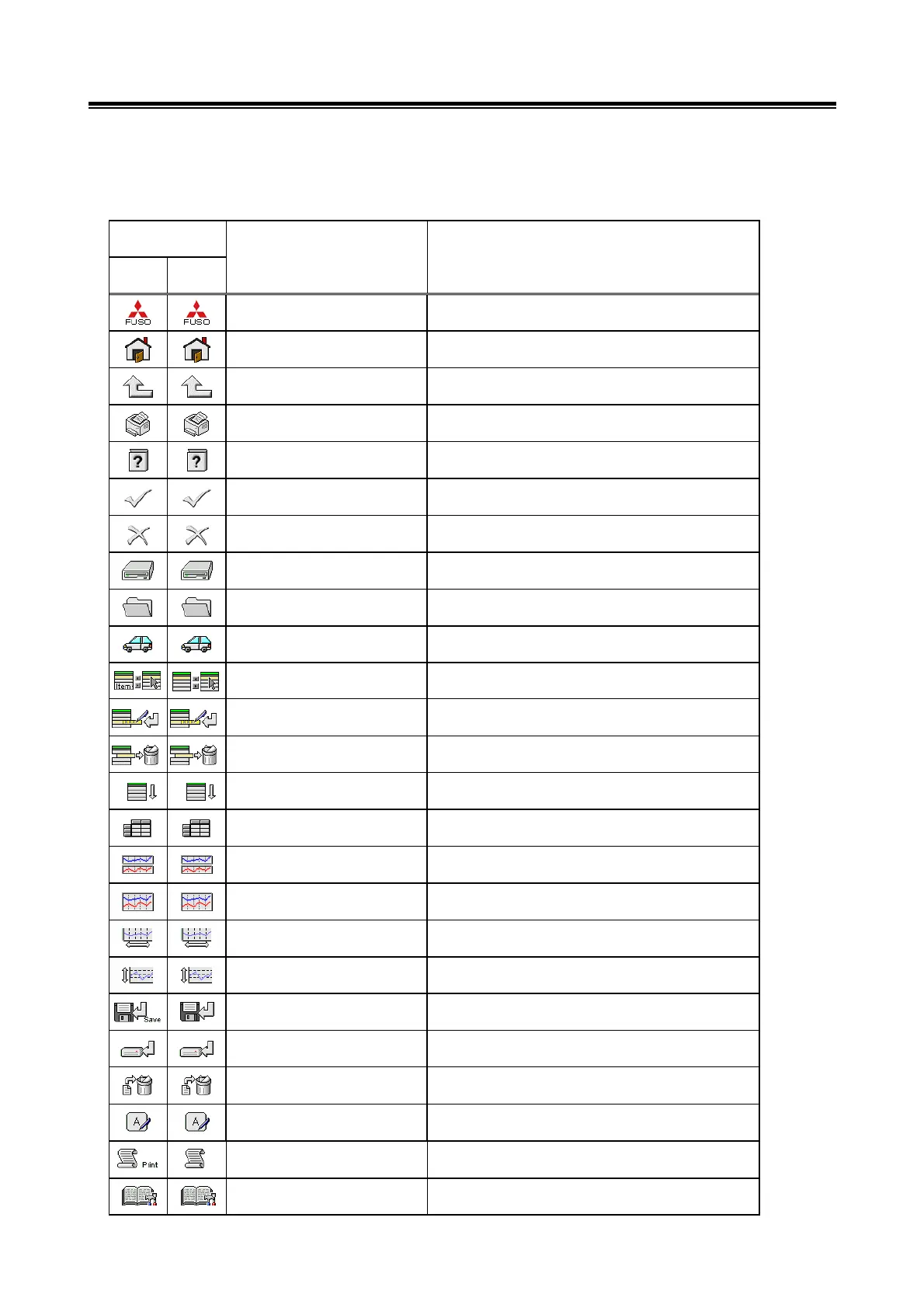
The names and functions for the button icons are as follows:
English
Except
English
Main menu Returns the screen to the main menu.
Return Home Returns the screen to the start screen.
Return one level Returns the screen to the upper layer screen.
Print screen Print the screen image.
Help Displays online help.
OK or YES Determines an outcome.
Cancel Cancels the operation or closes the screen.
Select drive Select drive
Select folder Select folder
View vehicle information Displays vehicle information.
Button Image
Button Name Button Function
Select item Select an item.
Item group registration Item group is registered.
Item group clearance Registered item group is cleared.
Item sort Sorts a chosen item.
View text Displays text.
View graph1 Displays four items on four graphs.
View graph2 Displays (overwrites) four items on one graph.
Change time scale Changes the graph display time scale.
Change data scale Changes the graph display time scale.
File save
Sets extraction conditions and saves the extracted data
in a file.
Save to HDD Save to Hard drive.
Delete file Deletes files.
Alphanumeric input screen Opens the alphanumeric input screen.
Print of the data Print of the data.
Displays troubleshooting Displays a troubleshooting


 To Next Page