Recording with the Drive Recorder
42
5-1-2. Recording with the PC
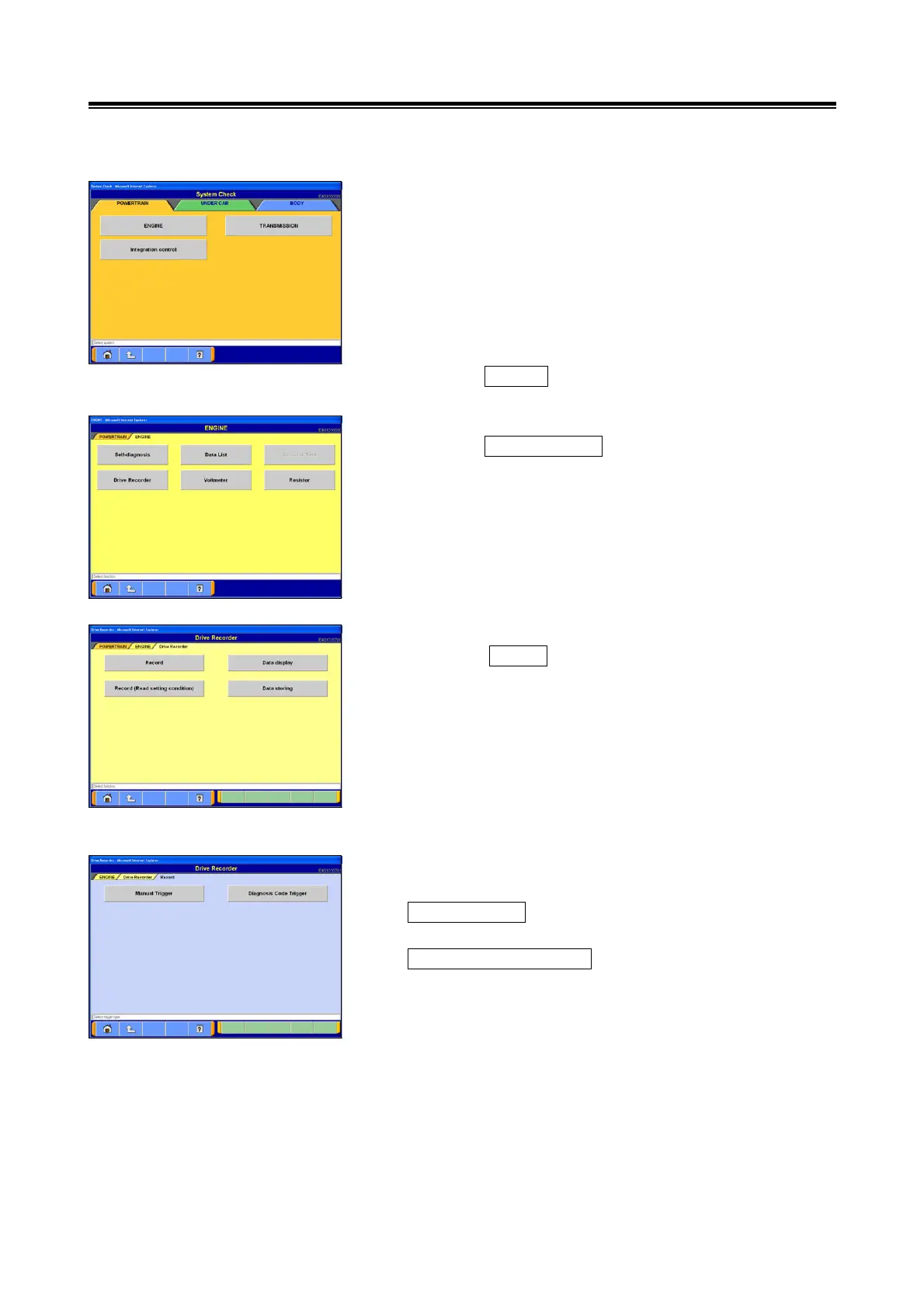
(1) The PC can be used to s
elect the recording settings.
Use the PC to select the drive recorder settings, such as
the items to be recorded and the triggering method.
Change the main category by selecting the tab located on
the upper side of the screen and selects the system for
which drive recording will be performed.
The procedures used for setting up the Drive Recorder for
the engine system are explained in this section.
Select the ENGINE button.
(2) Select Function
Select the Drive Recorder button.
(3) Select Drive Recorder Function
Select the Record button from the Drive Recorder menu
screen.
(4) Select Triggering Method
Select the triggering method.
Manual Trigger --- Touch this button for manual triggering.
-> go to section (6).
Diagnosis Code Trigger --- Touch this button for triggering
upon the occurrence of user-specified DTCs. -> go to
section (5).


 To Next Page