Recording with the Drive Recorder
43
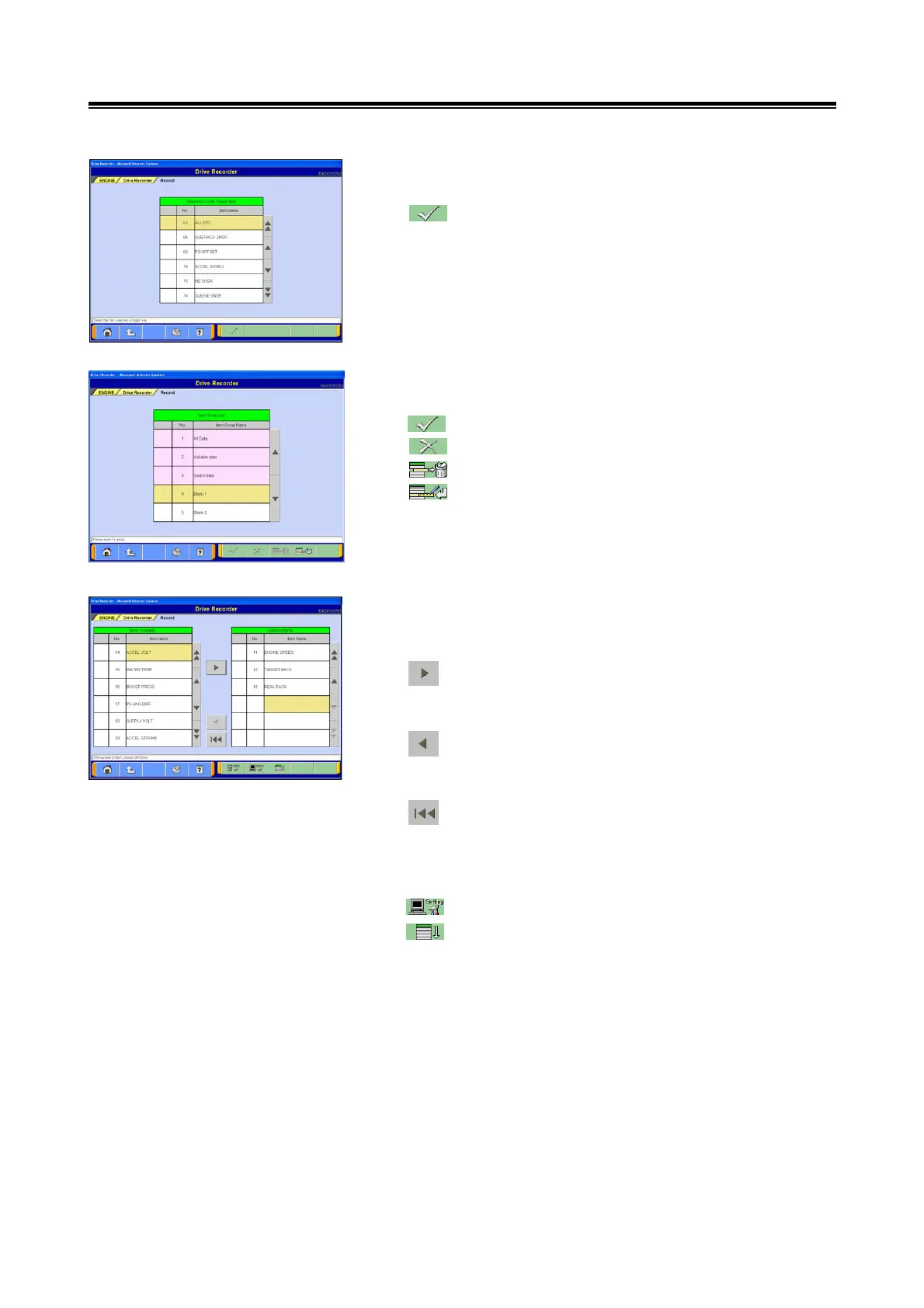
(5) Select Diag. Trigger
Select the item to be used as a trigger key and touch the
button. -> go to section (6).
(6) Item Group Selection
Select the Group for Recording Items.
--- OK : go to section (7)
--- Screen will return to the calling screen.
--- Registered group is cleared
--- Group registration : refer to 5-1-4.(1).
(7) Select Recording Items
The Display Item list for the Data List will be displayed.
Select the items to be recorded.
--- Touch this button to insert the item currently
chosen from the Selectable Item list into the
desired position on the Selected Item list.
--- Touch this button to move the item currently
chosen from the Selected Item list to the very
bottom position on the Selectable Item list.
--- Touch this button to move all the items from the
Recording Selection Item list to the very bottom of
the Selectable Item list. (The selected position
and items are fixed.)
--- PC Settings -> go to section (8).
--- Sort: Touch this button to change the order of
items on both the Selectable Item list and the
Recording Selection Item list, in accordance with
the specified default setting.
<Note>
A maximum of 16 items can be chosen as Recording
Selection Items.


 To Next Page