EasyManua.ls Logo

FUTABA FX40 - Page 127

FUTABA FX40
129 pages
Print Icon
To Next Page IconTo Next Page
To Previous Page IconTo Previous Page
Loading...
127
<Data>
S
w
i
tch select
i
on metho
d
T
he various functions used in the FX-40 can be selected b
y
switch. The switch (includin
g
when stick,
tr
i
m
l
ever, or VR are use
d
as a sw
i
tc
h)
sett
i
ng met
h
o
d
i
s common to a
ll
funct
i
ons
.
S
w
i
tch select
i
on
W
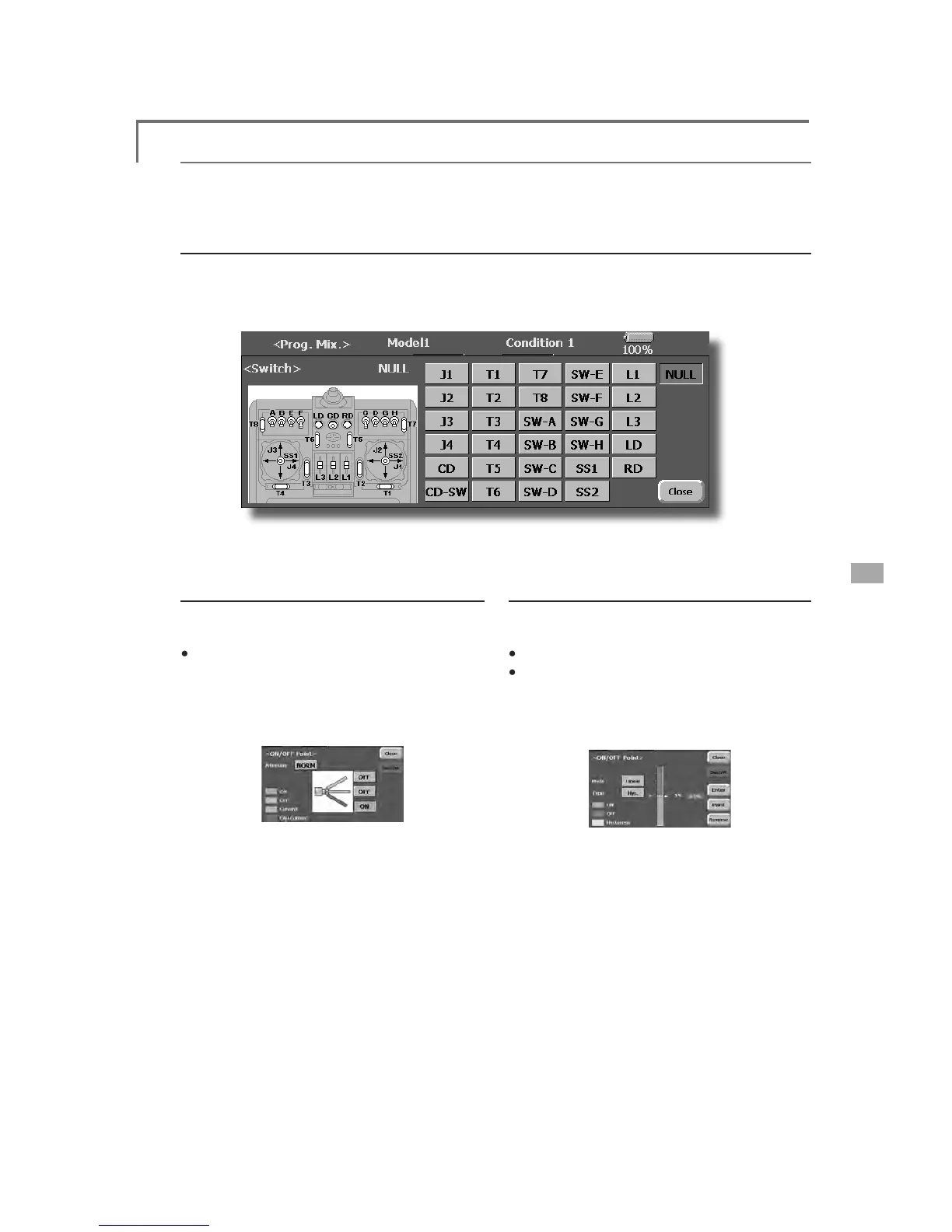
hen the switch select button at a mixing function screen or other screen is touched, the selection shown
below
is
c
a
lled.
(
Switch selection screen example
)
W
hen switch is selected
Sw
i
tc
h
ON
/
OFF sett
i
ng
i
s poss
ibl
e at eac
h
p
os
i
t
i
on
.
ŏ
A
l
ternate:$OWHUQDWHVZ
L
WFK
L
QJPRGH
L
V
ava
i
lable depend
i
ng on m
i
x
i
ng
f
unct
i
on
.
:KHQWKH21SRV
L
W
L
RQVZ
L
WFK
L
VWRXFKHGD
I
WHU
the sw
i
tch was selected, the screen shown
b
e
l
ow appears
.
*When the button of each
p
osition is touched,
L
WWRJJOHVEHWZHHQ21DQG2))
7RXFKWKHEXWWRQDQGVHWWRWKH21SRV
L
W
L
RQ
&ORVHWKHVFUHHQE\WRXFK
L
QJ>&ORVH@
When stick, trim lever, or VR is selected.
Wh
en a st
i
c
k,
tr
i
m
l
ever
,
or VR
i
s use
d
as a
sw
i
tc
h
, t
h
e fo
ll
ow
i
n
g
4 mo
d
es can
b
e se
l
ecte
d
.
ŏ
Mo
d
e: L
i
n/Sy
m
ŏ
T
ype
:
+\VWHUHV
L
V
+\V
ER[
%R[
:KHQWKH21SRV
L
W
L
RQEXWWRQ
L
VWRXFKHGD
I
WHU
st
i
ck, etc. was selected, the screen shown
b
e
l
ow appears
.
2. Select the mode
y
ou want to use, and set it
as descr
i
bed below
.
&ORVHWKHVFUHHQE\WRXFK
L
QJ>&ORVH@

Table of Contents

Related product manuals