EasyManua.ls Logo

FUTABA FX40 - RUD to AIL

FUTABA FX40
129 pages
Print Icon
To Next Page IconTo Next Page
To Previous Page IconTo Previous Page
Loading...
89
<Model Menu (Airplane/Glider Functions)>
RUDDER 2
RUDDER
RUDDER
V-TAIL
RUDDER 2
Winglet
RUDDER 1
Winglet
at Flying wing at Flying wing
( )
( )
AIL 3 AIL 3
(Chip Aileron)
(Chip Aileron)
AIL1
(Main Aileron)
AIL 2
(Main Aileron)
ŏ5
H
W
X
UQW
R
0
RGH
O0
H
Q
X
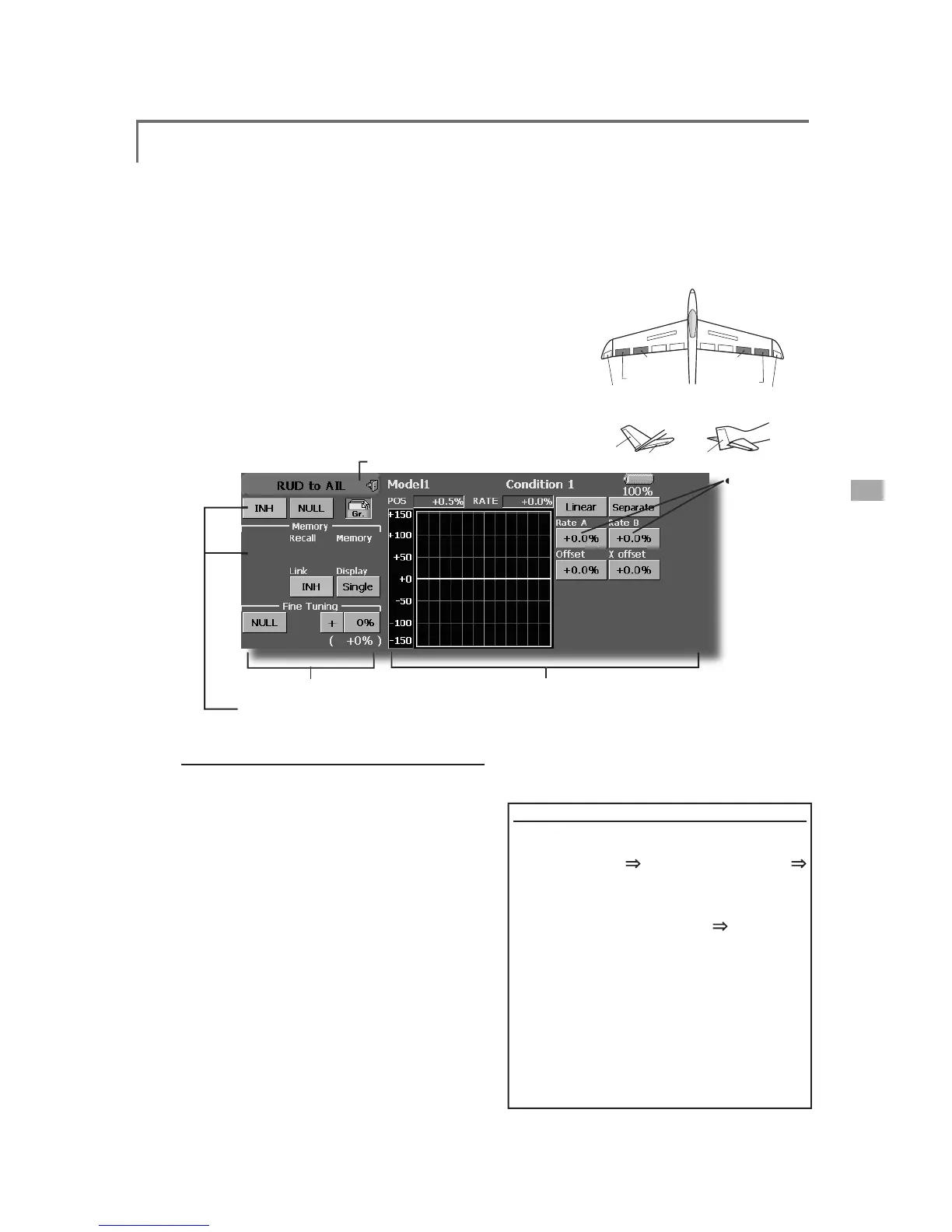
RUD to AIL
>
&RUUHVSRQGLQ
J
PRGHOW\SH@$LUSODQH
J
OLGHU
J
HQHUD
O
Thi
s funct
i
on
i
s use
d
w
h
en you want to m
i
x
the ailerons with rudder operation. It is used
w
hen rudder is applied during roll maneuvers,
k
n
i
fe e
d
ge, etc. of stunt p
l
anes. It can
b
e use
d
to
b
ank scale models, lar
g
e models, etc. like a full
size
p
lane
.
ŏ$P
L
[
L
QJFXUYHFDQEHVHW
ŏ0
L
[
L
QJGXU
L
QJ
ÁL
JKWFDQEHWXUQHG212))E\
VHWWLQJDVZLWFK$OZD\V21DW>18//@VHWWLQJ
ŏ7K
H
U
D
W
H
R
I
FR
UU
HF
WL
R
QU
XGGH
U
FD
Q
EH
P
H
P
R
UL]
HG
b
y using the memory function. This is convenient
ZKHQVHWWLQ
J
DPL[LQ
J
FXUYH:KHQPHPRU\
operation
(
switch operation
)
is performed in the
memory mode w
i
th correct
i
on rudder appl
i
ed, the
sw
i
tch operat
i
on pos
i
t
i
on at that t
i
me
i
s d
i
splayed
ŏ7RXFKWKH>58'WR$,/@EXWWRQ
L
QWKH0RGHO0HQXWR
ca
ll
t
h
e setup screen s
h
own
b
e
l
ow.
ŏ0L[LQ
J
FXUYHVHWWLQ
J
(
For a
d
escr
i
pt
i
on of t
h
e curve sett
i
n
g
met
h
o
d
, see t
h
e
d
escr
i
pt
i
on at t
h
e
b
ac
k
of t
hi
s manua
l
.
)
ŏ
)LQHWXQLQ
J
95VHWWLQ
J
ŏ
:KHQVHWWR21E\WRXFKLQ
J
>,1+@WKH
memor
y
items are dis
p
la
y
ed
.
ŏ2
YHUD
OO
ad
j
ustment by
5D
W
H
$
D
Q
G
5D
W
H
%
RQWKHP
L
[
L
QJFXUYH:KHQWKHPHPRU\PRGH
L
V
ex
i
ted, the memor
i
zed
p
o
i
nts are automat
i
call
y
UHÁHFWHGRQWKHFXUYH:KHQWKHPHPRU\
IXQFWLRQLVXVHG/LQHW
\S
HFXUYHLVDXWRPDWLFDOO
\
s
elected.)
ŏ/LQNLQ
J
FDQEHVHW/LQNVWKLVPL[LQ
J
WRRWKHU
mixin
g
s.
ŏ7KHP
L
[
L
Q
J
UDWHFDQEH
À
QHWXQHE\VHWW
L
Q
J
D95
6
HWW
L
Q
J
PHWKR
G
ŏ
7RXFKWKH,1+EXWWRQDQGVHWWKH
I
XQFW
L
RQWR$
&
7
21

ŏ
:KHQVHWW
L
QJDVZ
L
WFKWRXFKWKH>18//@EXWWRQ
t
o call the <Switch> screen
,
and then select the
V
ZLWFKDQGVHWLWV21GLUHFWLRQ$OZD\V21DW
18//VHWWLQJ
(
For a description of the switch selection method,
s
ee the description at the back of this manual.
)
ŏ
:KHQVHWW
L
Q
J
D95WRXFKWKH)
L
QHWXQ
L
Q
J
18//
b
utton to call the <
S
w
i
tch> screen and then select
W
KH957KHDG
M
XVWPHQWUDWHDQGDG
M
XVWPHQW
di
rect
i
on can be set
,.
7KH95R
S
HUDWLRQPRGHFDQDOVREHVHW
)RUDGHVFULSWLRQRIWKHÀQHWXQLQJ95VHWWLQJ
method, see the descri
p
tion at the back of this
manual.
)
ŏ
$PL[LQ
J
FXUYHFDQEHVHW
(
For a descr
i
pt
i
on o
f
the curve sett
i
n
g
method,
s
ee the descr
i
pt
i
on at the back o
f
th
i
s manual.
)
ŏ
7KHFXUYHG
L
VSOD\PRGHFDQEHFKDQJHG
6
L
QJOH'
L
VSOD\VWKHP
L
[
L
QJFXUYHRQO\
)LQHWXQLQJ'LVSOD\VWKHDGMXVWPHQWUDWHRIWKH
À
QHWXQLQJ95
$OO&RQG'LVSOD\VWKHPL[LQJFXUYHRIDOOWKH
F
RQGLWLRQV
:KHQFRQGLWLRQVDUHVHW
ŏ
:KHQOLQNLQ
J
7RXFKWKH/LQNEXWWRQDQGVHWLWWR
2
1
0HPRU\
I
XQFW
L
RQXVDJHPHWKRG
(
Example
)
Usin
g
the memory function with an F3A
a
irplane
(
knife ed
g
e correction
)
*
W
hen call switch
[
SW-A] and memory switch
[
SW-H] were set
>0HPRU\
I
XQFW
L
RQRSHUDW
L
RQ
@
0HPRU\
I
XQFW
L
RQPRGH>0DQXDO
@
>
0HPRU\
@
:KHQWKHPHPRU\VZ
L
WFK
6:+
ZDVVHWWR21
w
h
i
le per
f
orm
i
ng a
i
leron correct
i
on when rudde
r
w
as applied at knife edge, the point position at
t
hat time is memorized. Perform memorization while
c
han
g
in
g
the left and ri
g
ht stick positions
.
7RUHFDOOWKHPHPRUL]HGSRVLWLRQVVHW>6:$@WR21
7KHPHPRU
L
]HGFRUUHFW
L
RQUDWH
L
VUH
Á
HFWHGRQWKH
c
urve, and operat
i
on
i
s s
i
multaneously set
.
1RWH:KHQPHPRUL]HGIURPPDQXDOEHIRUHÀL
J
KWEHVXUHWKDW
the memor
y
SW is not accidentall
y
set to ON and incorrec
t
mixin
g
settin
g
is not applied when taxiin
g
, startin
g
the en
g
ine,
etc
.

Table of Contents

Related product manuals