EasyManua.ls Logo

FUTABA FX40 - Functions of Linkage Menu; Linkage Menu Functions Table

FUTABA FX40
129 pages
Print Icon
To Next Page IconTo Next Page
To Previous Page IconTo Previous Page
Loading...
51
<Linkage Menu>
FUNCTIONS OF LINKAGE MENU
Th
e L
i
n
k
age Menu
i
s ma
d
e up of funct
i
ons
w
hich perform model addition, model t
y
pe
selection, frequency setting, end point setting, an
d
o
t
h
er
b
as
i
c sett
i
ngs.
ŏ5
H
W
X
UQW
R
+
R
P
H
VF
U
HHQ
ŏ:KHQDEXWWRQLQWKH/LQND
J
H0HQXRIWKH+RPHVFUHHQ
LVWRXFKHG
WKHPHQXVKRZQEHORZLVFDOOHG7RXFKWKH
EXWWRQR
I
WKH
I
XQFW
L
RQ\RXZDQWWRVHW
Th
e funct
i
ons w
hi
c
h
can
b
e se
l
ecte
d
d
epen
d
on
the model t
y
pe. A t
y
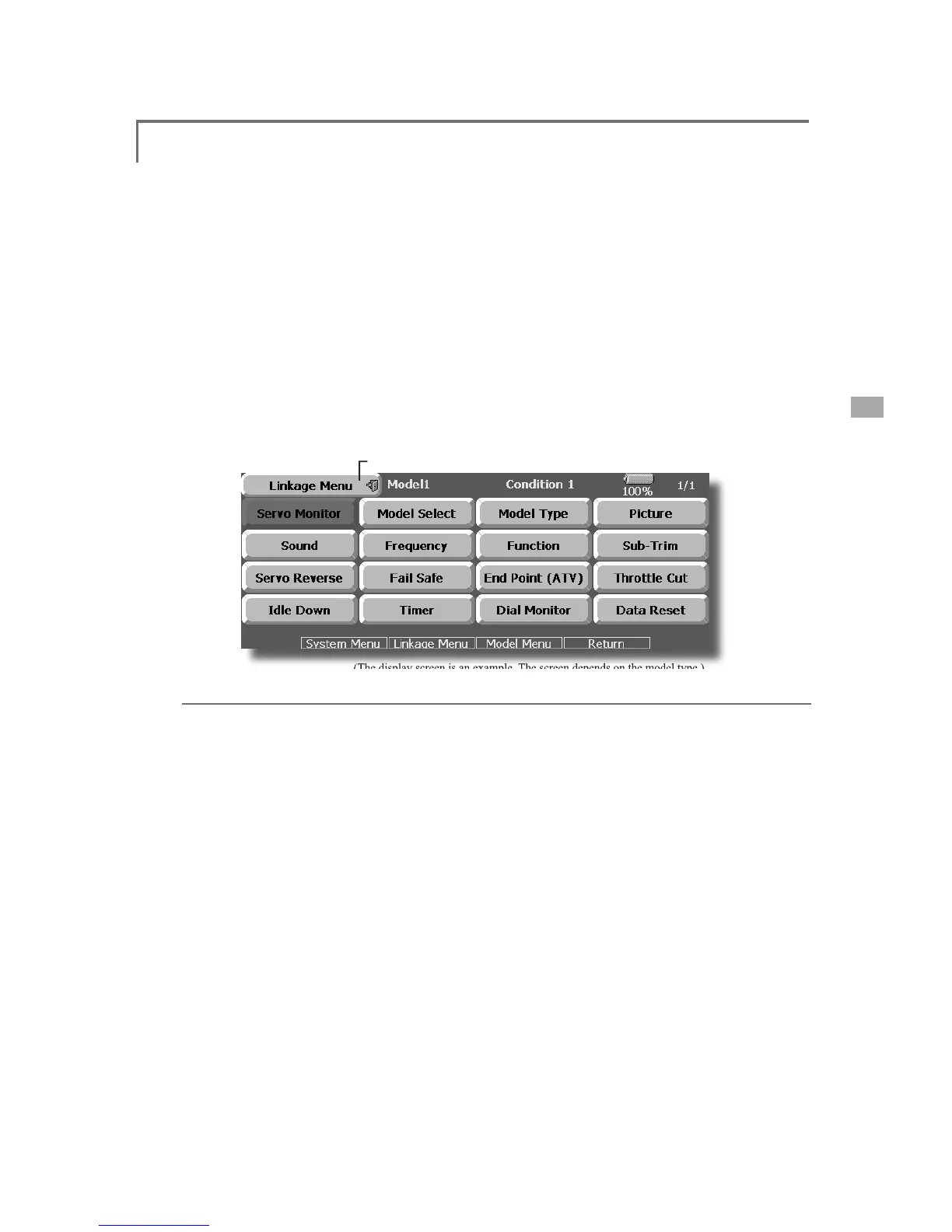
pical menu screen is shown
be
l
ow.
(The
display
screen
is
an
example
.
The
screen
depends
on
the
model
type
.
)
L
i
nkage Menu
f
unct
i
ons tabl
e
[Servo Mon
i
tor]: D
i
sp
l
ays t
h
e servo test an
d
operat
i
on pos
i
t
i
o
n
[Mo
d
e
l
Se
l
ect]: Mo
d
e
l
a
ddi
t
i
on, ca
ll
,
d
e
l
et
i
on, cop
y
, mo
d
e
l
name sett
i
n
g
[Model T
y
pe]: Model t
y
pe, win
g
t
y
pe, tail t
y
pe
[P
i
cture]: P
i
cture se
l
ect
i
on for eac
h
mo
d
e
l
[Soun
d
]: Soun
d
recor
di
ng an
d
p
l
ay
b
ac
k
[Frequenc
y
]: Frequenc
y
selection, modulation mode selection, receiver ID settin
g
[Function]: Channel assignment of each function can be changed
[Su
b
-Tr
i
m]: A
dj
usts t
h
e neutra
l
pos
i
t
i
on of eac
h
servo
[
Servo Reverse
]
: Servo direction reversal
[Fail Safe]: Fail safe function and battery fail safe function setting
[En
d
Po
i
nt
(
ATV
)
]: Servo
b
as
i
c ru
dd
er a
dj
ustment an
d
li
m
i
t sett
i
ng
[T
h
rott
l
e Cut]: Stops t
h
e en
gi
ne safe
ly
an
d
eas
ily
(
a
i
rp
l
ane an
d
h
e
li
copter on
ly)
[Idle Down]: Lowers the idle speed of the en
g
ine (airplane and helicopter onl
y
)
[Swash]: Swash AFR and linkage correction function (helicopter only
)
[T
i
mer]: T
i
mer sett
i
ng an
d
l
ap t
i
me
di
sp
l
a
y
[Dial Monitor]: Dial, slidin
g
lever, and di
g
ital trim position displa
y
[Data Reset]: Model memory set data reset (by item)

Table of Contents

Related product manuals