EasyManua.ls Logo

FUTABA FX40 - Condition Hold

FUTABA FX40
129 pages
Print Icon
To Next Page IconTo Next Page
To Previous Page IconTo Previous Page
Loading...
75
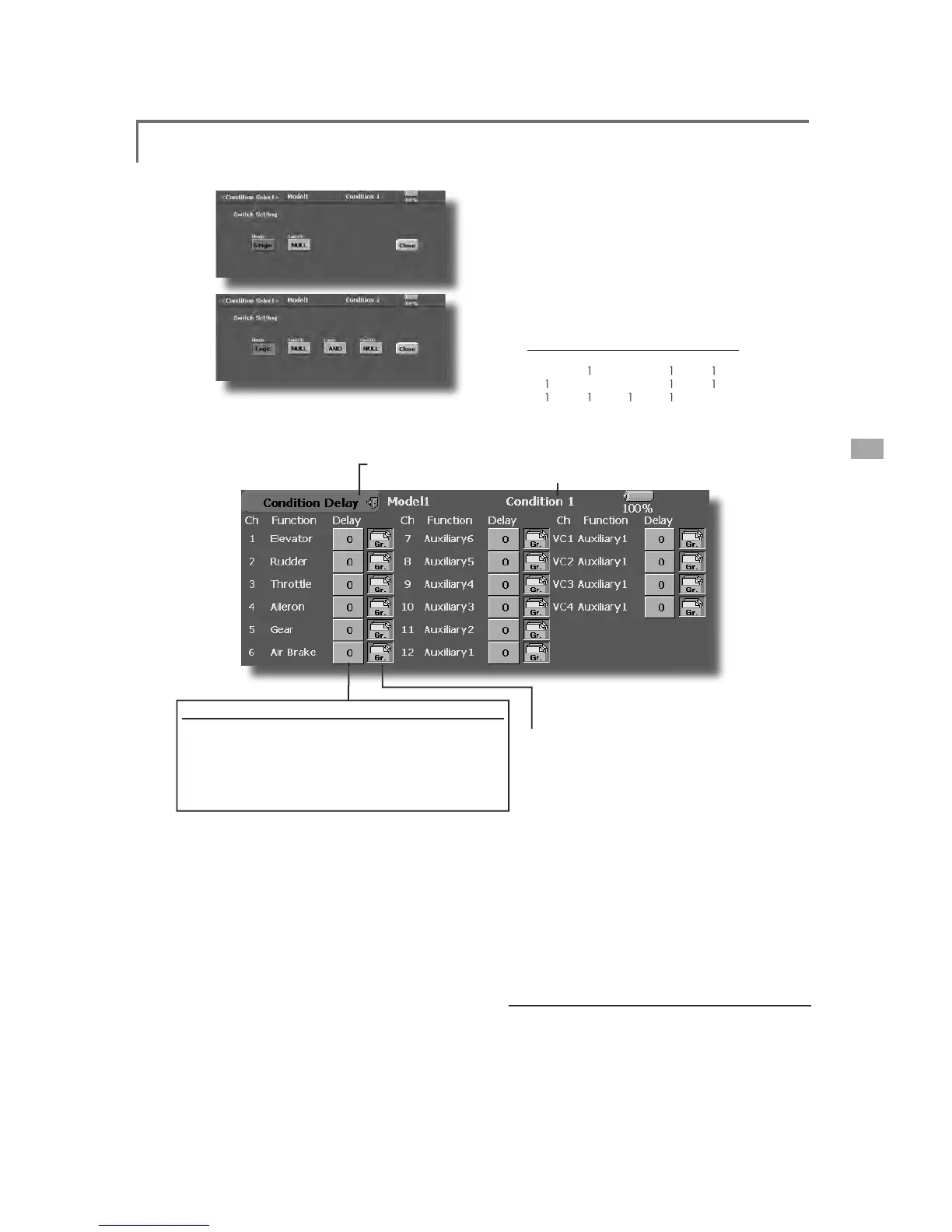
<Model Menu (Common Functions)>
ŏ5HWXUQWR
&
RQGLWLRQ
6
H
O
HFWVFUHHQ
ŏ7RXFKWKH
>
'HOD
\@
EXWWRQRQWKH&RQGLWLRQ
6HOHFWVFUHHQWRFDOOWKH&RQGLWLRQ'HOD
\
sc
r
ee
n
s
h
o
wn
be
l
o
w
.
(
Current
ly
se
l
ecte
d
con
di
t
i
on name
)
&
RQG
L
W
L
RQGHOD
\
VHWW
L
Q
J
6Z
L
WFKWRWKHFRQG
L
W
L
RQ\RXZDQWWRVHW
7RXFKWKH'HOD\EXWWRQR
I
WKHFKDQQHO\RXZDQWWRVHW
3
. Use the ad
j
ustment buttons to set the delay
.
ŏ,QLWLDOYDOXH
ŏ$GMXVWPHQWUDQJHaPD[LPXPGHOD\
ŏ
*URXSV
L
Q
J
OHPRGHVZ
L
WFK
L
Q
J
*U6Q
J
O
(For a descri
p
tion of the o
p
eration method, see the
d
escri
p
tion at the back of this manual.
)
Thi
s funct
i
on ma
y
b
e use
d
to
li
m
i
t t
h
e max
i
mum
speed of the en
g
ine so that
y
ou ma
y
ad
j
ust fli
g
h
t
c
on
di
t
i
ons w
h
en t
h
e eng
i
ne
i
s runn
i
ng. T
h
e
max
i
mum t
h
rott
l
e pos
i
t
i
on
i
s setta
bl
e, an
d
an
a
larm indicates that the function is operatin
g
.
T
h
e funct
i
on
i
s espec
i
a
ll
y usefu
l
for
h
e
li
copters,
b
ecause
i
t w
ill
prevent t
h
e en
gi
ne from rac
i
n
g
d
an
g
erousl
y
when ad
j
ustin
g
the Idle-Up settin
g
s.
W
hile this function is active, the throttle o
p
erates
o
n t
h
e
d
efau
l
t con
di
t
i
on t
h
rott
l
e curve, an
d
m
i
x
i
n
g
is a
pp
lied as normal, exce
p
t the throttle is no
t
a
llowed to move
p
ast the set
p
oint.
Y
ou must
d
eact
i
vate t
hi
s funct
i
on w
h
en you are
t
h
rou
gh
ma
ki
n
g
a
dj
ustments. T
h
e s
y
stem w
ill
not
a
llow
y
ou to deactivate this function in either of the
fo
ll
ow
i
ng states
:

:KHQDQ\RIWKHIOL
J
KWFRQGLWLRQVZLWFKHV
a
r
e
o
n
.

:
KHQWKHWKURWWOHVWLFNLVKL
J
KHUWKDQWKH
s
et
p
oint.
7RDFWLYDWH&RQGLWLRQKROG
6HWWKHWKURWWOHVW
L
FNDWDSRV
L
W
L
RQEHORZ
f
ull throttle.
3UHVVWKH
&
RQGLWLRQ+ROGER[LQWKHORZHUOHIW
KDQGFRUQHURIWKH0RGHO0HQXRU/LQND
J
H
0
H
Q
X
VF
U
HH
Q
V
&RQGLWLRQ+ROG+HOLFRSWHU2QO\
6
Z
L
WFKVHOHFW
L
RQVFUHHQ
ŏ7KHIOL
J
KWFRQGLWLRQVDUHVHOHFWHGE\WZR
s
witches status combination as a lo
g
ical
H
TXDWLRQ7KHVXSSRUWHGOR
J
LFDUH$1'
2
5(25
H[FOXV
L
YH25
7KHPRGHEXWWRQ
L
VVHOHFW
L
RQR
I
H
L
WKHUFRQYHQW
L
RQDO
6
L
QJOH
R
U
l
og
i
cal
(
Log
i
c
)
sw
i
tch mode.
6
HOHFWORJ
L
FPRGHWKHQWZRVZ
L
WFKHV
s
elect
i
on and coupl
i
ng log
i
c button appear.
6
HWWKHWZRVZLWFKHVDQGOR
J
LFWREH
a
ctivated the lo
g
ical switches. The input and
l
o
g
ical output are as follows.

6
:
6
:
$1'
25
(
2
5
0
0
0
0
0
0
1
0
1
1
1
0
0
1
1
1
1
1
1
0
(
0= off, 1= on
)

Table of Contents

Related product manuals