EasyManua.ls Logo

FUTABA FX40 - Function

FUTABA FX40
129 pages
Print Icon
To Next Page IconTo Next Page
To Previous Page IconTo Previous Page
Loading...
60
<Linkage Menu>
ŏ
5HWXUQWR/LQNDJH0HQX
ŏ
7RXFKWKH>)XQFWLRQ@EXWWRQLQ WKH/LQND
J
H
0
HQXWRFD
OO
W
K
HVHWX
S
VFUHHQV
K
RZQ
E
H
O
RZ
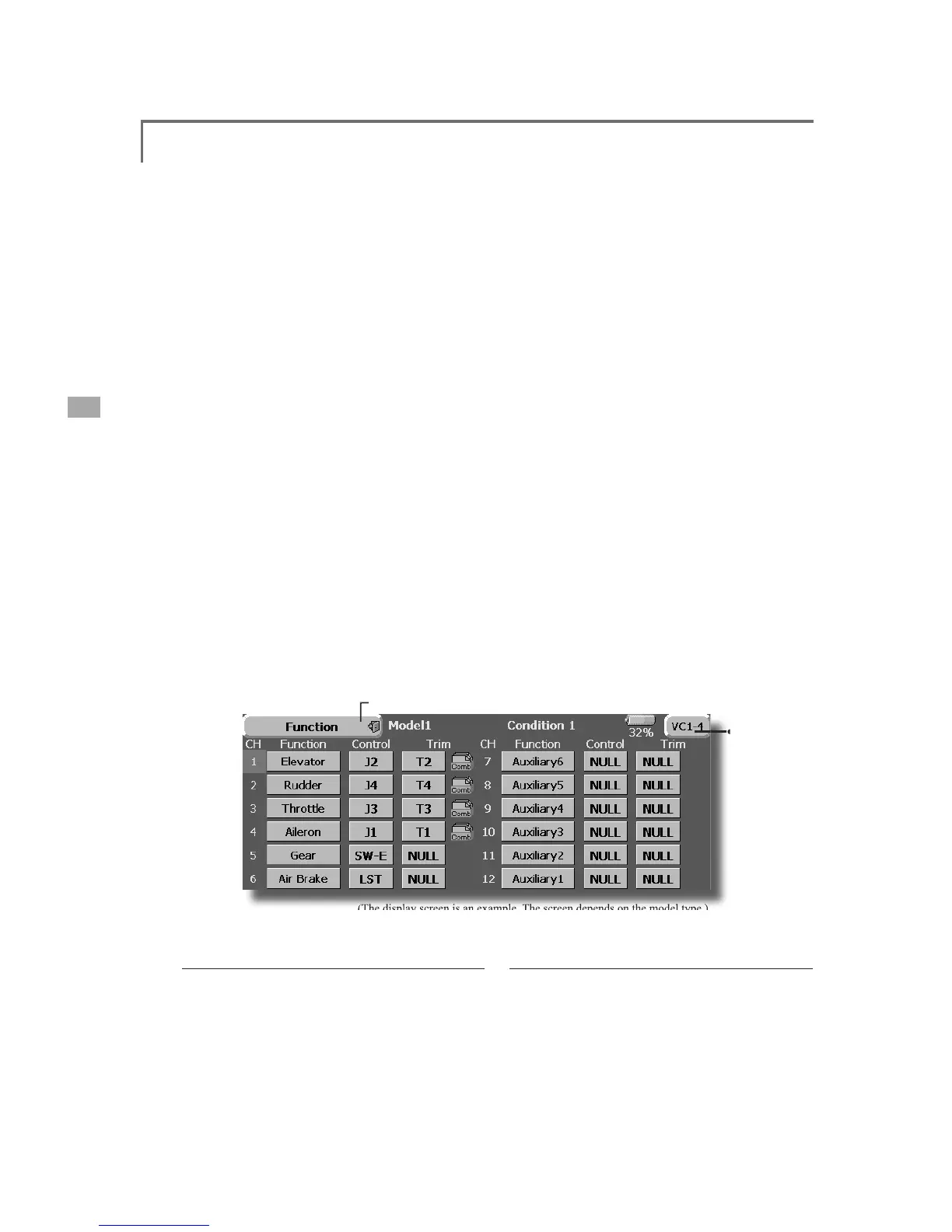
Function
&KDQQHODVVL
J
QPHQWRIHDFKIXQFWLRQFDQEHFKDQ
J
HG
When
y
ou select model and win
g
(swash) t
y
pes,
you w
ill
f
i
n
d
t
h
at t
h
e opt
i
m
i
ze
d
com
bi
nat
i
ons o
f
s
ervo output c
h
anne
l
s an
d
funct
i
ons
h
ave
b
een
alread
y
preset. If
y
ou would like, on the function
-
s
ett
i
ng screen of t
h
e
li
n
k
age menu, you can free
l
y
c
h
an
g
e com
bi
nat
i
ons of servo output c
h
anne
l
s,
f
unctions (aileron, elevator, etc), and in
p
ut
contro
ll
ers
(
st
i
c
k
s, sw
i
tc
h
es, tr
i
m
l
evers an
d
tr
i
m
s
w
i
tc
h
es
)
. You can a
l
so ass
ig
n t
h
e same funct
i
on to
m
ultiple servo output channels such as assi
g
nin
g
el
evator funct
i
on to
C
H2 an
d
C
H3
.
DG
1, D
G
2
(
sw
i
tch channels
)
These two channels can be used as switch
c
h
anne
l
s. You can free
l
y c
h
ange com
bi
nat
i
ons
b
etween servo output c
h
anne
l
s an
d
i
nput contro
ll
ers
(
sticks, switches, trim levers and trim switches
).
V
C1~VC4 (virtual channels
)
T
hese
f
ou
r
ch
ann
els
c
an
be
se
t a
s
vi
rt
u
a
l
f
u
n
c
t
io
n
s
t
hat do not have servo out
p
ut channels. You can
f
ree
l
y c
h
ange com
bi
nat
i
ons
b
etween funct
i
ons
(
a
il
eron, e
l
evator, etc
)
an
d
i
nput contro
ll
ers
(
st
i
c
k
s,
s
witches, trim levers and trim switches).
(The
display
screen
is
an
example
.
The
screen
depends
on
the
model
type
.
)
Ɣ
7RQH[WSDJH
(
VC1-4, DC-1-2
)
Funct
i
on chang
e

7
RXF
KWK
H
I
X
Q
F
WL
R
Q
EX
WW
R
Q
R
IWK
H
F
K
D
QQ
H
O
\
RXZDQWWRFKDQJHWRFDOOWKH
I
XQFW
L
RQO
L
VW
6HOHFWWKH
I
XQFW
L
RQ\RXZDQWWRFKDQJH
7RXFK><HV@7KHG
L
VSOD\UHWXUQVWRWKHRU
L
J
L
QDO
V
FUHHQ
:KHQ\RXZDQWWRFDQFHO
I
XQFW
L
RQ
F
KDQJHWRXFK>1R@
*
Multiple channels can be assi
g
ned to 1 function.
1
RWH,Q3&0*PRGHFRPELQDWLRQVRIWKUHH
FK
DQQH
O
VVXF
K
DV
&
+W
K
URXJ
K
&
+

&
+
W
K
URXJ
K
&
+

&
+W
K
URX
JK
&
+
DQ
G
&
+
W
K
URX
JK
&
+
Z
RUNVLPXOWDQHRXVO\)XWDEDUHFRPPHQGVWKDW\RX
X
VHWKHVWDQGDUGRSW
L
P
L
]HGGH
I
DXOWFRPE
L
QDW
L
RQV
RI
FKDQQHOVDQG
I
XQFW
L
RQV
L
QRUGHUWRP
L
Q
L
P
L
]H
VHUYRGHOD
\
ZKHQ
\
RXXVHPXOW
LS
OHVHUYRVWRFRQWURO
P
RGHOVVXFKDVVZDVKPRGHKHO
L
FR
S
WHUVDQGGXDO
H
OHYDWRUDLU
S
ODQHVRUÁD
S
HURQDLU
S
ODQHV
S
ervo Output
C
hannels
F
or PCMG3 mode, you can set twelve linea
r
c
h
anne
l
s an
d
two
di
g
i
ta
l
c
h
anne
l
s. For PCM1024
mode,
y
ou can set ei
g
ht linear channels and one
digital channel. For PPM mode, you can set only
ei
g
h
t
li
near c
h
anne
l
s.
O
perat
i
on control change
7
RXF
KWK
H
FR
QWU
R
O
EX
WW
R
Q
R
IWK
H
F
K
D
QQ
H
O
\
RXZDQWWRF
K
DQJH$
&
RQWUR
O
VH
O
HFW
V
FUHHQ
VW
L
FNVZ
L
WFKNQREWU
L
POHYHUHWF
L
V
GL
VSOD\HG

6
H
O
HFWW
K
HFRQWUR
O
\RXZDQWWRRSHUDWH
7RXFK>&ORVH@7KHG
L
VSOD\UHWXUQVWRWKH
S
UHFHGLQ
J
VFUHHQ
*The same control can be assi
g
ned to multiple channels
.

Table of Contents

Related product manuals