EasyManua.ls Logo

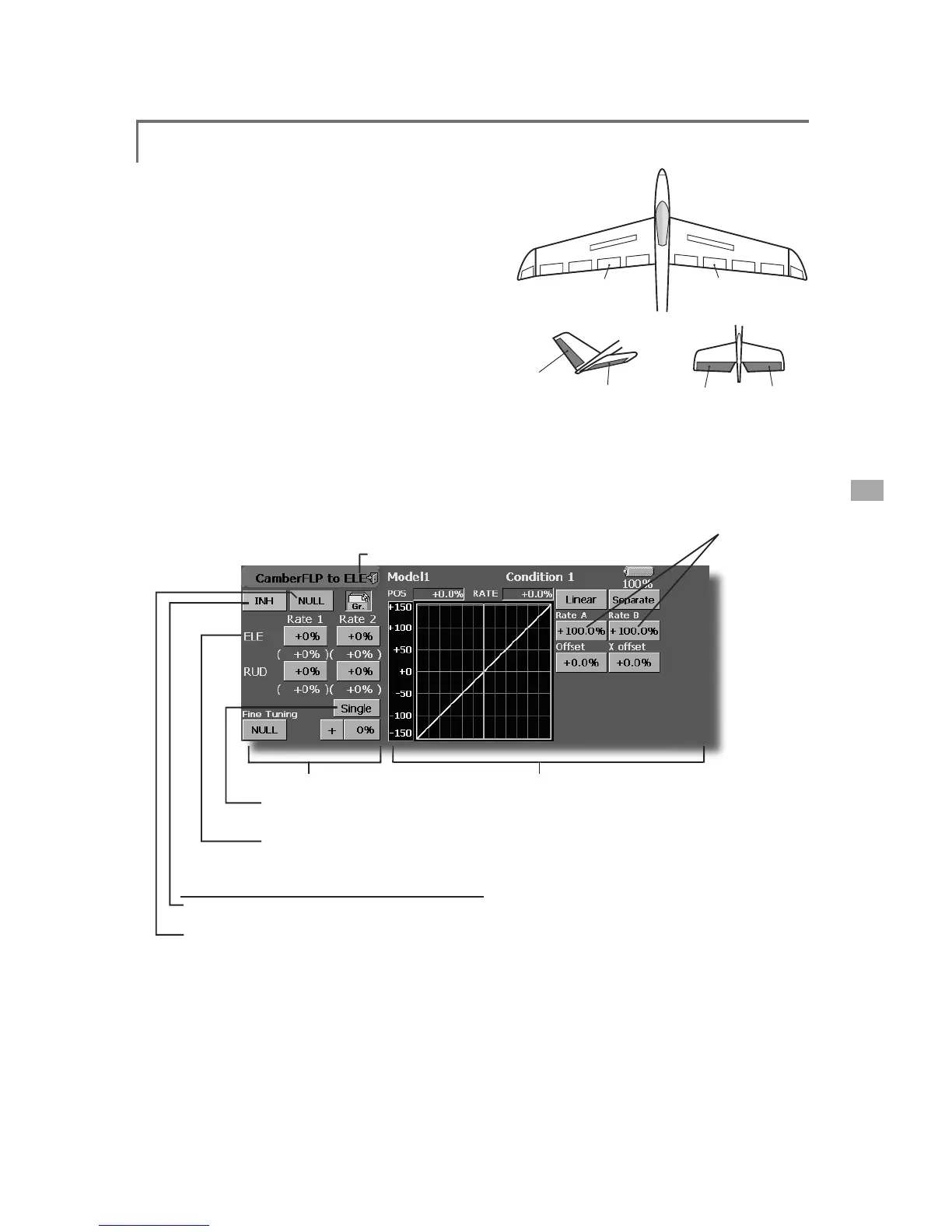
FUTABA FX40 - Camber FLP to ELE

FUTABA FX40
129 pages
Print Icon
To Next Page IconTo Next Page
To Previous Page IconTo Previous Page
Loading...
93
<Model Menu (Airplane/Glider Functions)>
ELEVATOR
ELEVATOR 2
V-TAIL
ELEVATOR
ELEVATOR 2
AILEVATOR
FLP 2
(Camber Flap)
FLP 1
(Camber Flap)
ŏ
0L[LQ
J
FXUYHVHWWLQ
J
(
For a
d
escr
i
pt
i
on of t
h
e curve sett
i
n
g
met
h
o
d
, see t
h
e
d
escr
i
pt
i
on at t
h
e
b
ac
k
of t
hi
s manua
l
.
)
ŏ)
L
QHWXQ
L
QJ95VHWW
L
Q
J
ŏ
5
H
W
X
UQW
R
0
RGH
O0
H
Q
X
&DPEHU)/3WR(/(
>&RUUHVSRQGLQ
J
PRGHOW\SH@$LUSODQH
J
OLGHUDLOHURQVIODSR
U
more
T
hi
s m
i
x
i
ng
i
s use
d
to correct c
h
anges
(
e
l
evator
GLUHFWLRQ
J
HQHUDWHGZKHQWKHFDPEHUÀDSVVSHH
G
À
D
S
VDUHXVHG
ŏ
7KHHOHYDWRUVHUYRVX
S
GRZQUDWHFDQEH
D
G
M
XVWHG:KHQWKHP
L
[
L
QJG
L
UHFW
L
RQ
L
VUHYHUVHG
by the linkage, adjustments can be made by
c
hanging the mixing rate polarity.
ŏ
$PL[LQJFXUYHFDQEHVHW
ŏ
0L[LQ
J
GXULQ
J
ÁL
J
KWFDQEHWXUQHG212))E\
V
HWWLQ
J
DVZLWFK
$OZD\V21DW18//VHWWLQ
J
ŏ
7KHP
L
[
L
Q
J
UDWHFDQEH
À
QHWXQHGE\VHWW
L
Q
J
D95
ŏ7RXFKWKH>&DPEHU)/3WR(/(@EXWWRQ
L
Q
WK
H0R
G
H
O
0HQXWRFD
OO
W
K
HVHWXSVFUHHQ
s
h
o
wn
be
l
o
w
.
*
T
h
e
di
sp
l
a
y
screen
i
s an examp
l
e. T
h
e actua
l
screen
d
epen
d
s on t
h
e mo
d
e
l
t
y
pe.
ŏ&XUYHGLVSOD\PRGHVZLWFKLQ
J
(
S
i
n
gl
e
/
F
i
ne tun
i
n
g/
A
ll
Con
d
.
)
ŏ(OHYDWRUUDWHDG
M
XVWPHQ
W
ŏ*URXSV
L
QJOHPRGHVZ
L
WFK
L
QJ
(
Gr./Sngl
)
(
For more information, see the descri
p
tion
a
t the back of this manual.)
ŏ
2
YHUDOO
a
d
j
ustment
E
\5DWH$
D
Q
G
5DWH%
6
HWWLQJPHWKR
G
ŏ7RXFKWKH$&7EXWWRQDQGVHWWKHIXQFWLRQWR
$
&721
ŏ:KHQVHWWLQJDVZLWFKWRXFKWKHVZLWFKEXWWRQ
t
o call the <Switch> screen, and then select the
V
ZLWFKDQGVHWLWV21GLUHFWLRQ
$OZD\V21DW
18//VHWW
L
Q
J
(
For a descr
i
pt
i
on o
f
the sw
i
tch sett
i
n
g
method,
s
ee the descr
i
pt
i
on at the back o
f
the manual.
)
ŏ7RXFKWKHHOHYDWRUVHUYRVOH
I
WDQGU
L
JKWEXWWRQV
a
nd ad
j
ust the m
i
x
i
ng rate w
i
th the ad
j
ustment
b
uttons dis
p
la
y
ed on the screen.
*
W
h
en t
h
e m
i
x
i
n
g
di
rect
i
on
i
s reverse
d
by
t
h
e
li
n
k
a
g
e,
a
dj
ustments can
b
e ma
d
e
b
y c
h
ang
i
ng t
h
e m
i
x
i
ng rate
p
o
l
ar
i
ty.
ŏ:KHQVHWW
L
Q
J
D95WRXFKWKH)
L
QHWXQ
L
Q
J
18//
b
utton to call the <Sw
i
tch> screen
,
and then
VHOHF
WW
KH
95
7KH95R
S
HUDWLRQPRGHFDQEHVHOHFWHG
ŏ$PL[LQ
J
FXUYHFDQEHVHW
(
For a description of the curve settin
g
method, see
the description at the back of this manual.
)
ŏ7KHFXUYHRSHUDW
L
RQPRGHFDQEHFKDQ
J
HG
6
L
Q
J
OH'
L
VSOD\VRQO\WKHP
L
[
L
Q
J
FXUYH
)
L
QH7XQ
L
Q
J
'
L
VSOD\VWKHDG
M
XVWPHQWUDWHR
I
WKH
À
QHWXQ
L
QJ9
5
$OO&RQG'
L
VSOD\VWKHP
L
[
L
QJFXUYHR
I
DOOWKH
conditions (when conditions are set)

Table of Contents

Related product manuals