EasyManua.ls Logo

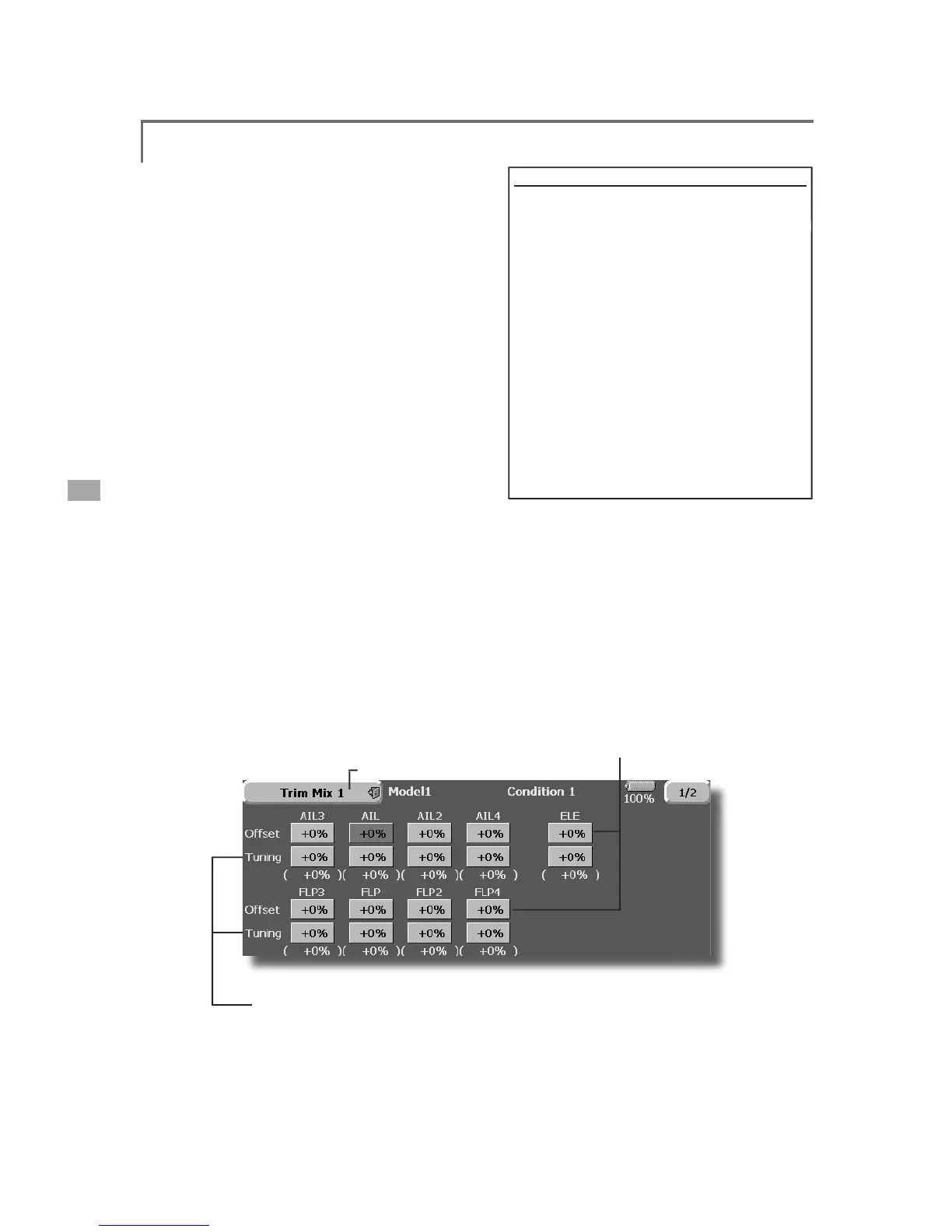
FUTABA FX40 - Trim MIX 1;2

FUTABA FX40
129 pages
Print Icon
To Next Page IconTo Next Page
To Previous Page IconTo Previous Page
Loading...
96
<Model Menu (Airplane/Glider Functions)>
7ULP0L[
>
&RUUHVSRQGLQ
J
PRGHOW\SH@*OLGHUDLOHURQVRUPRUH
Th
ese funct
i
ons ca
ll
t
h
e a
il
erons
,
e
l
evators
,
an
d
ÀDSVFDPEHUÀDSVEUDNHÀDSVWULPRIIVHWUDWHV
S
UHVHWDFFRUGLQJWRWKHÀLJKWVWDWH
Th
e amount of a
il
erons, e
l
evator, an
d
f
l
aps
FDP
E
HU
À
DS
E
UD
N
H
À
DS
WU
L
PRIIVHWFDQ
E
HVHWWR
a
switch
.
As an examp
l
e 7U
L
P0
L
[ can
b
e set up fo
r
O
DXQF
KL
Q
J
Z
L
W
K
VSHH
G
À
DSVDQ
G
D
LO
HURQV
G
URSSH
G
a
nd a sli
g
ht amount of up elevator.
7ULP PL[
can
b
e use
d
for
hi
g
h
spee
d
f
l
y
i
ng, w
i
t
h
b
ot
h
DLO
HURQVDQ
G
VSHH
G
À
DSVUH
À
H[H
G
V
OLJK
W
O\
DQ
G
D
EL
W
o
f down elevator.
T
he trim functions can be activated durin
g
ÀLJK
W
E\
VHWW
L
Q
J
DVZ
L
WF
K
7RSUHYHQWVX
GG
HQWU
L
P
F
KDQ
J
HVZKHQVZLWFKLQ
J
ÀL
J
KWFRQGLWLRQVDGHOD
\
c
an
b
e set to prov
id
e a smoot
h
trans
i
t
i
on
b
etween
t
h
e two. Tr
i
m M
i
x 2 w
ill
h
ave pr
i
or
i
t
y
over Tr
i
m
M
ix 1
.
ŏ
5
H
W
X
UQW
R
0
RGH
O0
H
Q
X
ŏ
:KHQD
À
QHWXQ
L
QJ95
L
VVHWRQWKHQH[WSDJH

WKHD
L
OHURQV
DQG
Á
DSVWU
L
PUDWHVFDQEHDG
M
XVWHG
Touch the correspond
i
ng button and ad
j
ust the rate w
i
th the
ad
j
ustment buttons d
i
splayed on the screen.
ŏ
7KHDLOHURQVIODSVDQGHOHYDWRUV
offset rate can be ad
j
usted
.
Touch the correspondin
g
button
and ad
j
ust the rate with the
ad
j
ustment buttons displayed on
t
h
e screen
.
ŏ
7RXFKWKH
>
7ULP0L[
@
EXWWRQLQWKH0RGHO0HQXWR
call the setu
p
screen shown below.
(
T
h
e
di
sp
l
ay screen
i
s an examp
l
e. T
h
e actua
l
screen
d
epen
d
s on t
h
e
PR
G
H
O
W\SH7
K
HVFUHHQV
K
RZQ
E
H
O
RZ
L
VIRUD
LO
HURQVDQ
G

À
DSV
(
Touch the [1/2] button to sw
i
tch to page 2.
)
ŏ
7RXFKWKH$&7EXWWRQDQGVHWWKH
I
XQFW
L
RQWR$&7
21

ŏ
:KHQVHWW
L
QJDVZ
L
WFKWRXFKWKH6Z
L
WFKEXWWRQ
to call the <Switch> screen, and then select the
VZLWFKDQGVHWLWV21GLUHFWLRQ
$OZD\V21DW18//
settin
g)
(
For a
d
escr
i
pt
i
on of t
h
e sw
i
tc
h
se
l
ect
i
on met
h
o
d
, see t
h
e
d
escr
i
pt
i
on a
t
t
h
e
b
ac
k
of t
hi
s manua
l
.
)
([DPSO
H
7RXFKWKH$
&
7EXWWRQDQGVHWWKHWULPPL[IXQFWLRQ
WR
>2
1
@
*
W
h
en separat
i
n
g
t
h
e sett
i
n
g
s for eac
h
con
di
t
i
on, touc
h
t
h
e
g
roup mo
d
e
b
utton an
d
set
i
t to [Sn
gl
]
.
6HOHFWWKH21
2))VZLWFK

6
H
O
HFWW
K
H
>
0DQXD
O@
RU
>
$XWR
@
PR
G
H
,QWKH>$XWR@PRGHDOVRVHOHFWDQDXWR6:7K
L
V
s
w
i
tch can be l
i
nked to a st
i
ck
,
etc
.
<
Speed
>
,Q7KHR
S
HUDWLRQV
S
HHGDWVZLWFK21FDQEHVHW
2XW7KHUHWXUQVSHHGDWVZ
L
WFK2))FDQEHVHW
<
Fine Tuning
>
T
he o
ff
set rate can be var
i
ed
i
n the F
i
ne Tun
i
ng
QXPHU
L
FUDQJHVHWDWVFUHHQ>@E\95HWF
se
l
ec
t
io
n
.
&RQG
L
W
L
RQ'HOD\!
:KHQÁLJKWFRQGLWLRQVDUHVHWWKHRSHUDWLRQVSHHG
FDQEHVHWIRUHDFKFRQGLWLRQ&RQGLWLRQGHOD\
operation can be interrupted and each rudder
quickly returned to its original position by selecting a

cu
t
s
wit
c
h
.

Table of Contents

Related product manuals