EasyManua.ls Logo

FUTABA FX40 - Program MIX

FUTABA FX40
129 pages
Print Icon
To Next Page IconTo Next Page
To Previous Page IconTo Previous Page
Loading...
78
<Model Menu (Common Functions)>
ŏ
5HWXUQWR0R
G
H
O
0HQX
ŏ7RXFKWKH>3UR
J
0L[HV@EXWWRQLQWKH0RGHO0HQXWR
call the setu
p
screen shown below
.
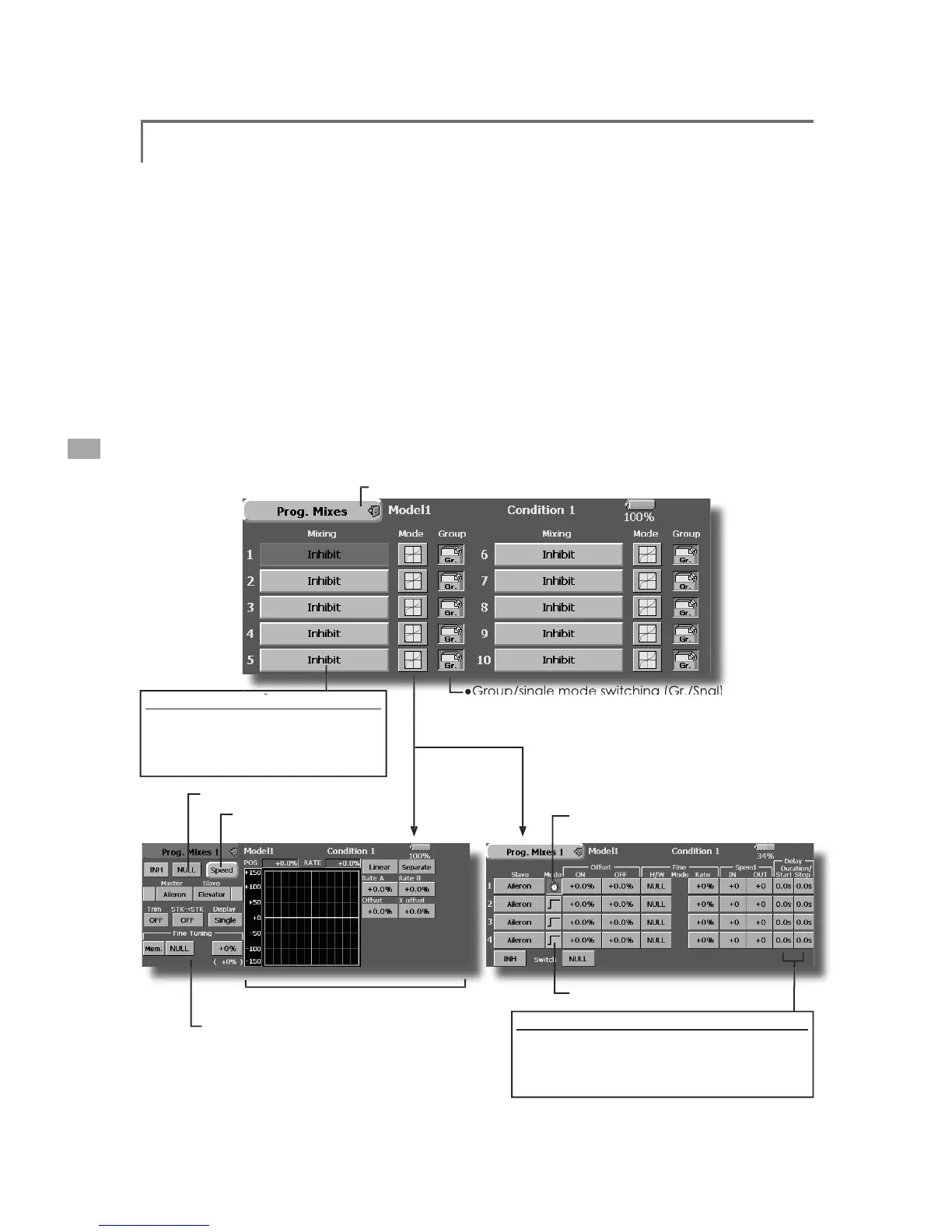
3URJ0L[HV
P
ro
g
ram mixin
g
which can be freely customized. Up to 10 mixin
g
s can be used fo
r
H
DFKFRQG
L
W
L
RQ
>
$OOPRGHOW
\S
HV
@
P
ro
g
rammable mixin
g
ma
y
be used to correc
t
u
n
d
es
i
re
d
ten
d
enc
i
es of t
h
e a
i
rcraft, an
d
i
t may a
l
s
o
b
e use
d
for unusua
l
contro
l
conf
ig
urat
i
ons. M
i
x
i
n
g
m
eans that the motion of a command channel, calle
d
th
e "master
,
" contro
l
s t
h
e mot
i
on of t
h
e m
i
xe
d
c
h
anne
l,
c
a
lled
"
sl
a
ve.
"
You ma
y
choose to have the Masters trim added
t
o the Slave channel response, if you desire ("Trim"
s
ett
i
ng
)
. T
h
e m
i
x
i
ng curve can
b
e c
h
ange
d
so t
h
at t
he
u
ndesired tendencies can be corrected effectivel
y
b
y
s
etting the LINEAR1/LINEAR2/EXP1/EXP2/VTR
/
L
INE
/
SPLINE mo
d
es. T
h
e De
l
ay funct
i
on can
be
pro
g
rammed for each rate. The Dela
y
is used to chan
g
e
t
he rate smoothly when switching. You may defin
e
M
i
x
i
ng ON
/
OFF sw
i
tc
h
, contro
l
or you may c
h
oose to
h
ave m
i
x
i
ng rema
i
n
i
ng on a
ll
t
h
e t
i
me.
O
ffset-t
y
pe m
i
x
i
n
g
app
li
es a f
i
xe
d
offset or preset
t
o the pro
g
rammed channel servo operation and ma
y
contro
l
up to four c
i
rcu
i
ts s
i
mu
l
taneous
l
y.
T
h
e Pro
g
ramma
bl
e m
i
x
i
n
g
i
nc
l
u
d
es a
li
n
k
funct
i
on,
which allows Pro
g
rammable mixin
g
to be linke
d
w
i
t
h
t
h
e spec
i
a
l
m
i
x
i
ng funct
i
ons, or w
i
t
h
ot
h
e
r
p
ro
g
ramma
bl
e m
i
x
i
n
g
funct
i
ons. T
h
e
li
n
k
funct
i
on can
be set up for Master and Slave channel individuall
y
.
T
h
e s
l
ave c
h
anne
l
AFR mo
d
e
(
STK-STK mo
d
e
)
ma
y
b
e se
l
ecte
d
, w
h
ere t
h
e s
l
ave c
h
anne
l
AFR an
d
D/R settin
g
s are observed when Link function is set.
7K
H
N
QR
E
IRU
¿
QHWXQ
L
QJFDQ
E
HVHWXSIRUHYHU\P
L
[
L
Q
J
c
i
rcu
i
t.
(
F
i
ne tune funct
i
on
)
0L[LQJEXWWRQV
A
fter t
hi
s funct
i
on was act
i
vate
d,
t
h
e
master and slave function names (or
offset mixing) are displayed
.
ŏ0L[LQ
J
PRGHFKDQ
J
HEXWWRQ
ŏ*URXSVLQJOH
PRGH
VZLWFKLQJ
*U
6QJO
(
For more
i
nformat
i
on, see t
h
e
d
escr
i
pt
i
on at t
h
e
b
ac
k
of t
hi
s manua
l
.
)
ŏ2SHUDWLRQFXUYHVHWWLQ
J
ŏ6HUYRVSHHGVHWW
L
QJ
ŏ6Z
L
WFKVHOHFW
L
RQ
ŏ
)LQHWXQLQ
J
WULPVHWWLQ
J
(
Timer mode
)
(
Normal mode
)
7
LPHUPRG
H
T
h
e on t
i
me
(
start
/
stop t
i
me
)
can
b
e set up to
9 seconds. It is useful for landin
g
g
ear control o
f
t
he jet or scale plane, etc
.

Table of Contents

Related product manuals