EasyManua.ls Logo

FUTABA FX40 - Dial Monitor

FUTABA FX40
129 pages
Print Icon
To Next Page IconTo Next Page
To Previous Page IconTo Previous Page
Loading...
71
<Linkage Menu>
ŏ5HWXUQWR/LQND
J
H0HQ
X
ŏ7RXFKWKH>'LDO0RQLWRU@EXWWRQLQWKH/LQND
J
H
0
HQXWRFD
OO
W
K
HVHWXSVFUHHQV
K
RZQ
E
H
O
RZ
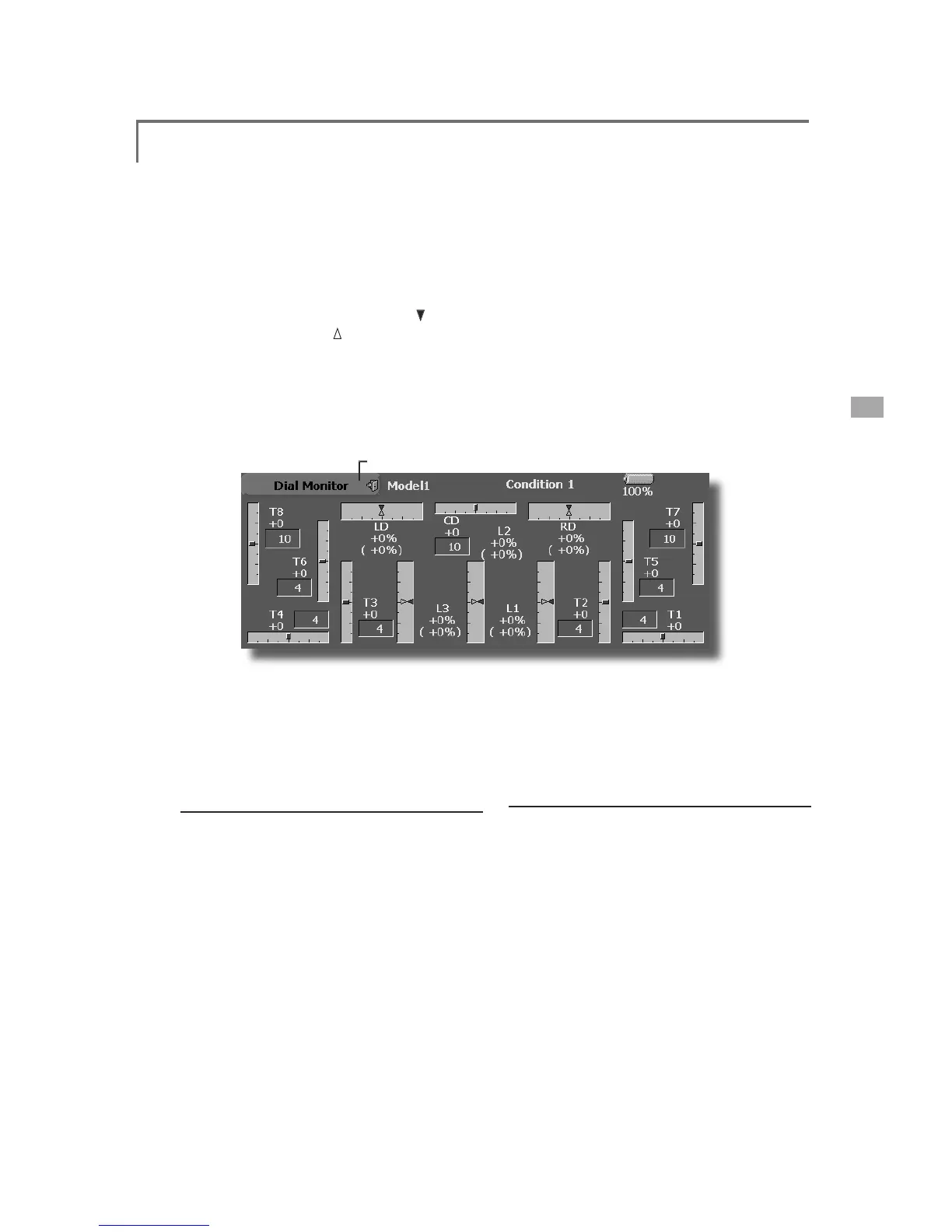
Dial Monitor
/'LVSOD\VWKHSRVLWLRQRIWKHGLDOVVOLGHUOHYHUVDQGGL
J
LWDOWULP
D
i
g
i
tal Tr
i
m Pos
i
t
i
on d
i
splay
(
T1-T8,
C
D
)
Th
e D
i
a
l
Mon
i
tor
di
sp
l
a
y
s t
h
e current pos
i
t
i
on
and the operation step amount of each Di
g
ital Trim.
Th
e tr
i
m step can
b
e set
di
rect
l
y on t
h
e
di
a
l
mon
i
tor
men
u.
V
R and slide lever position displa
y
(LD, RD,
L
1-L3
)
D
i
sp
l
ays t
h
e current pos
i
t
i
on
(bl
ac
k
)
an
d
l
ast
operatin
g
position (
g
reen ) of the VRs and slider
l
evers
.
Knob and Lever Position display
(
LD, RD, L
S
, L1-L3
)
T
he Dial Monitor displa
y
s the current position
an
d
l
ast operat
i
on pos
i
t
i
on of eac
h
k
no
b
an
d
l
ever.
A
l
t
h
ou
gh
ne
i
t
h
er
k
no
b
nor
l
ever can
h
o
ld
t
h
e
l
as
t
operation position because of the
y
are “analo
g
type, t
h
e pos
i
t
i
on
d
ata
d
ur
i
ng t
h
e
l
ast operat
i
on
i
s
memor
i
ze
d
i
n t
h
e mo
d
e
l
memor
y
. B
y
mov
i
n
g
t
h
e
knob and lever to the position displa
y
ed on this
mon
i
tor, t
h
e
l
ast operat
i
on pos
i
t
i
on
i
s reca
ll
e
d
.
Recalling Dial Position
(
LD, RD, L
S
, L1-L3
)
T
he dial
p
osition data at the last o
p
eration is
di
sp
l
aye
d
for eac
h
k
no
b
an
d
l
ever
i
n t
hi
s mon
i
tor.
(Green arrow)
0RYHWKHEODFNDUURZ
FXUUHQWSRV
L
W
L
RQ
WRWKHJUHHQDUURZSRV
L
W
L
RQE\RSHUDW
L
QJ
WKHGHV
L
UHGNQRERUOHYHUWRUHFDOOWKHODVW
RSHUDW
L
QJSRV
L
W
L
RQ

Table of Contents

Related product manuals