129
<Data>
Updating
);WUDQVPLWWHUSURJUDPFDQEHXSGDWHG:KHQIXQFWLRQVDUHDGGHGRULPSURYHGWKHXSGDWH¿OHFDQEH
GRZQORDGHGIURPRXUZHEVLWH&RS\WKHXSGDWH¿OHVWRWKH&)FDUGDQGWKHQXVHWKHIROORZLQJSURFHGXUHWR
update the program.
Updating procedure
Note: If the battery fully discharges during
program updating, updating will fail. When
WKHUHPDLQLQJEDWWHU\FDSDFLW\LVRU
less, always recharge the battery before
updating.
Note: The model data in the transmitter will not
be changed after updating, but to be safe,
back up the model data before updating.
Normal operation mode
Update mode
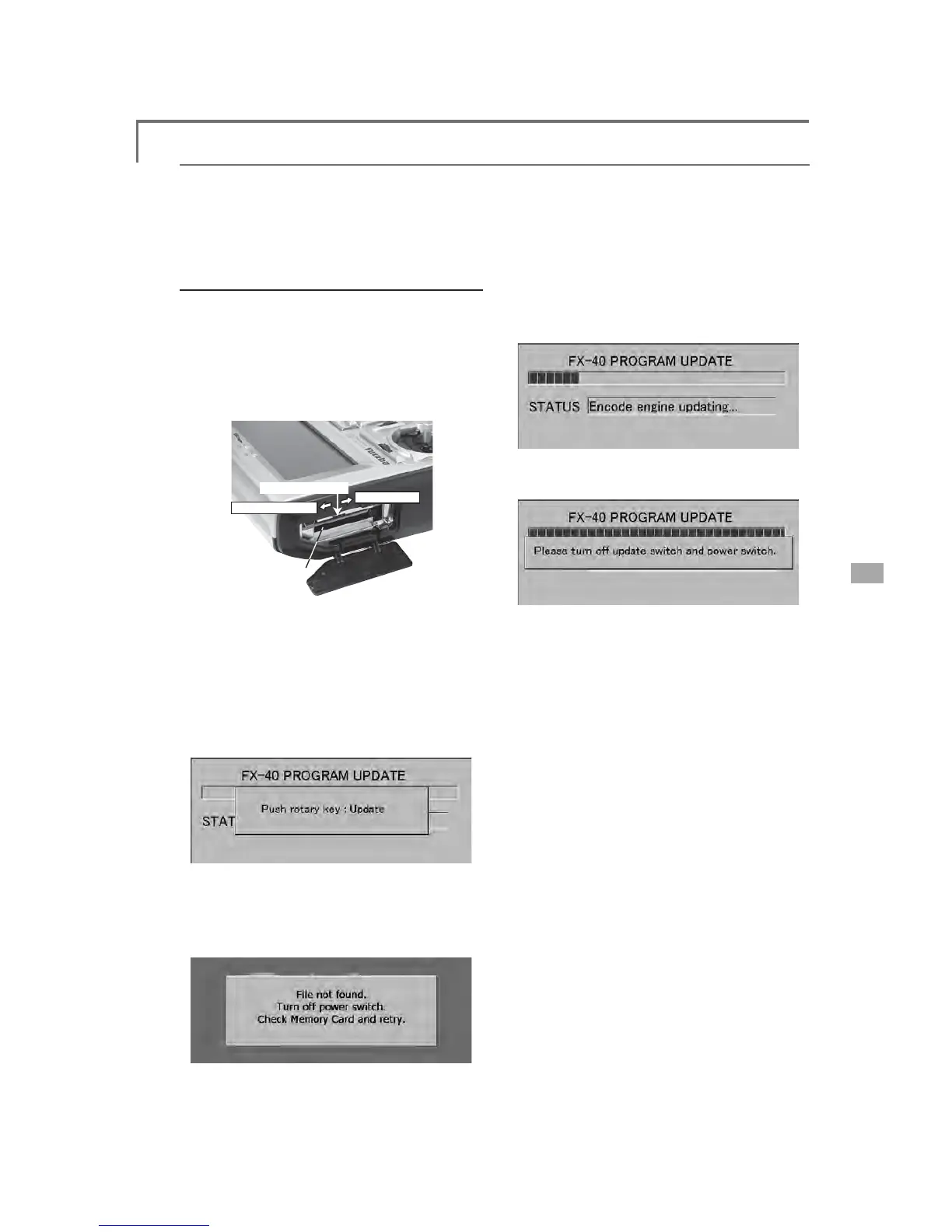
Update switch
Card slot
,QVHUWWKH&)FDUGFRQWDLQLQJWKHXSGDWHÀOH
into the card slot.
8VHWZHH]HUVWRVZLWFKWKHVOLGHVZLWFK
(update switch) at the side of the card slot in
the up direction.
7XUQRQWKHWUDQVPLWWHUSRZHU$ERXW
seconds later, the screen shown below will
appear. To abort updating, turn off the
transmitter power.
1RWH,ID&)FDUGLVQRWLQVHUWHGLQWRWKHFDUG
VORWRUWKHÀOHVQHHGHGDUHQRWFRSLHGWRWKH
&)FDUGWKHHUURUPHVVDJHVKRZQEHORZZLOO
appear. Turn off the power to the transmitter
DQGFKHFNWKH&)FDUG
4. When the rotary switch is pushed, updating
starts. During updating, the bar graph moves
to the right.
:KHQXSGDWLQJLVFRPSOHWHWKHVFUHHQ
shown below appears.
7XUQRIIWKHSRZHUVZLWFK $IWHUWKHPRQLWRU
LED goes off, switch the update switch in the
down direction.
$IWHUWKHXSGDWLQJDERYHKDVEHHQ
completed, turn on the power and then
check the system program version at the
system menu information screen.



 To Previous Page