GPSMAP 60CSx Owner’s Manual 29
BASIC OPERATION >
3. To read or transfer the .gpx files use the USB
cable to connect to your PC and enable the
USB Mass Storage feature as explained on
page 69. You can open the track logs using
Garmin MapSource or another .gpx file-
compatible application.
4. To delete these track logs from the microSD
card, highlight individual logs, and then press
ENTER. Use the Delete All button to clear the
entire list.
NOTE: Do not remove the microSD card
from the unit while logging a track, because
corruption of the data can result.
To view a track on the map:
On the Saved Track Page, select the Map
button, and press ENTER to open the Map
Page. A map showing the entire track appears.
Begin and End markers and user waypoints
are added to the track.
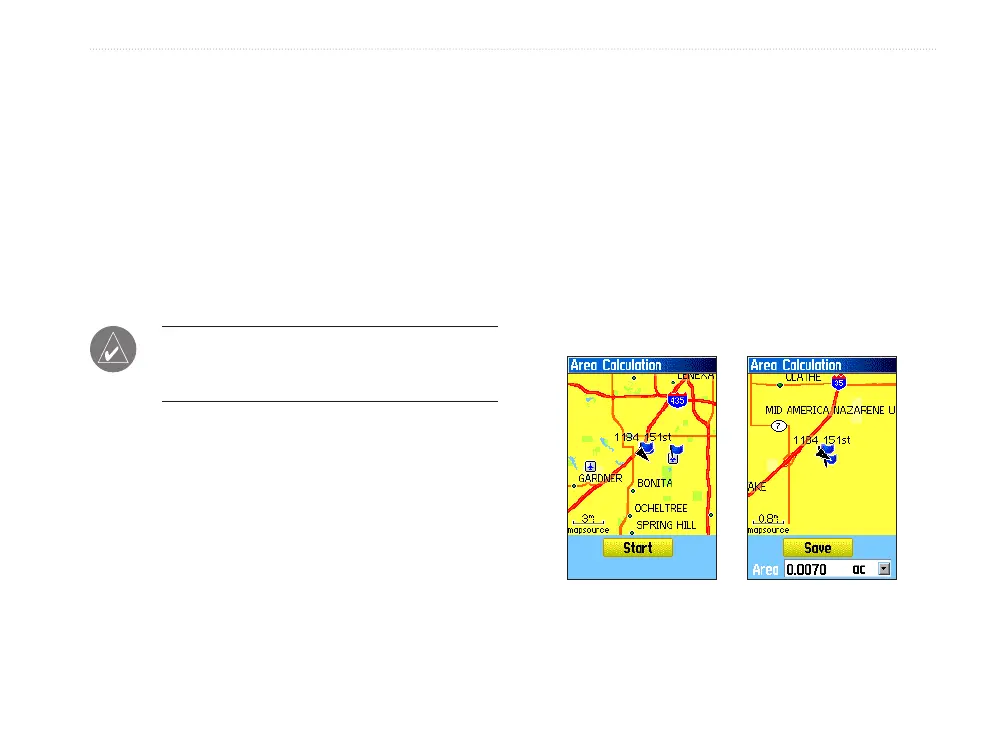
To calculate the area of a track:
1. With the Track Log Page open and the Track
Log on, press MENU to open the Options Menu.
2. Highlight Area Calculation, and press ENTER
to open the Area Calculation Page.
3. Press ENTER to start the area calculation.
As you begin to move and define the area’s
boundaries, a Stop button appears at the
bottom of the page.
4. When finished defining the area, press ENTER
to open the page with a Save button.
5. Press ENTER to save the new track to the
Saved Tracks list on the Tracks Page
Start calculation
Save calculated track















 To Next Page