GASBOY Series 9800A
3-8 03/07/03
$GGUHVV
12
13
14
15
6:
Closed
Open
Closed
Open
Closed
Open
6: 6:
Open
Open
6:
Open
Open
11
Open ClosedOpen Open
10
Closed ClosedOpen Open
9
Open ClosedClosed Open
8
Closed ClosedClosed Open
6
7Closed
Open
Open
Open
Open
Open
Closed
Closed
4
5Closed
Open
Open
Open
Closed
Closed
Closed
Closed
2
3Closed
Open
Closed
Closed
Open
Open
Closed
Closed
1Closed
Open Closed
ClosedClosed
Closed
Closed
Closed
Closed Open Open
Open Open Open16
SW2
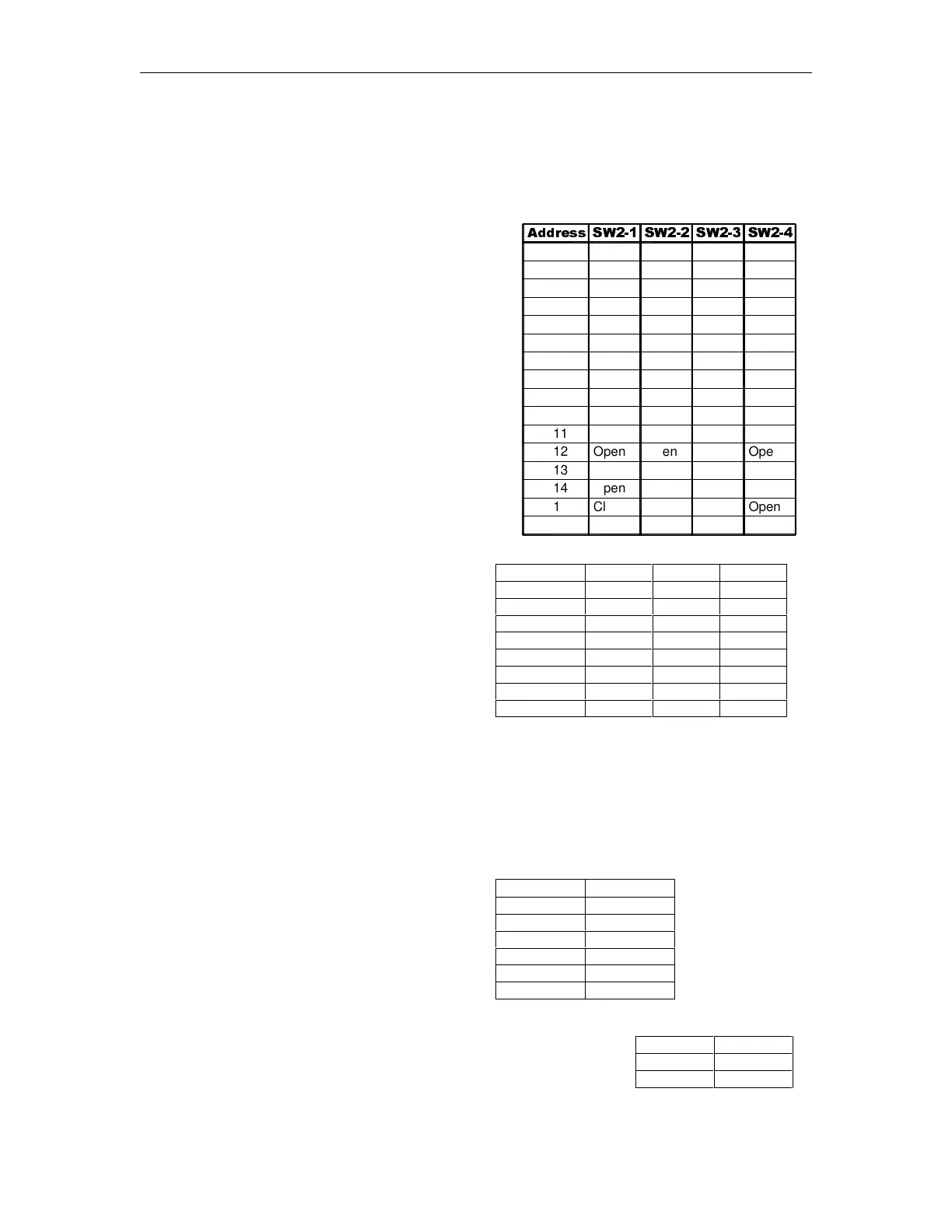
This four-position switch pack serves a dual purpose: as an address setting when communicating
on the GASBOY RS-485 loop or Series 900, or as a pulser output rate selector when pulser data
is sent to a fuel management system other than a GASBOY CFN or Series 900.
Address Switches
A unique address identifier must be set when the
9800A is connected to the GASBOY RS-485
pump loop via the 9800A RS-485 I/F PCB.
Because there are 16 possible address
combinations, up to 16 units (single or twin) may
be connected to the pump loop. Addressing
should start at 1 and continue sequentially through
16. The physical wiring order does not have to
correspond with the address order; that is the first
unit on the RS-485 loop doesn’t have to be
address 1. The chart at right gives the switch
settings and address selections. With the Series
900 option, the address must be set to 1.
Pulser Output Rate Switches
When the 9800A is connected to external
control equipment other than a GASBOY
CFN system (standalone), the pulser signals
are sent out via the 9800A Pump I/F PCB.
The pulse rate required by the monitoring
equipment can be configured by setting the
switches as shown in the chart at right. The
pulse rate represents pulses per gallon
(PPG, domestic) or pulses per liter (PPL,
international). For domestic units, the pulse
rate can be up to 500 PPG for 9840A, 250
PPG for 9850A and up to 1000 PPG for all
other models. For international units, the
pulse rate can be up to 100 PPL for 9840A,
10 PPL for 9850A, and up to 250 PPL for all
other models. This switch may need to be
sealed by a Weights and Measures paper
seal if the 9800A is used for the resale of
product.
Leading zeros are always suppressed in the
hundreds and tens positions to the left of the
decimal point. When in standalone mode,
positions to the right of the decimal point are
displayed based on the pulse rate selected
as shown in the table at right.
Pulse Rate SW2-1 SW2-2 SW2-3
1 Closed Closed Closed
10 Open Closed Closed
100 Closed Open Closed
250 Open Open Closed
500 Closed Closed Open
1000 Open Closed Open
None Closed Open Open
None Open Open Open
Pulse Rate Display
1:1 XXX.
10:1 XXX.X
100:1 XXX.XX
250:1 XXX.XXX
500:1 XXX.XXX
1000:1 XXX.XXX
Timeout Switch
When the 9800A is in standalone mode, it will turn off an active
hose if it doesn’t detect pulses for 4 minutes, 15 seconds. This
timeout feature can be disabled by setting switch SW2-4 to
Open.
Timeout SW2-4
Enabled Closed
Disabled Open



 To Next Page