– 19 –
Front Bulkhead
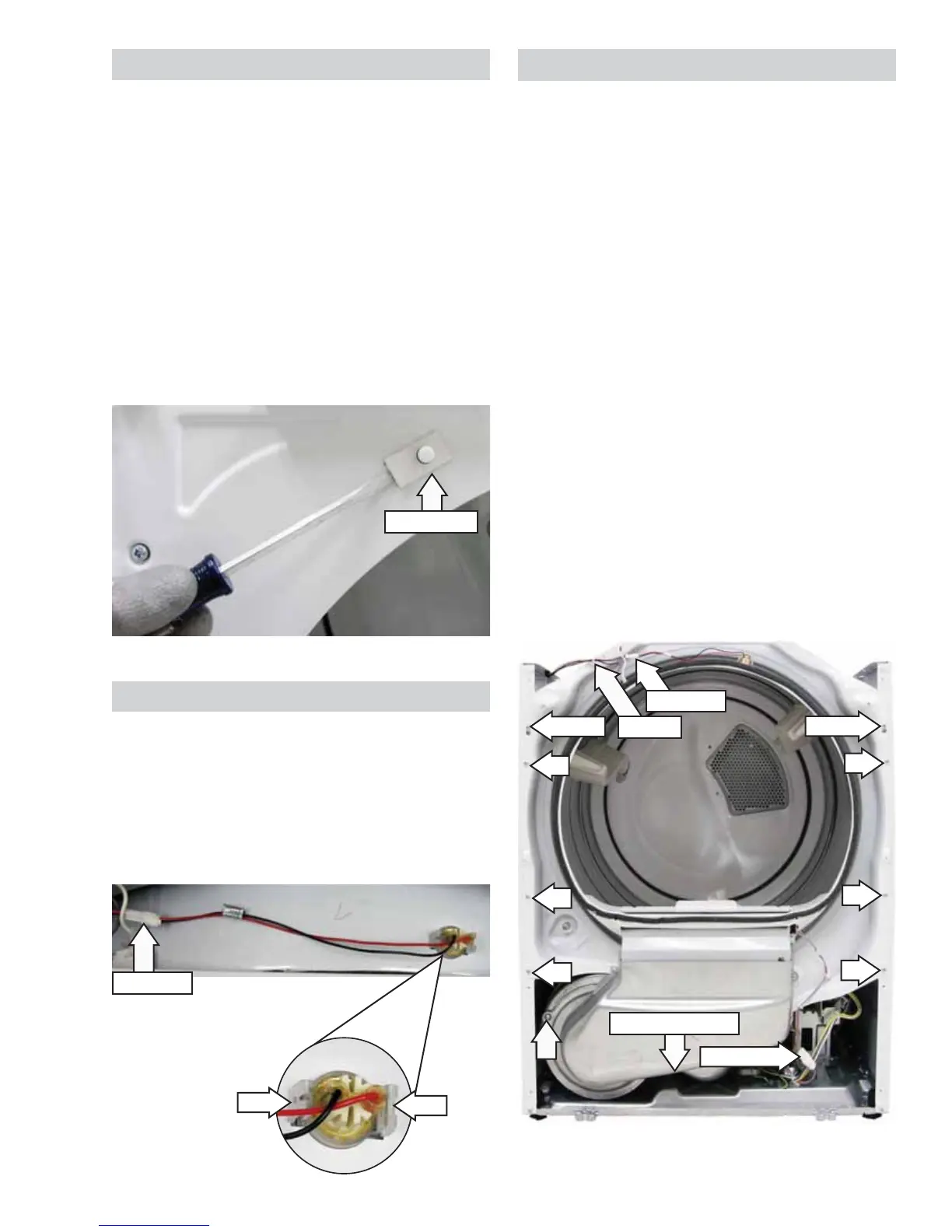
The front bulkhead houses the lint fi lter housing,
2 sensor rods, 2 front rollers, and drum light. It is
located behind the front panel.
To remove the front bulkhead:
1. Remove the control, top, and front panels. (See
Control Panel, Top Panel, and Front Panel.)
2. Remove the wire tie from the front bulkhead.
3. Disconnect the drum light wire harness.
4. Disconnect the sensor rods wire harness.
5. Loosen, but do not remove the top 2 Phillips-
head screws that attach the front bulkhead to
the side panels.
6. Remove the remaining 6 Phillips-head screws
that attach the front bulkhead to the side
panels.
7. Remove the 2 Phillips-head screws that attach
the bottom of the front bulkhead to the blower
housing.
8. Lift the front bulkhead off the top 2 screws.
Screw (below duct)
Loosen
Loosen
Disconnect
Wire Tie
Disconnect
Door Switch
The door switch is fastened to the front panel by 2
locking tabs (1 on each side). When the dryer door
is closed, the switch will complete the drum motor
circuit, allowing dryer operation. When the door is
open, the switch will open the drum motor circuit,
interrupting dryer operation. Opening the dryer door
will also cause the drum light to be energized.
The door switch can be removed by inserting a fl at
blade screwdriver behind the switch fl ange and
carefully prying the switch out from the front panel.
Two wires are connected to the switch.
The door switch circuit can be checked in the
service mode.
Door Switch
LED Drum Light
The LED drum light is attached to the front bulkhead
with 2 clips. It is necessary to disconnect the drum
light wire harness and squeeze both clips to remove
the LED drum light.
The LED drum light receives approximately 3.8 VDC
from the control board J11 connector.
Disconnect
Clip
Clip


 To Next Page