3–26 MM300 MOTOR MANAGEMENT SYSTEM – INSTRUCTION MANUAL
SOFTWARE CHAPTER 3: INTERFACING WITH THE MM300
Using the Quick
Connect feature
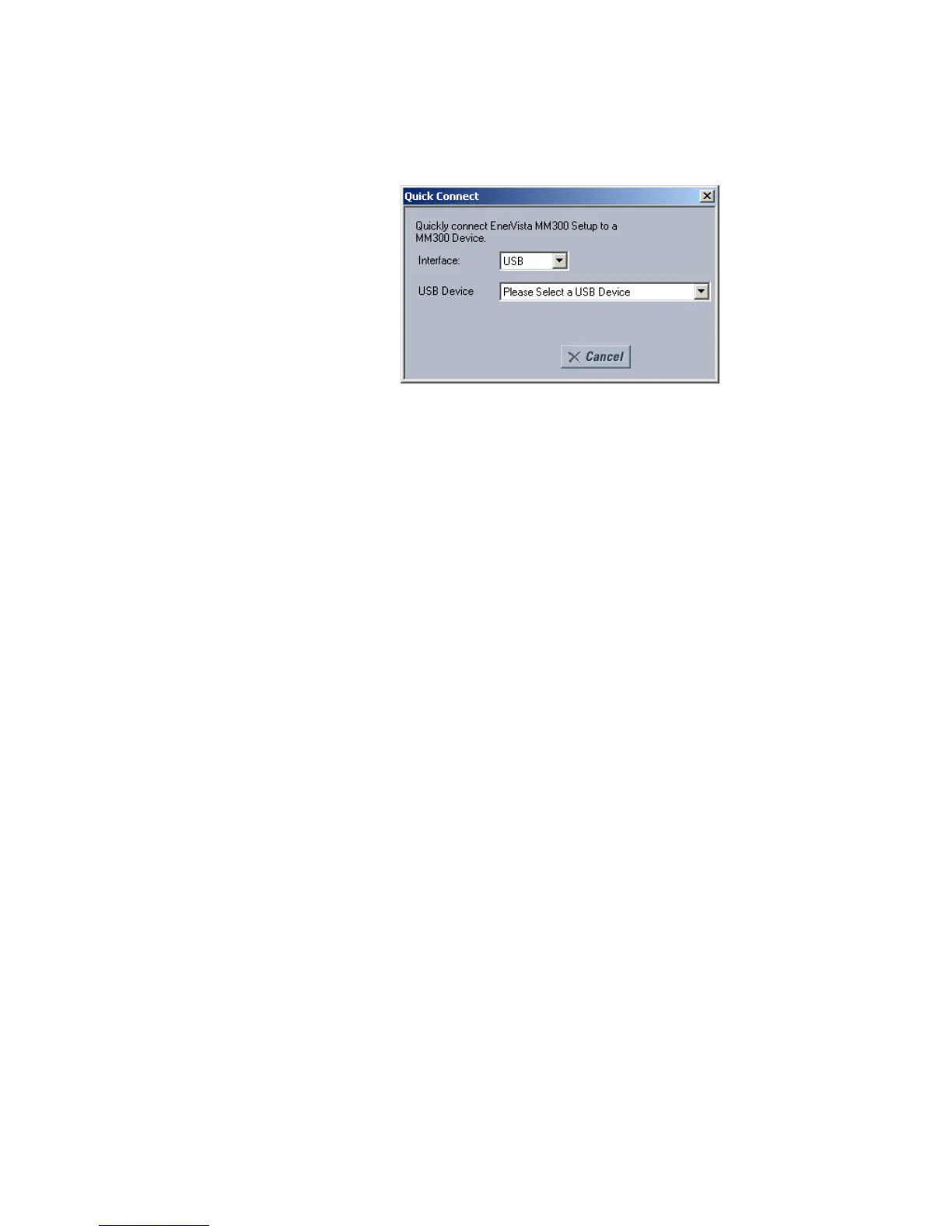
The Quick Connect button can be used to establish a fast connection through the front
panel USB port of a MM300 relay. The following window will appear when the
QuickConnect button is pressed:
As indicated by the window, the "Quick Connect" feature can quickly connect the EnerVista
MM300/MM200 Setup software to a MM300 front port if the USB is selected in the interface
drop-down list. Select "MM300
Relay" and press the Connect button.
When connected, a new Site called “Quick Connect” will appear in the Site List window.
The MM300 Site Device has now been configured via the Quick Connect feature for either
USB or Serial communications. Proceed to Connecting to the Relay below, to begin
communications.
Connecting to the
relay
Now that the communications parameters have been properly configured, the user can
easily communicate with the relay.
1. Expand the Site list by double clicking on the site name or clicking on the «+» box to
list the available devices for the given site.
2. Desired device trees can be expanded by clicking the «+» box. The following list of
headers is shown for each device:
Device Definition
Setpoints
Values
Diagnostics
Device Summary
Status
Exerciser
Maintenance.
3. Expand any list item and double click on any item contained in the expanded list to
open that item, as shown below:








 To Next Page