13 / 66
1436 cPos
7 Operation
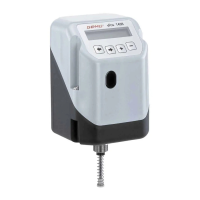
7.1 Operating and display elements
Back key
2-line display
Forwards key Plus key Minus-key
7.2 Menu levels
The GEMÜ 1436 cPos uses two menu levels. These are the
working level (Mode) and the conguration level (Setup).
7.2.1 Workinglevel(Mode)
The GEMÜ 1436 cPos is automatically at this level after the
supply voltage is switched on.
The menu item Mode can be used to select between the
operating modes A(Auto),M(Manual),F(Manual-Flex),
T(Test) and OFF.
A(AUTO):
The positioner is triggered by an external set value signal when
using the AUTO operating mode.
The positioner also processes an external actual value signal
when operated as a process controller.
M(MANUAL):
If MANUAL is selected together with operation as a positioner,
the valve can be opened and closed manually using the + and
– keys.
If MANUAL is selected together with operation as a process
controller, the set value can be changed manually using the +
and – keys.
When switching from AUTO to MANUAL the last set value
input when MANUAL was last selected is adopted.
AUTO
Sollwert 30,0%
MANUAL
Sollwert 50,0%
AUTO
Sollwert 40,0%
MANUAL
Sollwert 50,0%
Set value Set value Set value Set value
F(MANUAL-FLEX):
If MANUAL-FLEX is selected together with operation as a
positioner, the valve can be opened and closed manually using
the + and – keys.
If MANUAL-FLEX is selected together with operation as a
process controller, the set value can be changed manually
using the + and – keys.
When switching from AUTO to MANUAL-FLEX the last set
value connected under AUTO is adopted.
AUTO
Sollwert 30,0%
MANUAL-FLEX
Sollwert 30,0%
AUTO
Sollwert 40,0%
MANUAL-FLEX
Sollwert 40,0%
AUTO
Sollwert 30,0%
MANUAL-FLEX
Sollwert 30,0%
AUTO
Sollwert 40,0%
MANUAL-FLEX
Sollwert 40,0%
Set value Set value Set value Set value
T(Test):
In TEST mode in the standard setting as positioner the device
may be operated manually for test purposes.It does not
process any external input signals
and works as a mere positioner.
OFF:
If switched to OFF the positioner is in pause mode and then
does not react to any changes to the input signals.
7.2.2 Congurationlevel(Setup)
Various parameters can be set at this level (see Menu structure
chapter 11.3) in order to realise optimal adaptation to the
application conditions.
8 Changing parameters
For the GEMÜ 1436 cPos the keys
+
ـ
are used to select the various menus according to chapter
11.Congurationmenu.
The changes to the parameters required are made using
brackets that are put round the respective parameters.
Use the
or
key to move the cursor onto the respective
parameter and change it with the
+
or
ـ
key.
Example:
The operating mode is to be changed from OFF to Auto.


 To Next Page