20 / 66
1436 cPos
11 Congurationmenu(Setup)
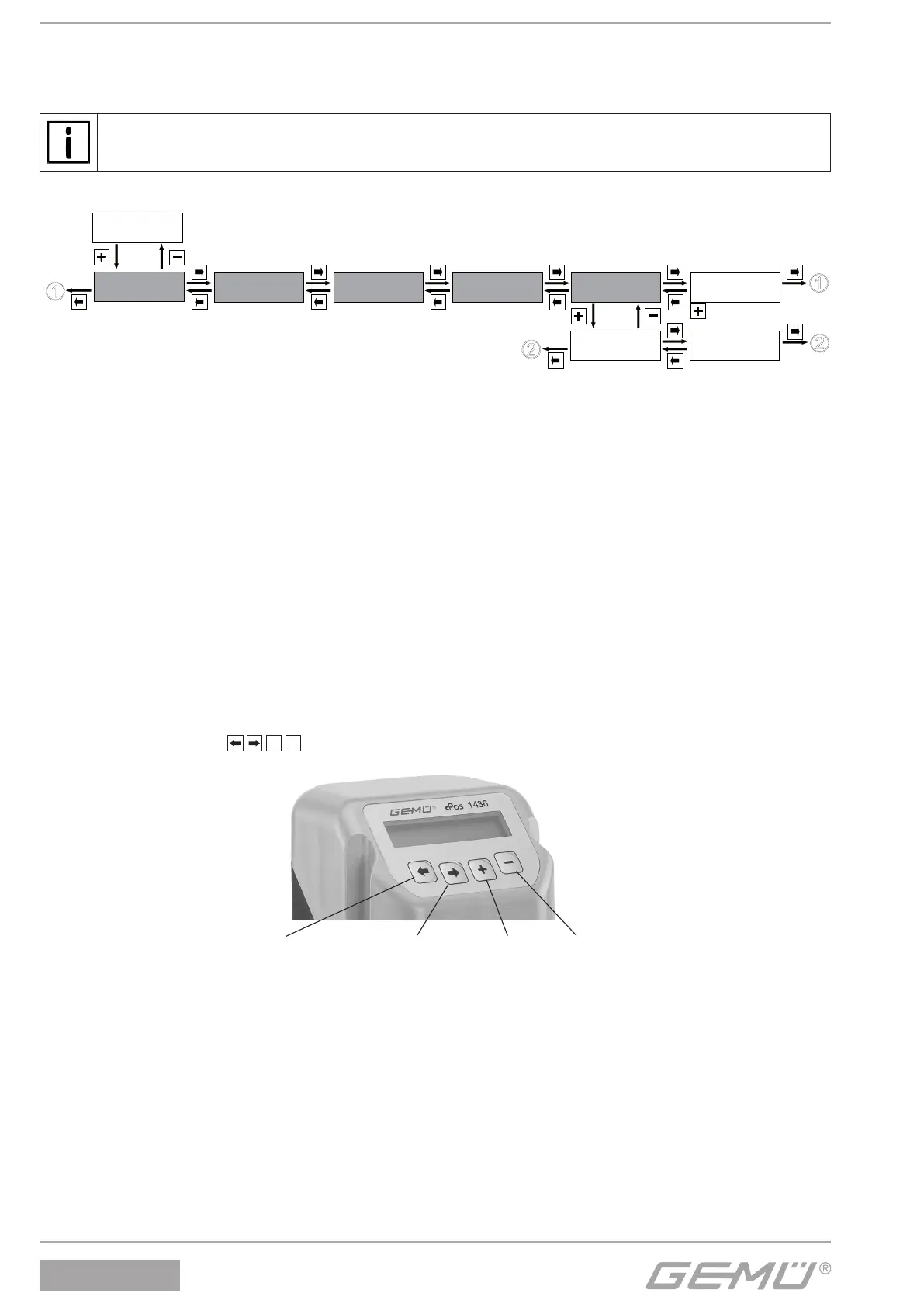
Various parameter values of the GEMÜ 1436 cPos can be changed in the conguration menu. The parameter name appears in
the top left line of the display and the parameter value on the right.
In order to enable immediate use of the GEMÜ 1436 cPos, the most common values were entered as factory settings.
The submenus which are only required for the process controller are only available for the design with integrated
process controller (PA01).
The relevant submenus are highlighted in grey.
Service
1
SetBasics
2
SetFunction
3
SetCalibration
4
Return
6
SETUP
Communication
5
Fieldbus
5.2
IR-Port
5.1
The conguration menu consists of ve submenus with the following functions:
1. Service
This menu is used to read out all information/diagnostics regarding the positioner, the connected signals and errors that occur.
2. SetBasics
SetBasics is used to set the basic settings for the GEMÜ 1436 cPos such as the initialisation, selection of input signals and
resetting to factory settings.
3. SetFunction
The special positioner functions are activated or deactivated here and the control parameters set.
4. SetCalibration
SetCalibration is used to set the directions of action, characteristic curves, stroke limits and closing limits and error limit values.
5. Communication
The dierent communication options for the GEMÜ 1436 cPos can be set here.
11.1 Changesinthecongurationmenu
Changes can be made to the factory settings according to the menu overview below.
Before making changes in the conguration menu, familiarise yourself with the operation of the GEMÜ 1436 cPos (see chapter 7).
In this case, the small squares
+
ـ
represent the GEMÜ 1436 cPos keys that must be pressed to reach the next menu
item or within the menu to the various settings.
Back key Forwards key Plus key Minus-key
11.2 Accessauthorisationinthecongurationmenu
In order to hinder unwanted changes to the parameter values, the conguration level of the GEMÜ 1436 cPos is secured with
three dierent access codes.
The factory code setting is as follows:
Code 1: Password 0 (New Code: 1)
Code 2: Password 0 (New Code: 2)
Code 3: Password 0 (New Code: 3)
After entering the factory codes, these codes can be changed by the operator at any time.
The access priorities needed are marked in the conguration menu.
In order to change the access codes, please refer to 13.1.2. Activating or deactivating the user access.


 To Next Page