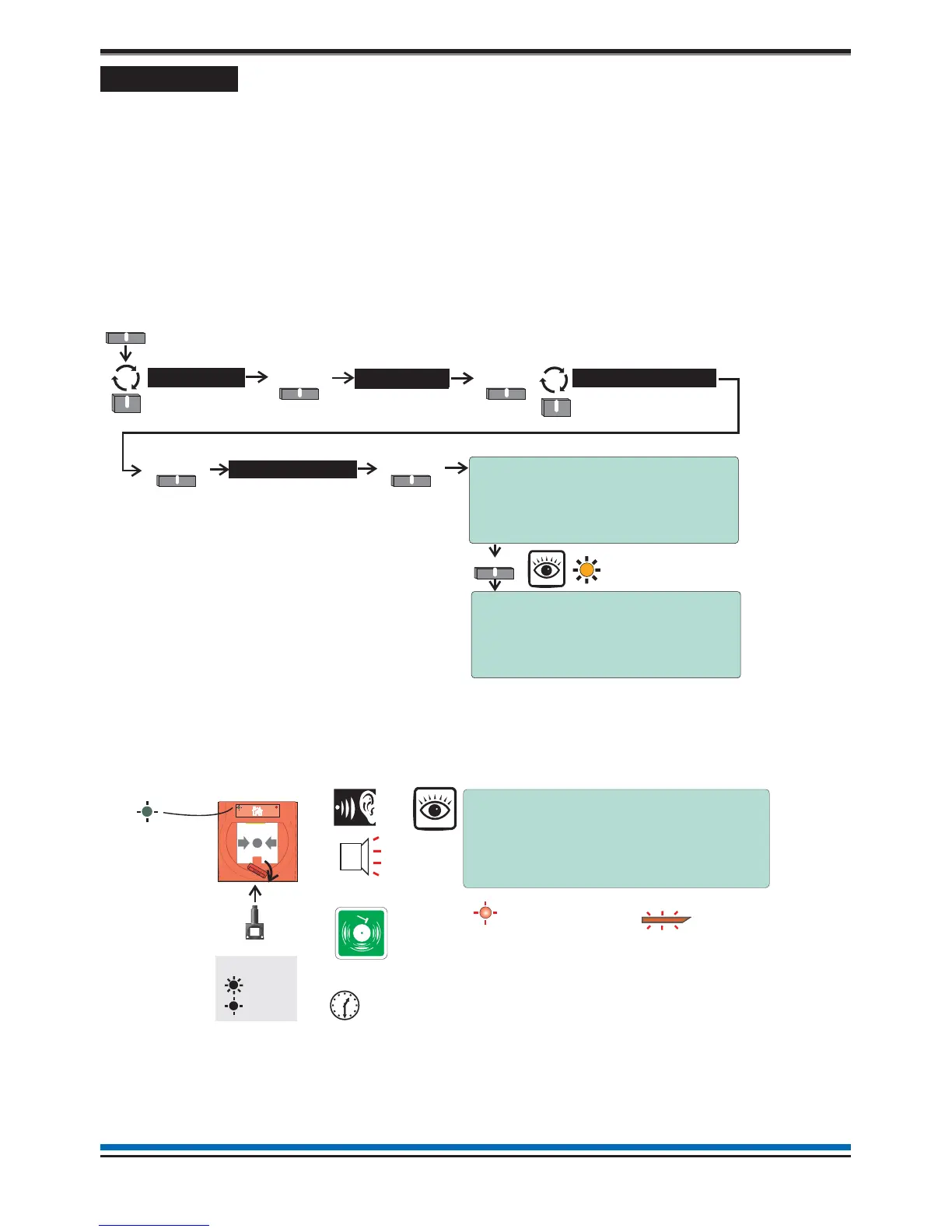
Weekly tests
Every week during normal working hours the fire detection and alarm system should be tested. It is important to
inform the alarm receiving centre of the fire test. A fire test reminder will appear on the display every week on
the specified day if the option is turned on. The fire test should be conducted at a specific time of the day.
A weekly test can be carried out at a manual call point without breaking the call point glass by use of a test key.
How to enter the Weekly test mode
To put the system in a weekly test mode and to identify the next device to be tested, carry out the following
procedure at the panel.
¨
First enter the Customer Mode by entering Access Level 2 PIN code, see page 9.
¨
Set the system for 'Weekly Test' by following these procedures.
¨
Go to the manual call point to be tested, its green light will be giving a flashing indication.
Insert the test key into the Call point keyhole. The keyhole is located on the bottom-centre front
face of the call point and is concealed behind a slider cover. Turn the key one quarter of a turn
clockwise.
¨
Check the alarms are sounding in the building and an indication is given of the fire event.
¨
Turn the key anticlockwise one quarter of a turn and remove it from the call point.
Record the event
Make an entry in the log book of the event for future reference.
10
Operating instructions
Menu
Select
Start/Stop
Select
System >
SelectSelect
User
Weekly Test >
Select
10:15 Mon 11/01/10
Start Weekly Fire Test
Warning!
Selecting 'FIRE TEST’ causes all
zones to enter test state
A?
Yes NO
RE YOU SURE YOU WANT TO PROCEED
Weekly Fire Test 10:15 Mon 11/01/10
ALL ZONES IN TEST STATE
Next manual call point to be tested:
Dev 004 Device 4
Zn 001 Zone 1
+/- More Quit
Yes
Tes t
On
Flashing
Manual Call point
Test Key
ZONE 1
FIRE
(red LEDs)
Audible
Buzzer
First fire indication
(flashing LED)
Common fire LED
(Steady indication)
1 ZONE IN FIRE
FIRE TEST IN PROGRESS
XX:TEST(S)
Menu
Test duration is 5 seconds before
automatic SILENCE ALARMS and
further 5 seconds before RESET.
key
Device to be tested
Test F i re
Alarm
The PLANT equipment will not
operate during ‘Fire Test’ condition.
Green LED



 To Next Page