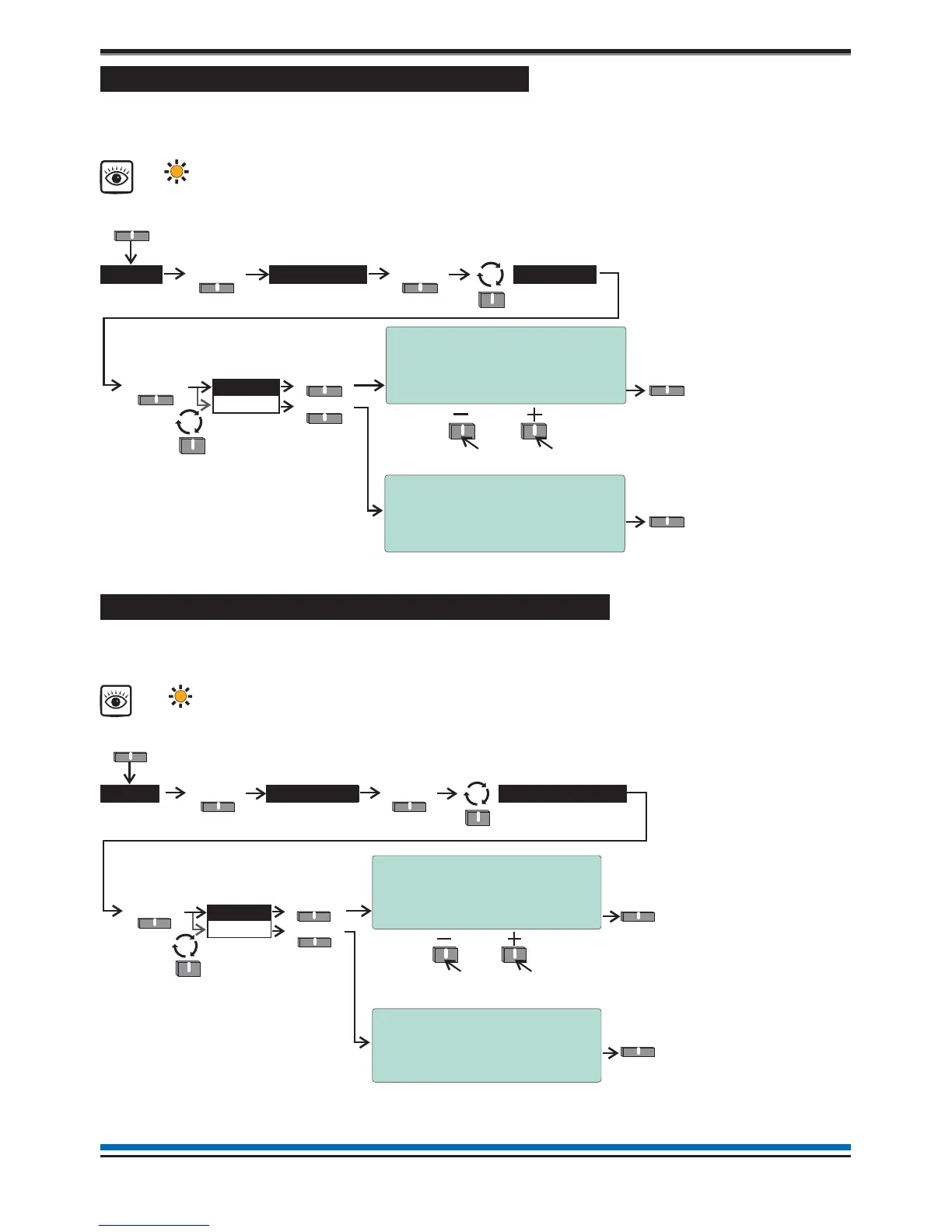
How to view or print active Fault events
All active fault events that are still present and have not cleared can be viewed or printed at any time. The fault
light will be lit. Follow these procedures to view the active fault events log:
How to view or print active Disablement events
All the active disablement events that are still present and have not cleared can be viewed or printed at any
time. The disablement light(s) will be lit. Follow these procedures to view the disablement events log:
20
Operating instructions
Fault >
View
Print
Select
Select
SelectSelect
Active >
Select
Logs
Menu
Select
Fault
[amber LED]
To view other active fault events
Prin
Quit
16:15 Mon 11/01/10
Fault Log ( 2)
1: 16:10:45 Mon 11/01/2010
Loop wiring open circuit
Dv 002:Device 2
Quit
16:15 Mon 11/01/10
Print Active fault Log
WARNING ! - This option will print all
entries in the active Fault log !
Print Quit
+ May be accompanied with other Fault indicators
The ‘Print’ option is only available
in Customer Mode and only when
a printer is connected to the panel.
16:15 Mon 11/01/10
Disablement Log ( 1)
1: 10:15:47 Mon 11/01/2010
Device Disabled
Device 002 Loop 01
Quit
16:15 Mon 11/01/10
Print Active Disablement Log
WARNING ! - This option will print all
entries in the active Disablement log !
Print Quit
Disablement >
View
Print
Select
Select
SelectSelect
Active >
Select
Logs
Menu
Select
Disablement
[amber LED]
To view other active disablement events
Prin
Quit
+ Sounder Disablement
LED may also be lit
The ‘Print’ option is only available
in Customer Mode and only when
a printer is connected to the panel.



 To Next Page