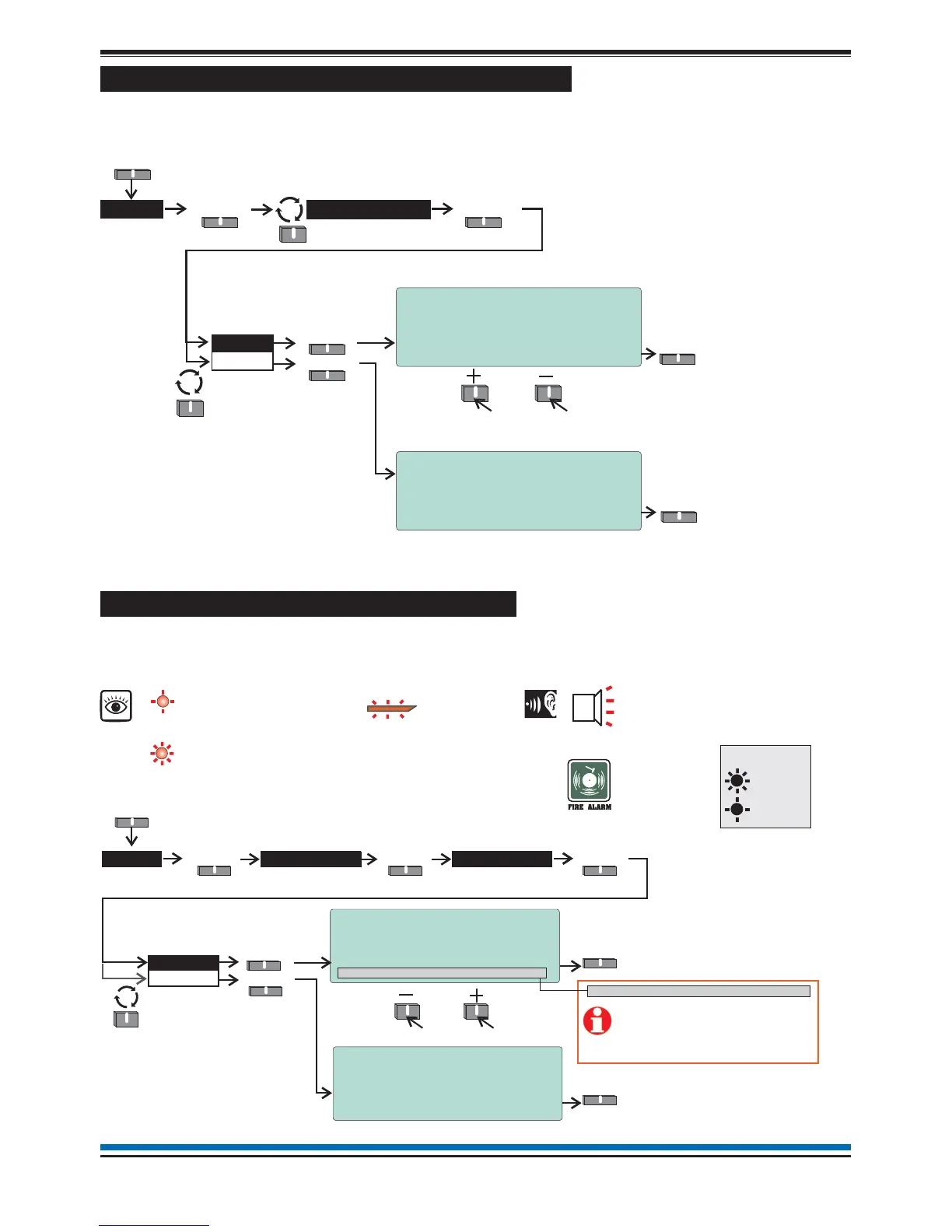
How to view or print the Historic Events log
The past events of the systems are stored in the Historic events log of the panel. To view the Historic events
log follow these procedures:
The event number '1' is always the most recent event.
How to view or print active Fire events
All active fire events that are still present and have not cleared can be viewed or printed at any time. The fire
lights will be lit at the panel. Follow these procedure to view the fire events log:
19
NANO fire system
View
Print
Select
Select
Historic >
Select
Menu
Select
6:15 Mon 11/01/10
Event Log (200)
1: 10:37:20 Sun 10/01/10
Device Disabled
Device 002 Loop 01
Quit
6:15 Mon 11/01/10
Print Event Log (200)
First Event to Print [175]
Last Event to Print [200]
Print Quit
To view other
historic events
The ‘Print’ option is only available
in Customer Mode and only when
a printer is connected to the panel.
Logs
Prin
Quit
17:56 Mon 11/01/10
Print Active Fire Log
WARNING ! - This option will print all
entries in the active fire log!
Print Quit
The ‘Print’ option is only applicable
if a printer is connected to the panel.
Fire >
View
Print
Select
Select
SelectSelect
Active >
Select
Logs
Menu
Select
Fire log (2)
17:54 Mon 11/01/2010
1: 17:53:58 11/01/2010
Dv 02 DEVICE 2
To view other active events
ZONE 4 + other zones in fire
(steady LED)
ZONE 1
FIRE
(all red LEDs)
Audible
Buzzer
First fire indication
(flashing LED)
Common fire LED
(Steady indication)
Print
Quit
MA + Sector X-Y, Z Disabled
Where ‘Master Alarm (MA)’
and/or alarm ‘Sectors’ are
disabled in the system then
they will be displayed in place
of ‘Total fires’.
On
Flashing
Key



 To Next Page