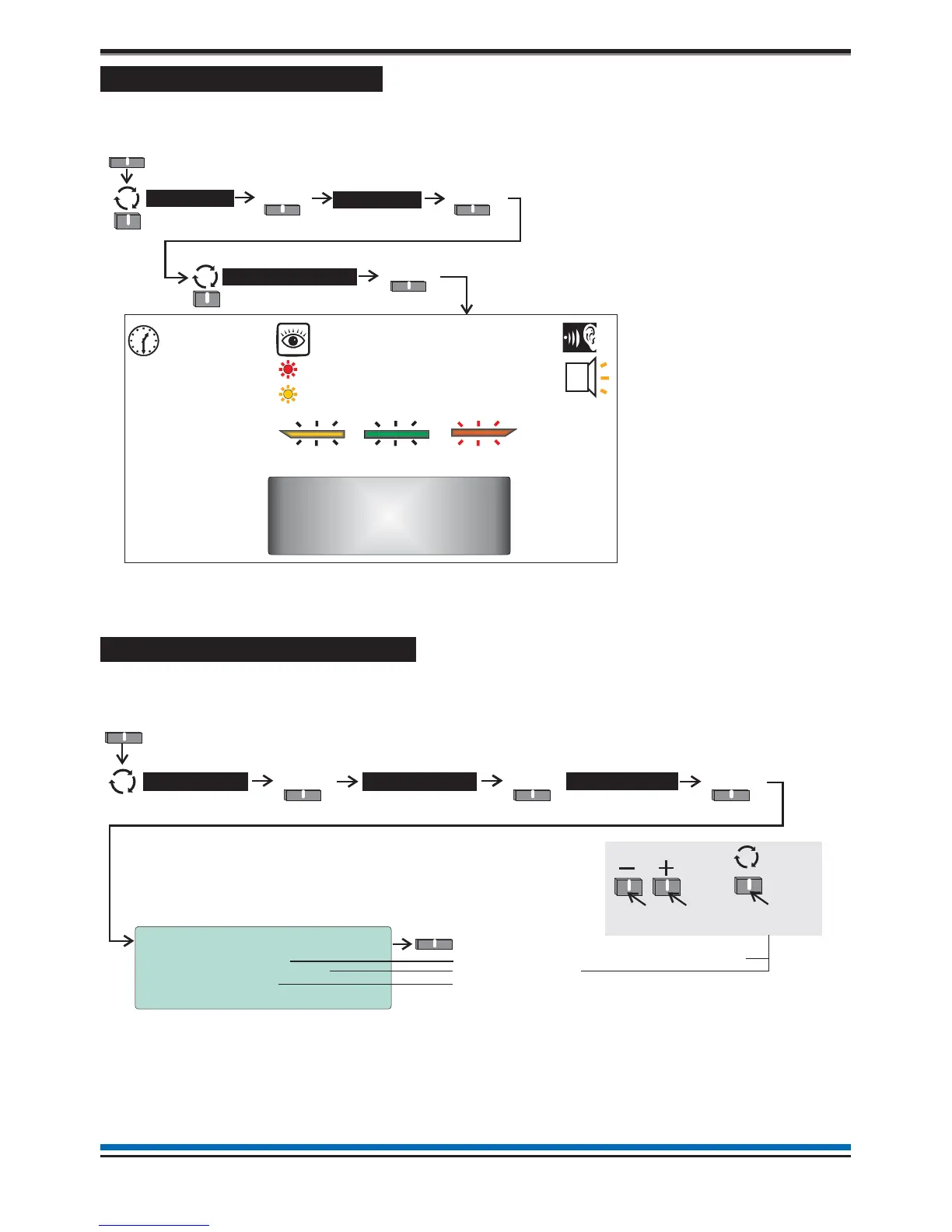
To carry out a display test
You can test the message display and the lights on the control panel. To operate the'display test' option you
will need to be in the Customer Mode at Access level 2, see page 9. Then carry out the following operation.
The display will clear, the indicators will illuminate, the buzzer sounds and then the display shows the system
status message. The test will run for several seconds.
How to change time and date
The time and date shown on the panel can be changed or adjusted. To make the changes you will need to be
at Access level 2, see page 9, then follow these procedures:
18
Operating instructions
POWER
FIRE
[green LED]
FAULT
[amber LED] [red LED]
[amber LEDs]
[red LEDs]
Test duration is
approximately
8 seconds.
Display Test
Select
Audible
Buzzer
Menu
Select
System >
Select
User
Menu
Select
System >
Select
Settings
Clock
Select
12:30 Tue 12/01/10
System Clock
Current Time : [12]:[30]
Current Date : [12]/ [ 1]/[2010]
Current Day : Tuesday
Save Quit
Save
Enter the current time in hours and minutes
Enter today’s date
The day of the week is displayed here
To scroll range
To move to
the next setting



 To Next Page