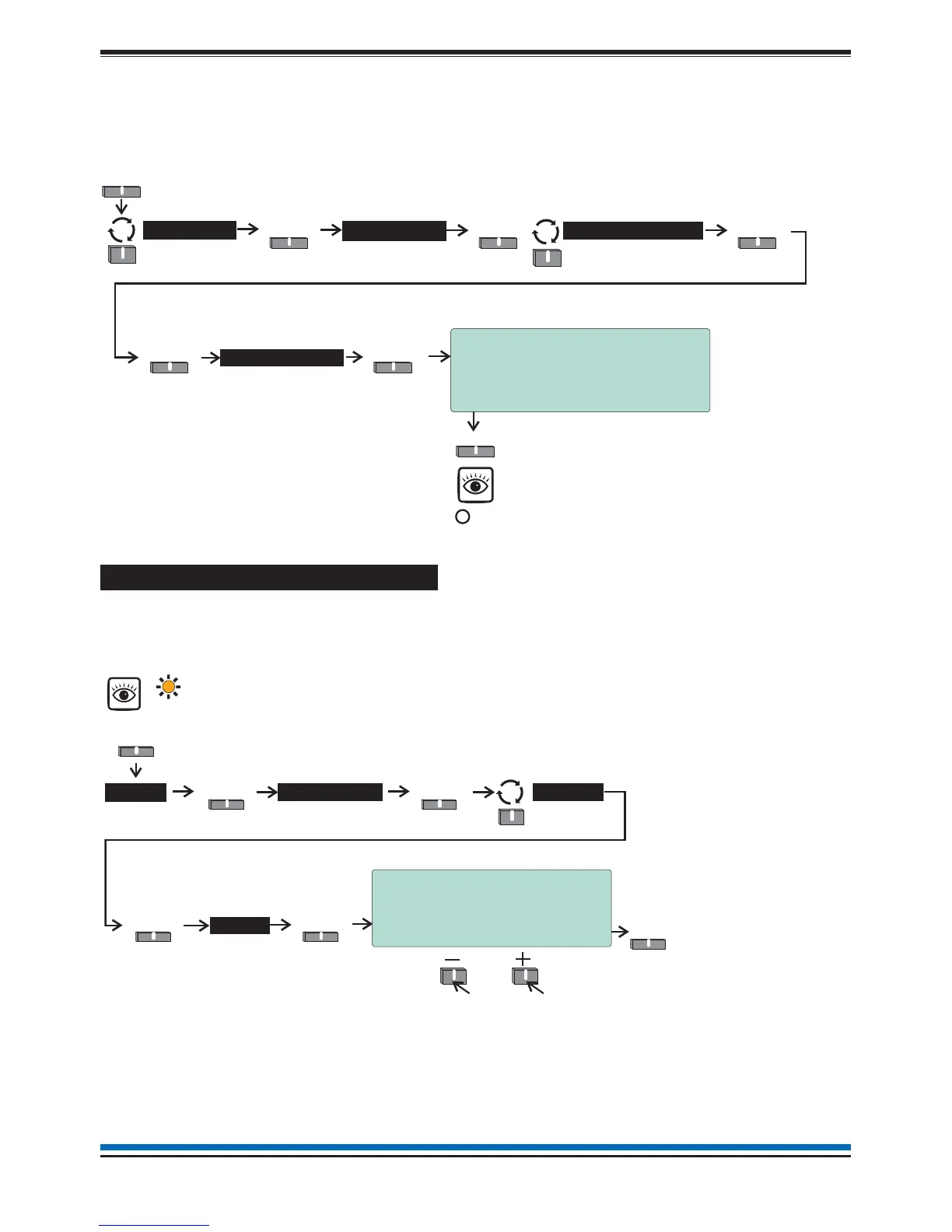
How to exit the Weekly Test mode
When the weekly test is over you will need to exit the weekly test mode.
¨
Ensure you are still in the Customer Mode at Access level 2, see page 9.
¨
To exit the 'Weekly Test' follow these procedures.
How to view the active Test log
The active test log will show the zones that are in weekly test mode, that is if weekly test is active. Additionally
the test log will also show any zone that have been manually placed in test. The'Test' light will be lit. Follow
these procedures to view the Test log:
11
NANO fire system
10:15 Tue 12/01/10
Stop Weekly Fire Test
Warning!
Stopping ‘FIRE TEST’ will cause all
zones to leave the test state
A?
Yes No
RE YOU SURE YOU WANT TO PROCEED
Yes
Tes t
Select
Start/Stop
Select
Menu
Select
System >
Select
User
Weekly Test >
Select
10:38 Mon 11/01/10
Test Log ( 2)
1: 10:37:20 Mon 11/01/10
Zone in Test
Zn 16:Zone 16
Quit
Test >
View
SelectSelect
Active >
Select
Menu
Select
To view other active
test events
Tes t
[amber LED]
Logs
Qui



 To Next Page