UAV Indication
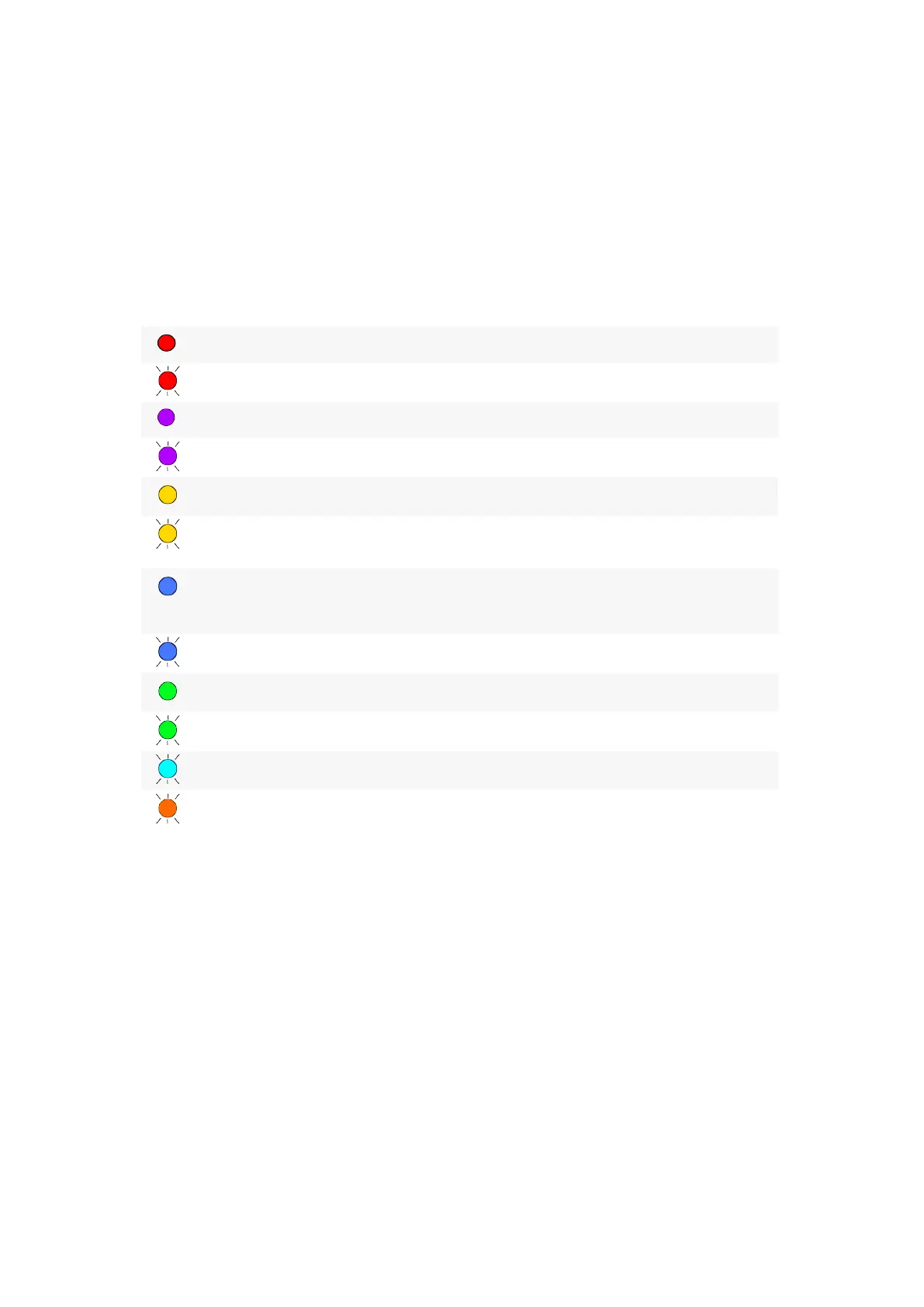
The Gemini has a LED indicator, which informs about the UAV status.
The table describes LED indication:
LED color Description
Solution
Glows solid red Critical error
Contact support
Flashes red
Critical battery charge level
Change or charge a flight battery
Glows solid violet
Magnetic сompass error
Contact support
Flashes violet UAV systems initialization
Wait until initialization is
completed
Glows solid yellow
Magnetic compass calibration
Complete the calibration process
Flashes yellow Magnetic compass calibration error
Distance UAV away from metal
objects; calibrate the magnetic
compass
Glows solid blue GNSS is not ready
Make sure that UAV is in an open
area to receive GNSS signals;
Wait until GNSS inizialization is
completed
Flashes blue IMU initialization
Wait until initialization is
completed
Glows solid green UAV is ready to fly
Launch Start Preparing Wizard in
Geoscan Planner software
Flashes green
Preflight system check
Wait until system check is
completed
Flashes cyan
Copying data to SD card
Wait until the process is
completed
Flashes orange
UAV firmware update is in progress
Wait until the update process is
completed
13



 To Next Page