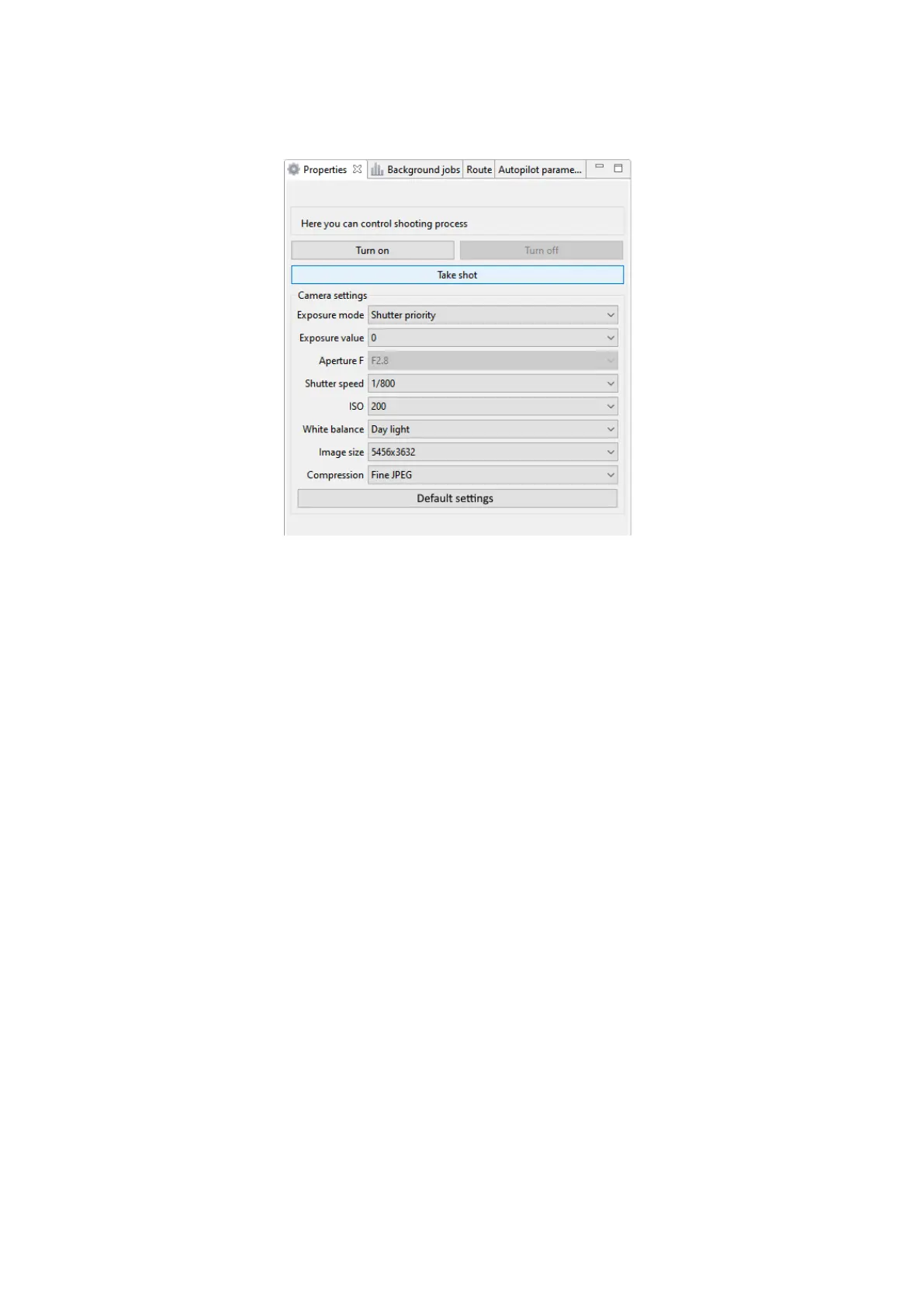
Сamera settings
The camera also can be used in manual mode (to set image quality, for example).
Press Turn on or Turn off button to turn camera on or off. Take shot button allows to
take photos manually.
We recommend to use default quality settings in daylight conditions, but camera settings
can be changed manually.
Exposure mode — allows to change the present of pictures’ exposure.
Options:
• Manual — manual setup of aperture value and shutter speed.
• Auto — camera automatically sets the aperture value and shutter speed.
• Aperture priority — automatic shutter speed mode according to the aperture value that
sets manually.
• Shutter priority — automatic setup of aperture value depends on the light intensity
measurement in the shooting area. The shutter speed is set manually.
• Exposure value — value that defines light sensitivity of the camera. Affects on the shutter
speed in Shutter priority exposure mode.
Aperture F — sets intencity of light that passing through the camera lens. Option is available in
Aperture priority and Manual Exposure modes. f/16 value is a lower amount of light, f/2.8 ——
is higher. Recommended values in bright light: f/8 — f/6.3
Shutter speed — the time during which the shutter is open to light. For example: 1/400 of
second — slow shutter speed, 1/4000 — fast shutter speed. Recommended value: 1/800.
17



 To Next Page