GD-Link V2 Adapter User Guide
19
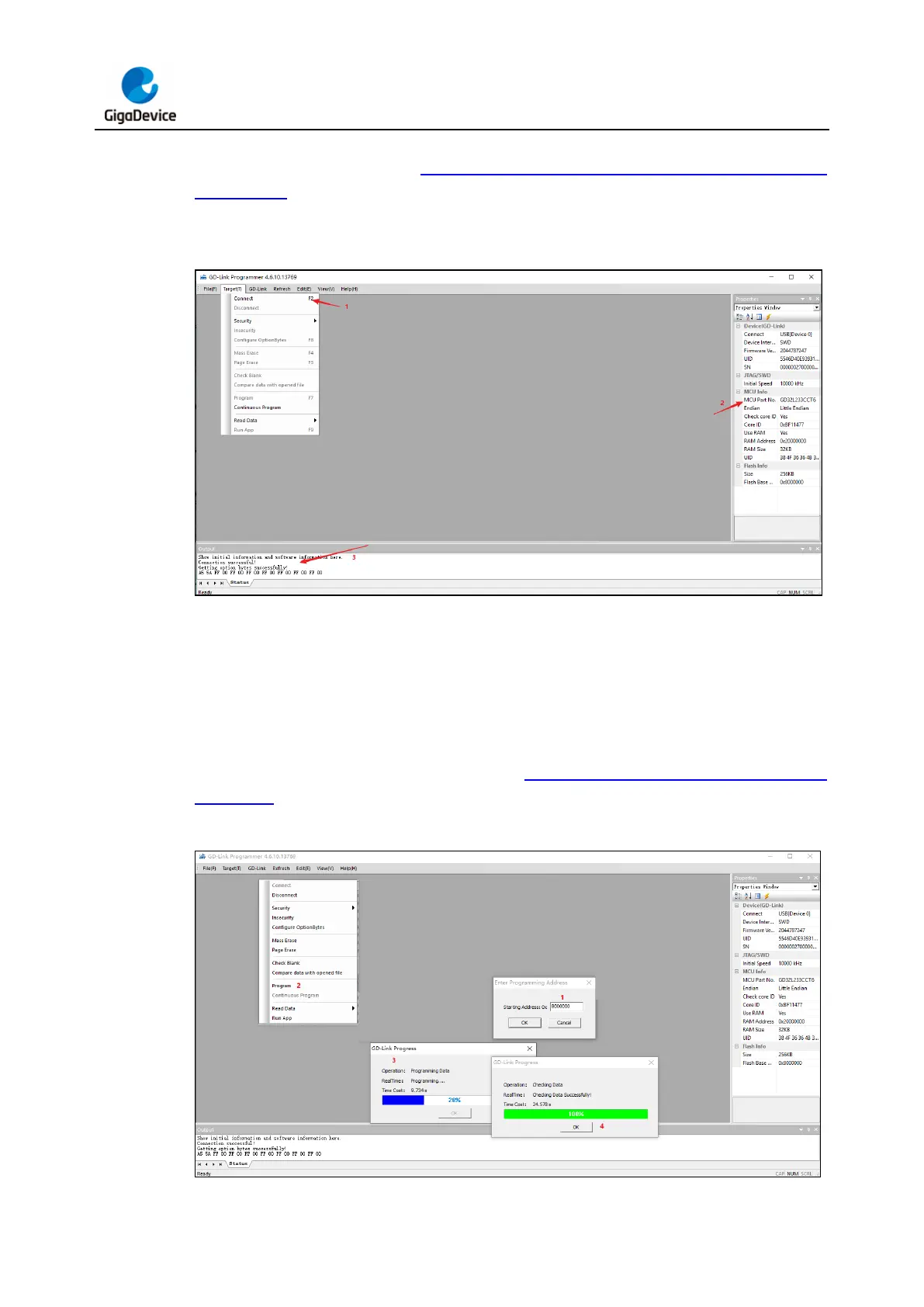
information about the connected target chip, including its specific type are listed in the
"Properties" window. Refer to Figure 3-17. Connecting the target chip in GD-Link
Programmer for an illustration of GD-Link Programmer successfully connecting to the target
chip.
Figure 3-17. Connecting the target chip in GD-Link Programmer
Drag and drop the binary file, "xxx.bin" or the executable file "xxx.hex" into the GD-Link
Programmer software. When using the "xxx.bin" file for programming, a dialog will appear on
the host computer's software, prompting to enter the starting address for the download. After
entering the correct download address, click the "OK" button. Then, select the "Target"
dropdown menu and choose the "Program" option. The software will start downloading the
program to the target chip. Wait for the progress bar to reach 100%, and a message will
confirm the successful download, as shown in Figure 3-18. GD-Link Programmer burns
target chip.
Figure 3-18. GD-Link Programmer burns target chip



 To Next Page