19
Operations & Maintenance Manual: Setting Up
PROCEDURE 4. ATTACH THE VIDEO CABLE & BLADE
The video cable attaches the video laryngoscope to the GlideScope Video Monitor, supplying power to the blade
and transmitting video data from the camera to the monitor. This procedure provides options for single-use and
reusable systems—complete the option appropriate for your configuration.
Ensure that the video monitor is turned off prior to connecting or disconnecting a video cable or blade.
The GlideScope Video Monitor is also compatible with GlideScope AVL system blades. For more information,
contact Verathon
®
Customer Care or see the GlideScope AVL System Operations & Maintenance Manual.
OptiOn 1. REUSABLE SYStEM
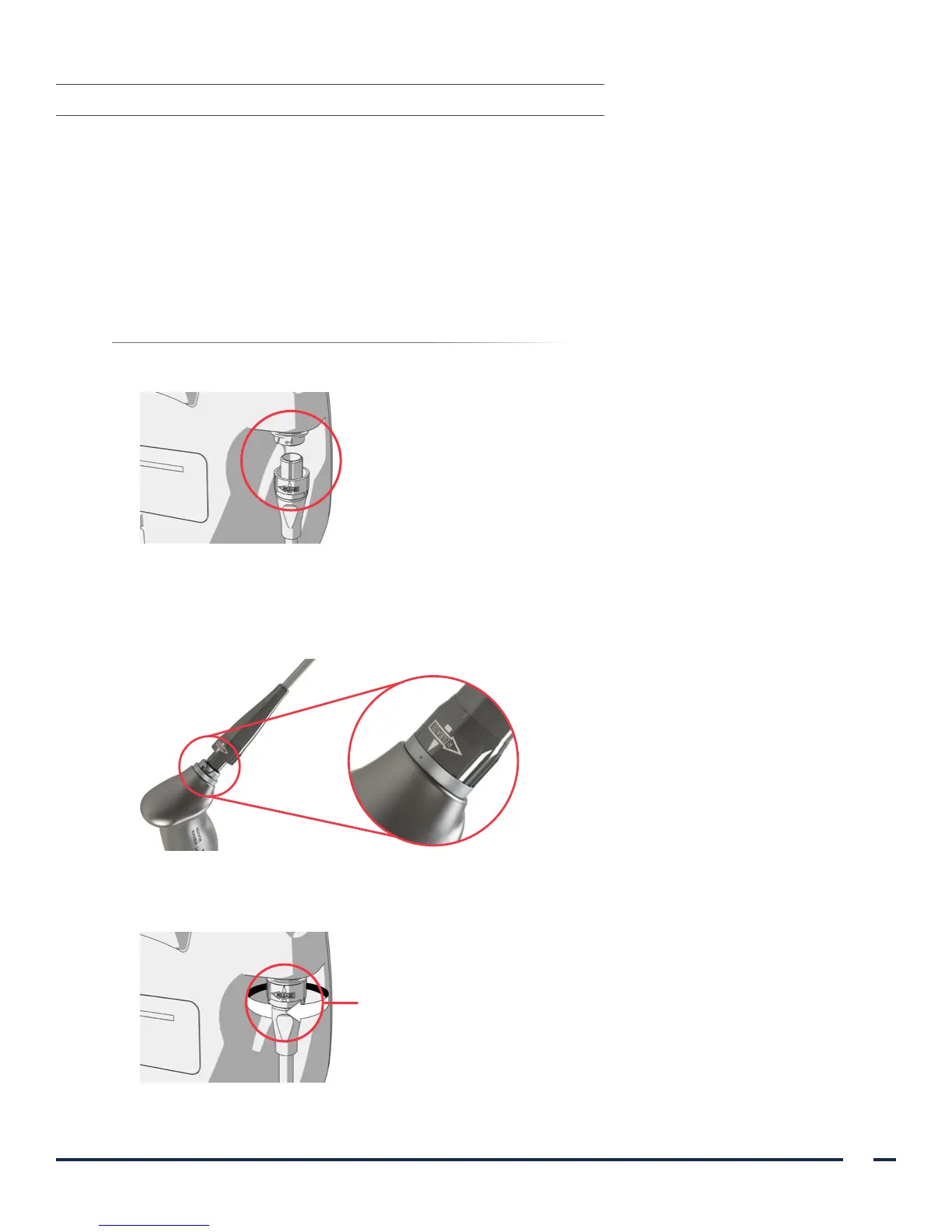
1. Align the arrow on the video cable and the arrow on the video cable port.
2. Insert the video cable connector into the port. You will hear a click when the cable is successfully connected.
3. Align the arrow on the video cable with the dot on the reusable blade, and then insert the video cable into
the blade port. You will hear a click when the cable is successfully connected.
4. To disconnect the video cable from the monitor or reusable blade, rotate the connector ring in the direction
of the release arrow, and then remove the connector from the port.
Connector ring


 To Next Page