83
CP30 INSTRUCTION MANUAL
Scan
1. Press the programmed Scan key to start the Scan function.
2. While scanning, press the programmed Scan key again to stop the
Scan function. The radio will return to normal operation.
For more details on scanning, please refer to the section on Scanning in the User
Manual.
Scan Hold
Press the programmed Scan Hold key while scanning has paused on a busy
channel to stay on the channel.
Scan Resume
Press the pre-programmed Scan Resume key while paused on a busy channel to
resume scanning.
This function can also be duplicated by rotating the Channel Selector knob or
pressing .
Scan Remove
Press the programmed Scan Remove key while scanning has paused on a busy
channel to remove the channel from the scan.
Scan Group
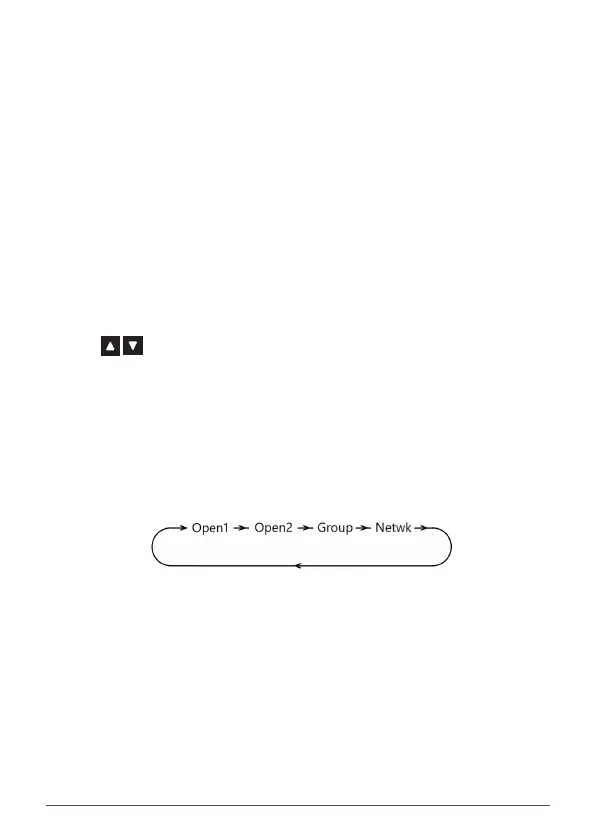
Press the programmed Scan Group key to cycle through the available scan
groups. By default each key press will cycle through OPEN1, OPEN2, GROUP or
NETWK. This is the same as pressing the F and OS/GS keys.
NOTE: NETWK will not appear unless NETWORK SCAN has been enabled in the
menu.
Scrambler Toggle
Press the programmed Scrambler key to toggle the Scrambler ON or OFF.
NOTE: The scrambler cannot be enabled on CB channels where Duplex is selected
or on CB repeater output channels (31-38 or 71-78).
Silent On
Silent ON enables the Silent mode to allow CTCSS/DCS control of your selected
channel. When enabled, your radio remains quiet to all incoming signals except
those that are using the same CTCSS or DCS code as your radio.



 To Next Page