85
CP30 INSTRUCTION MANUAL
• Rotate the Channel Selector knob counter-clockwise or press
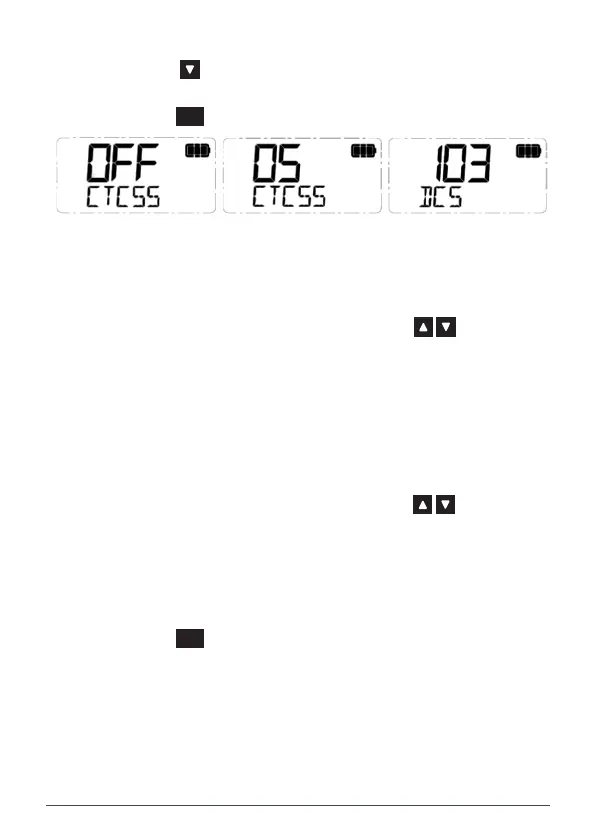
the key to select DCS tones 001 to 104.
• To disable CTCSS or DCS, select OFF.
3. Press the
MENU
F
key to exit or wait a few seconds for the menu to time-out.
CTCSS/DCS is OFF CTCSS Tone 05 Selected DCS Code 103 Selected
SelCall Menu
1. Press the programmed SelCall Menu key to access your SelCall
Contact list.
2. Rotate the Channel Selector knob or press the keys to select
from the available SelCall contacts (or select FREE to add a new
contact - see the SelCall section of the User Manual for details).
3. Hold the CALL key to send the SelCall.
SelCall Alpha Select
View a SelCall contact as either a numeric Ident or an alpha name.
1. Press the programmed SelCall Alpha Select key to access the SelCall
Alpha Selection Menu.
2. Rotate the Channel Selector knob or press the keys to switch
the SelCall Alpha setting ON or OFF.
SCALPH ON or SCALPH OFF will be displayed.
• SCALPH ON: The SelCall contact’s alpha name will be displayed.
• SCALPH OFF: The SelCall contact’s numeric Ident will be
displayed.
3. Press the
MENU
F
key to exit or wait a few seconds for the menu to time-out.
SelCall Alpha Toggle
View a SelCall contact as either a numeric Ident or an alpha name.
Press the programmed SelCall Alpha Toggle key to switch the SelCall Alpha setting
ON or OFF.



 To Next Page