■ [RUN/STOP]: Press the key to start continuous data acquisition or stop acquisition.
■ [SINGLE]: Press the key after the oscilloscope detects the trigger and stop after wave
acquisition is finished once.
When [RUN/STOP] or [SINGLE] is pressed to start acquisition, the oscilloscope
executes the following steps:
1. Acquire enough data to fill the waveform part before the waveform is
triggered, which is also named pre-trigger.
2. Continue to acquire data when waiting for trigger.
3. Detect the trigger conditions.
4. Continue to acquire data before the storage space is full.
5. Display the lately acquired waveform.
■ Time base: Use the [s/div] knob to regulate the time base. The time base is a
quantization unit of the time, namely the time represented by a large
horizontal grid (this series of oscilloscope has 14 horizontal grids in total) of
the oscilloscope. The time base is closely related with the sampling rate. The
larger the time base is, and the smaller the sampling rate is.
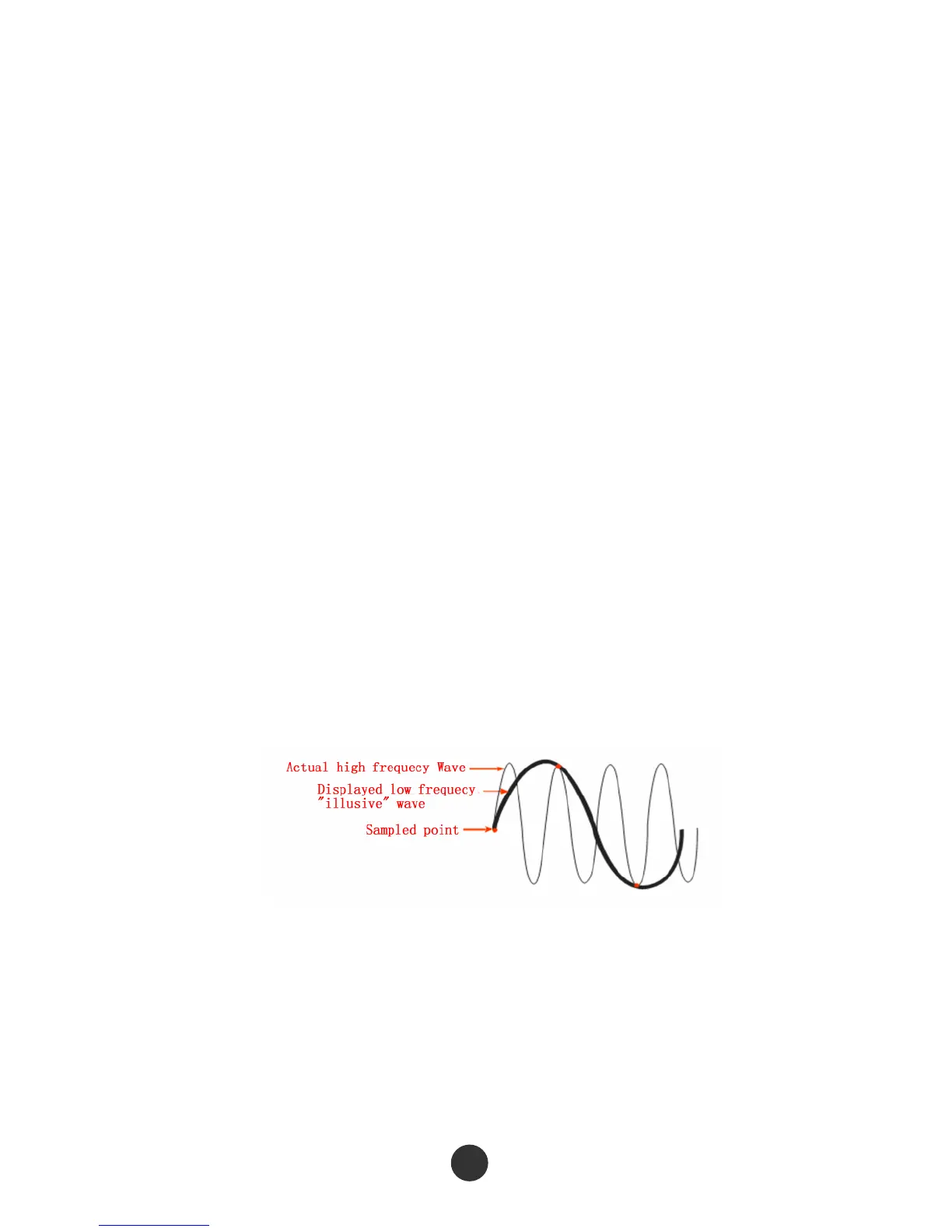
■ Fake wave phenomenon: Fake wave phenomenon will appear if the oscilloscope does
not sample the signal quickly enough and does not make accurate waveform
recording, as shown in figure 2-42. To eliminate this type of phenomenon,
switch to a quick time base gear or adopt the peak value detection mode.
Figure 2-42



 To Next Page