11
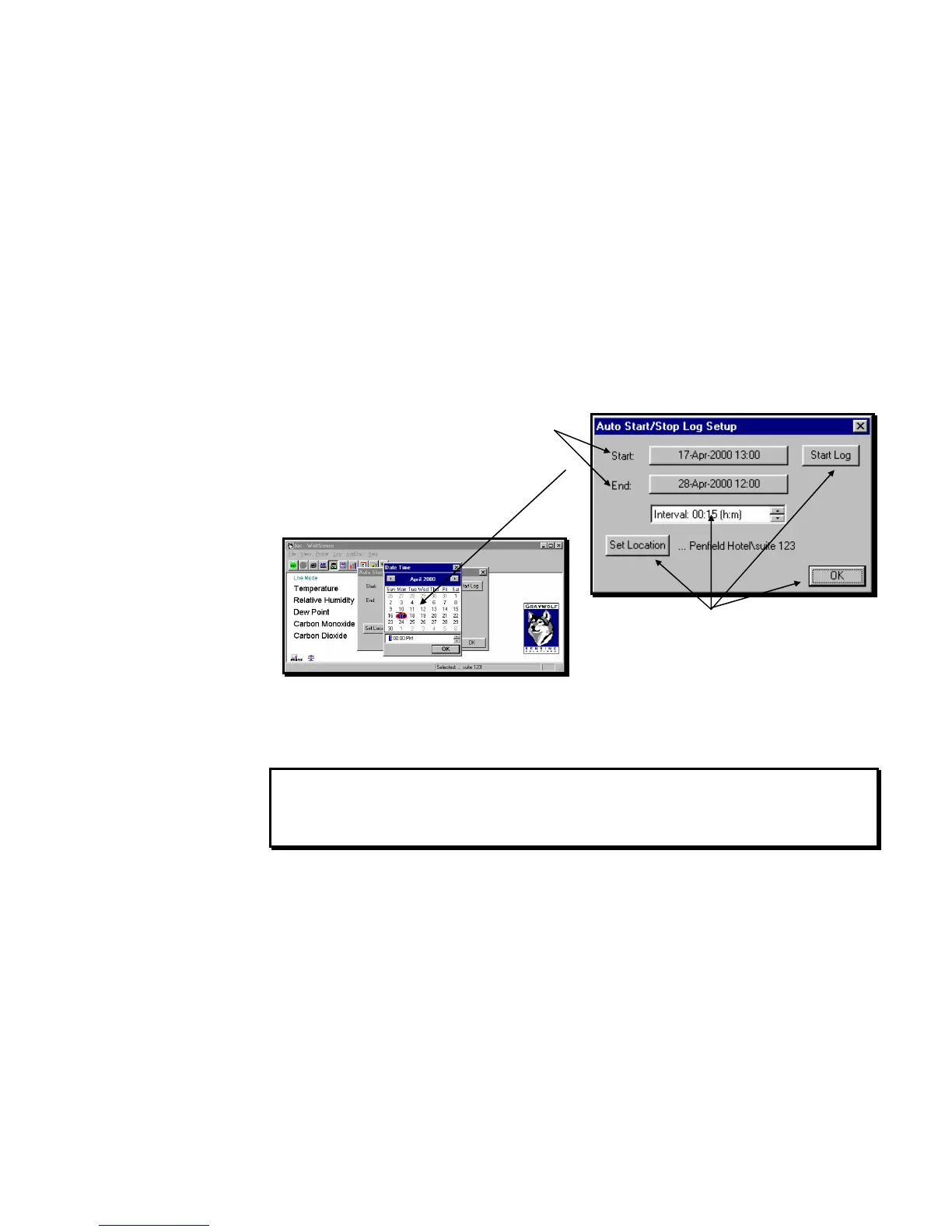
Auto Start/Stop Log
The Auto Start/Stop Log allows you to specify a starting date and time, an ending date
and time, and an interval. Because it will start and stop automatically, this log mode
is particularly useful for unattended logging and/or for pre-programming the system
for delivery to a measurement location in the PCC-15 deluxe hardshell security case.
From the main WolfSense IAQ LAP screen, click on
or tap Log, Auto Start/Stop Log.
Click on or tap the START or END field to display a
calendar.
To scroll through the months, click on or tap the right
and left arrows at the top of the calendar.
Click on or tap the date to select it.
Click on or tap OK to close the calendar.
Edit the interval times as for the Standard Timed
Log above.
Click on or tap Set Location to create or select a
location file.
Click on or tap OK to save changes without
starting the logger. The dialog box will close.
Click on or tap Start Log so logging will begin at
the specified start time. The dialog box will close.
NOTE: Install fresh probe batteries before using the Auto Start/Stop Log for
extended periods without AC power. Charge the Lap PC batteries frequently.
If the Lap PC’s batteries become depleted, a warning message is issued and
WolfSense IAQ LAP will automatically stop logging and suspend the Lap PC.
Figure 19 - AUTO START/STOP LOG SETUP dialog box
Figure 20 - Calendar to Set Start/Stop Dates and Times



 To Next Page