GST200 Intelligent Fire Alarm Control Panel
Installation and Operation Manual
The Intelligent Solution
Page 46
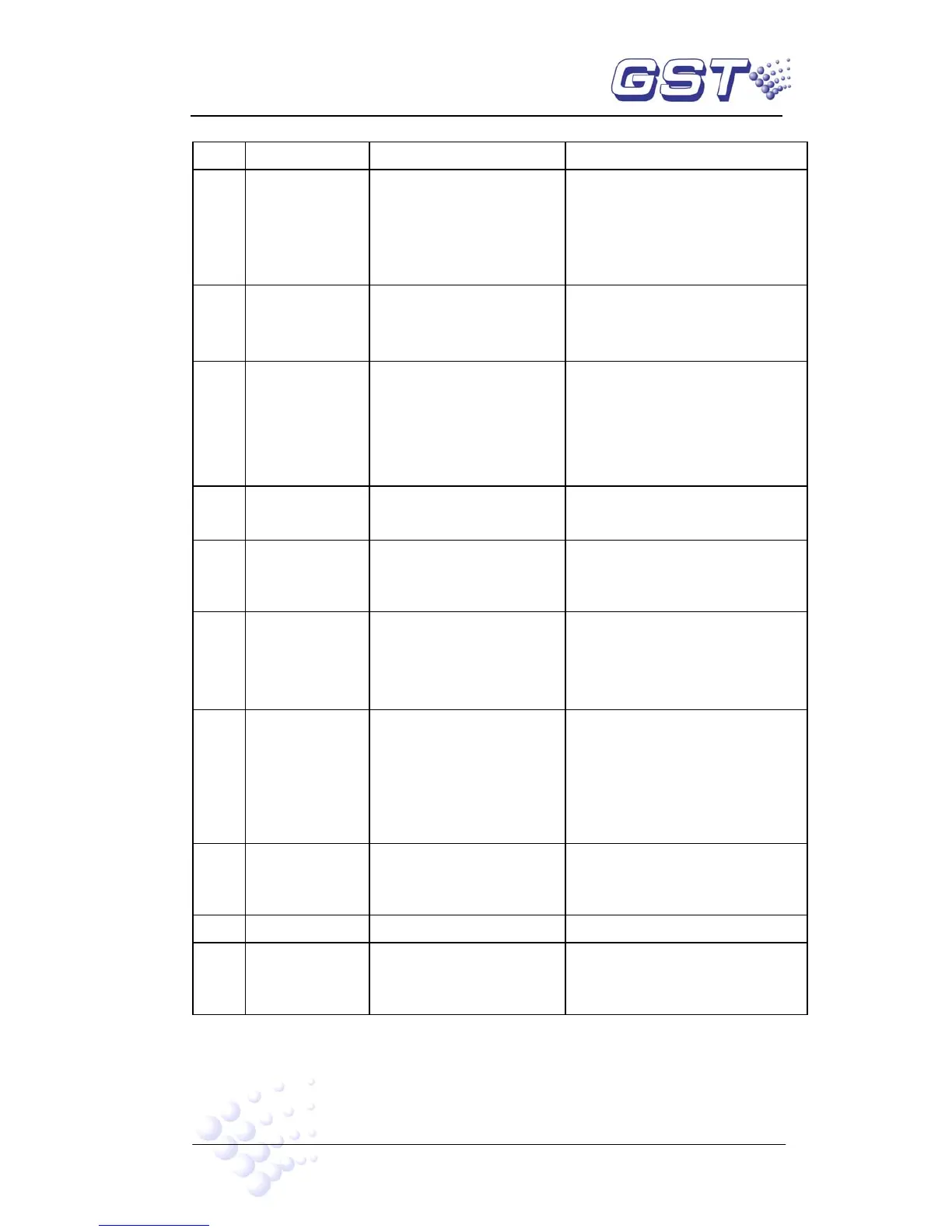
Table 8-2
No. Problems Possible Causes Solutions
1 No indication on
the panel or
abnormal
indication
a. AC input fuse blown
b. Power is abnormal
c. Loose connection with
switchboard.
a. Replace fuse.
b. Check and replace
low-voltage switch power.
c. Check the connection to
display board.
2 Display “AC
Fault” after
power-up.
a. No AC power
b. AC fuse blown
a. Check and connect AC wire.
b. Replace AC fuse(refer to the
specification on the label)
3 Display “Bat
Fault” after
power-up.
a. Loose connection with
battery.
b. Battery discharged or
damaged.
a. Open the power box and
check relative parts.
b. Power up for more than eight
hours with the AC power
supply, if the fault still exists,
replace the batteries.
4 Unable to register
loop equipment
Bus wrong or loose
connection
Check the loop
5 Unable to register
repeater panels
Wrong or loose connection
of communication cables
Check power supply to repeaters
and communication wires
6 Cannot print a. Print mode is not set.
b. Loose connection with
printer.
c. Printer damaged
a. Set the print mode.
b. Check and connect the printer
well.
c. Replace the printer.
7 No response
after pressing
keys on zone
indication and
manual
intervention
panel
a. Loose connection with
ZCP.
b. The circuit board of
ZCP damaged.
a. Check and connect, then
register again.
b. Replace the circuit board of
zone indication and manual
intervention panel.
8 Equipment fault a. Equipment
disconnected.
b. Equipment damaged.
a. Check connection
b. Replace equipment
9 Loop fault Loop is shorted Check the loop and repair.
10 Clock or memory
fault.
a. External interference.
b. Corresponding parts
are aging.
a. Check whether ground is
properly connected.
b. Inform our technical service



 To Next Page