POWER
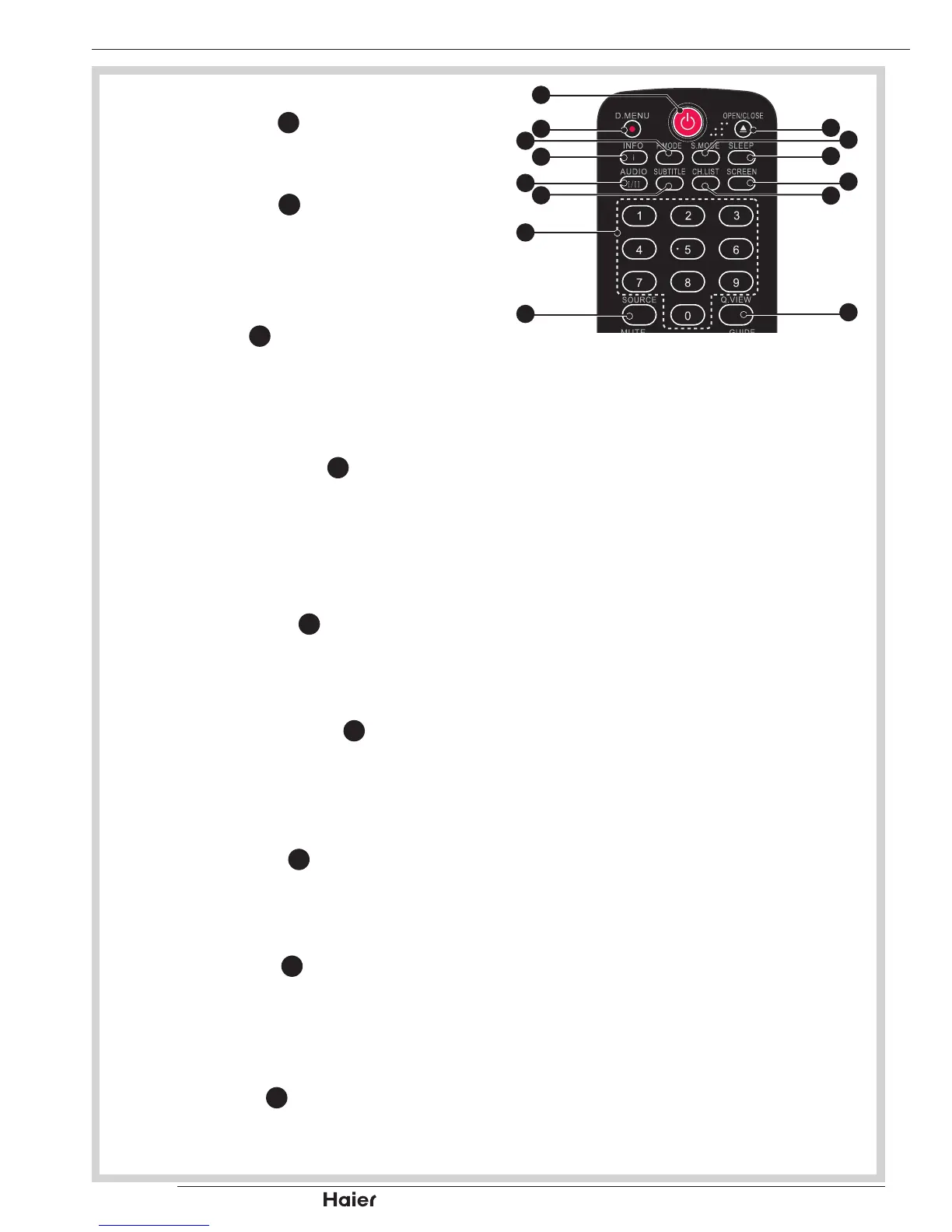
Press POWER •
1
to turn on the TV.
P.MODE
Press P.MODE •
3
to set the TV to a
predened picture setting.
Standard/Vivid/Movie/Eco/Personal.
INFO
Press INFO •
4
to display the current
signal status, including input source
and channel audio mode.
AUDIO I/II
Press the AUDIO I/II •
5
to select
MONO, STEREO, DUAL 1 and DUAL 2
for ATV channel. Select Audio language
for DTV channel.
SUBTITLE
Press SUBTITLE •
6
to turn the subtitle
On or Off.
Number Buttons
Use the Number Keys •
7
to select TV
channels directly. Enter the channel
number within 3 seconds.
SOURCE
Press SOURCE •
8
to select the
desired input source.
S.MODE
Press S.MODE •
39
to set the TV to a
predened sound setting.
Music/ Speech/ Personal.
SLEEP
Press SLEEP •
38
to turn the TV off after
a preset time.
OTHER CONNECTIONS


 To Next Page