CONTROLLER DETAILS
25
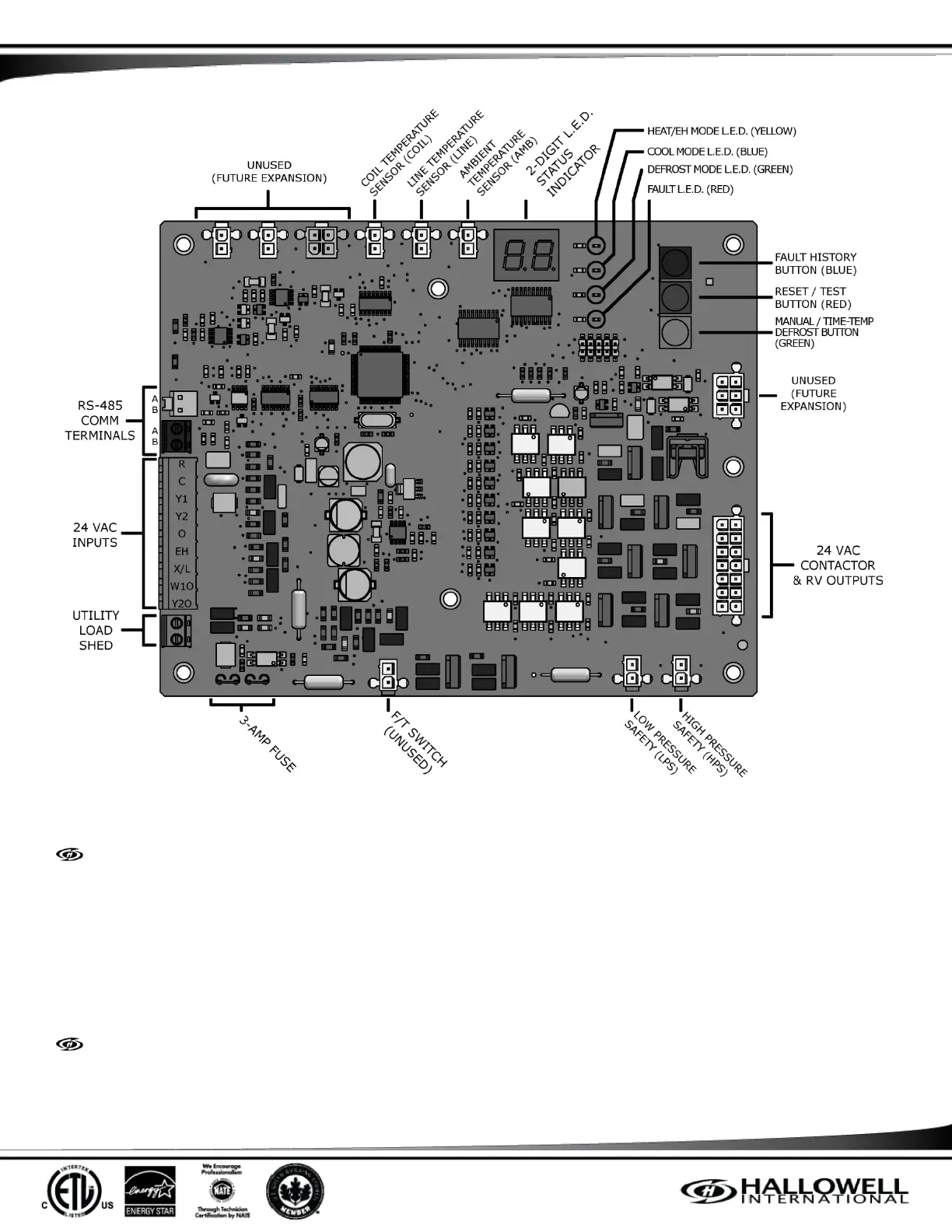
Figure 3 – Controller Layout
There are 3 buttons on the Controller, allowing field service and diagnostics to be performed.
FAULT HISTORY BUTTON (BLUE)
The FAULT HISTORY button allows old fault codes to be displayed on the 2-digit display starting with the most recent by pressing this
button for 1 second. The code stays on the display for 5 seconds before going back to normal status code. During this 5 second
period, if the button is pressed again, the next latest fault code is displayed. This process can be repeated to access all the fault
codes in the memory. After the last fault code is displayed, the Controller -- The next button press leaves the Fault
History mode.
The field technician can clear the FAULT HISTORY list by pressing and holding both the FAULT and RESET buttons for 5 seconds. At
the end of 5 seconds, the display shall blink and clear any faults in the list.
RESET / TEST BUTTON (RED)
If there is a fault, pressing this button for 1 second resets the fault, which returns the Controller to normal operation. After resetting
the fault, if the button is pressed a 2
nd
time for 1 second, the Controller goes into FIELD TEST mode. If there is no fault, pressing this
button for 1 second puts the Controller goes into FIELD TEST mode.



 To Next Page