APPENDIX A - SETTINGS
39
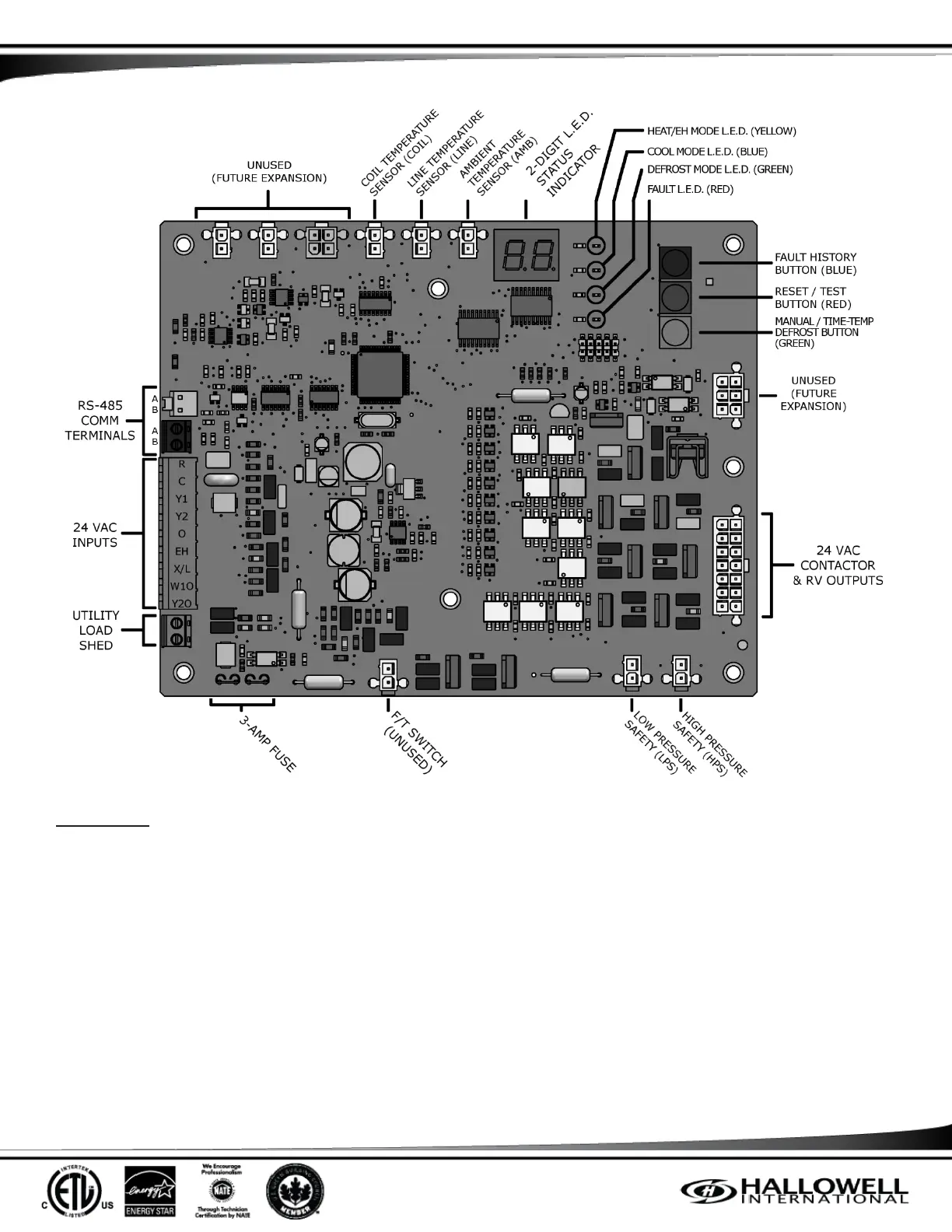
Figure 6 – Controller Layout
IMPORTANT: This Controller is equipped with the ability to energize electric heat (powering W1Out) for a 2
nd
stage call from 25-
31F for comfort in the home. This can be disabled for energy efficiency. J0 allows W1Out to be powered for a 2
nd
stage call from
25-
nd
stage call from 25-This can be changed by a technician in the field.
In any mode except FIELD TEST MODE (FTM):
1. Press and hold the Reset and Manual/Time-Temp Defrost Buttons simultaneously.
a. The J0 or J1 will be displayed for the J status.
b. If the buttons are released within 2 seconds, the J status is not changed.
2. Continue to hold the Reset and Manual/Time-Temp Defrost Buttons simultaneously and the J status will flash for 3 seconds.
Releasing the buttons while flashing aborts the change.
3. If the Reset and Manual/Time-Temp Defrost Buttons are held after the 3 seconds of flashing, the J status will be changed
and stay on solid for 2 seconds. After 2 seconds more, the display will go blank until the buttons are released.
4. To change the J status back, follow steps 1-3.
To change the operation mode program the unit must be in standby or anti shot cycle mode. Press and hold Fault History and
Manual Defrost buttons for 5 seconds. The display will show what operation mode the system is running in. P0 is for electric back



 To Next Page