24
CMD600
A2820−1.1 en
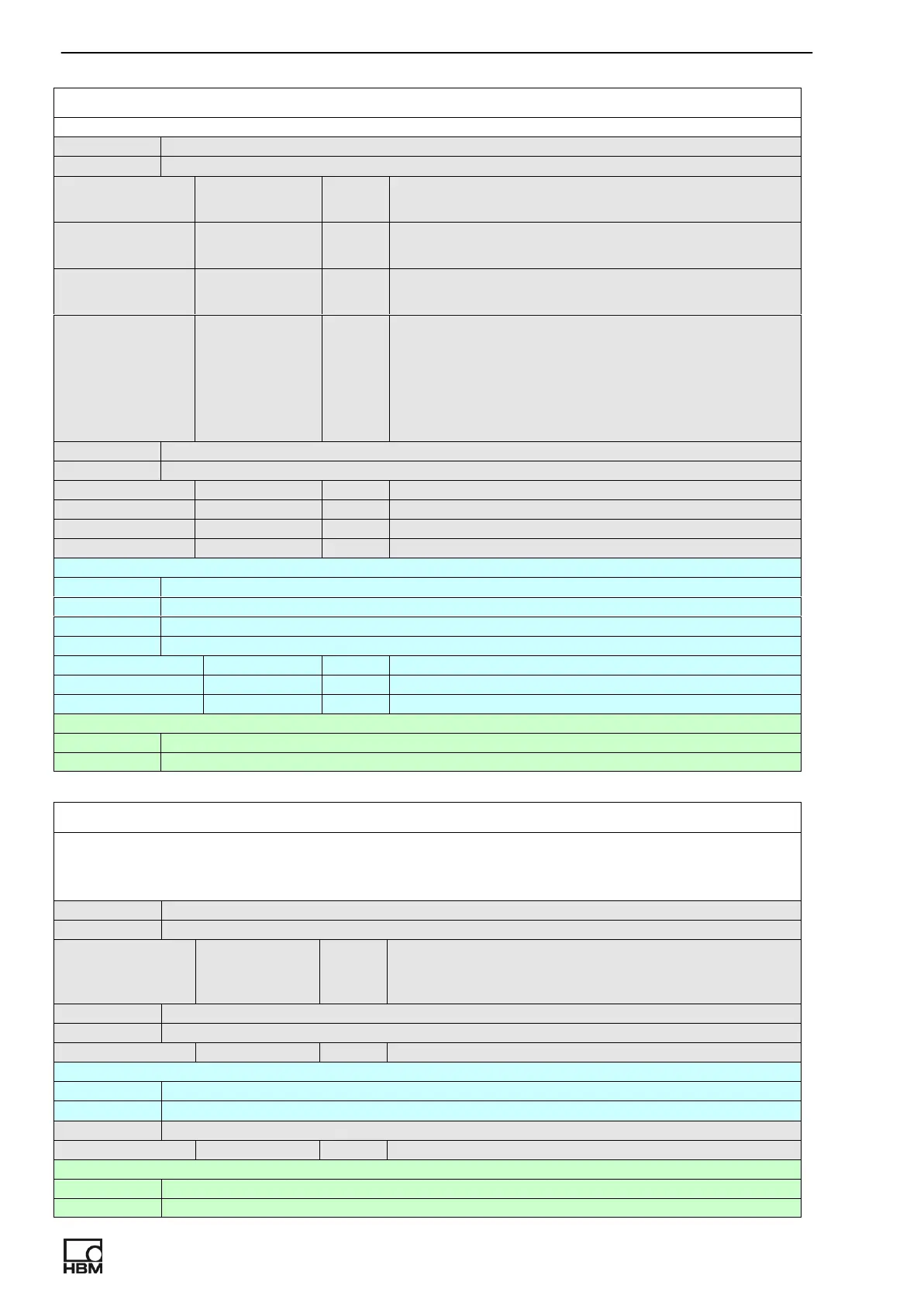
DIGITAL_OUTPUT
Enable/disable, set polarity and select mode for selected digital output.
command DIGITAL_OUTPUT number, enable [,inverted,mode]
parameters:
number int 1..digital output DIG1
2..digital output DIG2
enable int 0..disable digital output
1..enable digital output
inverted int 0..active logical state for digital output is 1
1.. active logical state for digital output is 0
mode int Possible mode:
0..state of limit switch number
1..overload
2..SW controlled digital output
3..System error
response OK, DIGITAL_ OUTPUT = number ,enable[, inverted, mode]
parameters:
number int See description above.
enable int See description above.
inverted int See description above.
mode int See description above.
inquiry DIGITAL_ OUTPUT = ?
response OK, DIGITAL_ OUTPUT=1,enable,inverted,mode(parameters for output 1)
OK, DIGITAL_ OUTPUT=2,enable,inverted,mode(parameters for output 2)
parameters:
enable int See description above.
inverted int See description above.
mode int See description above.
help DIGITAL_ OUTPUT ?
response OK, DIGITAL_ OUTPUT number, enable, polarity, mode
CH_OVERLOAD_RESERVE
Used to set overload reserve in auto scale mode. Applicable for preselected channel.
MAximum overload reserve is 9 V.
command CH_OVERLOAD_RESERVE voltage
parameters:
voltage float Auto scale function operate so, that peak
sensor charge is for voltage below maximum
amplifier output value
response OK, CH_OVERLOAD_RESERVE = voltage
parameters:
voltage float See description above
inquiry CH_OVERLOAD_RESERVE = ?
response OK, CH_OVERLOAD_RESERVE = voltage
parameters:
voltage float See description above
help CH_OVERLOAD_RESERVE?
response OK, CH_OVERLOAD_RESERVE voltage [V]



 To Next Page