USDE
Automation Instructions CPK • 10-2015 •106-29009
Installation
15
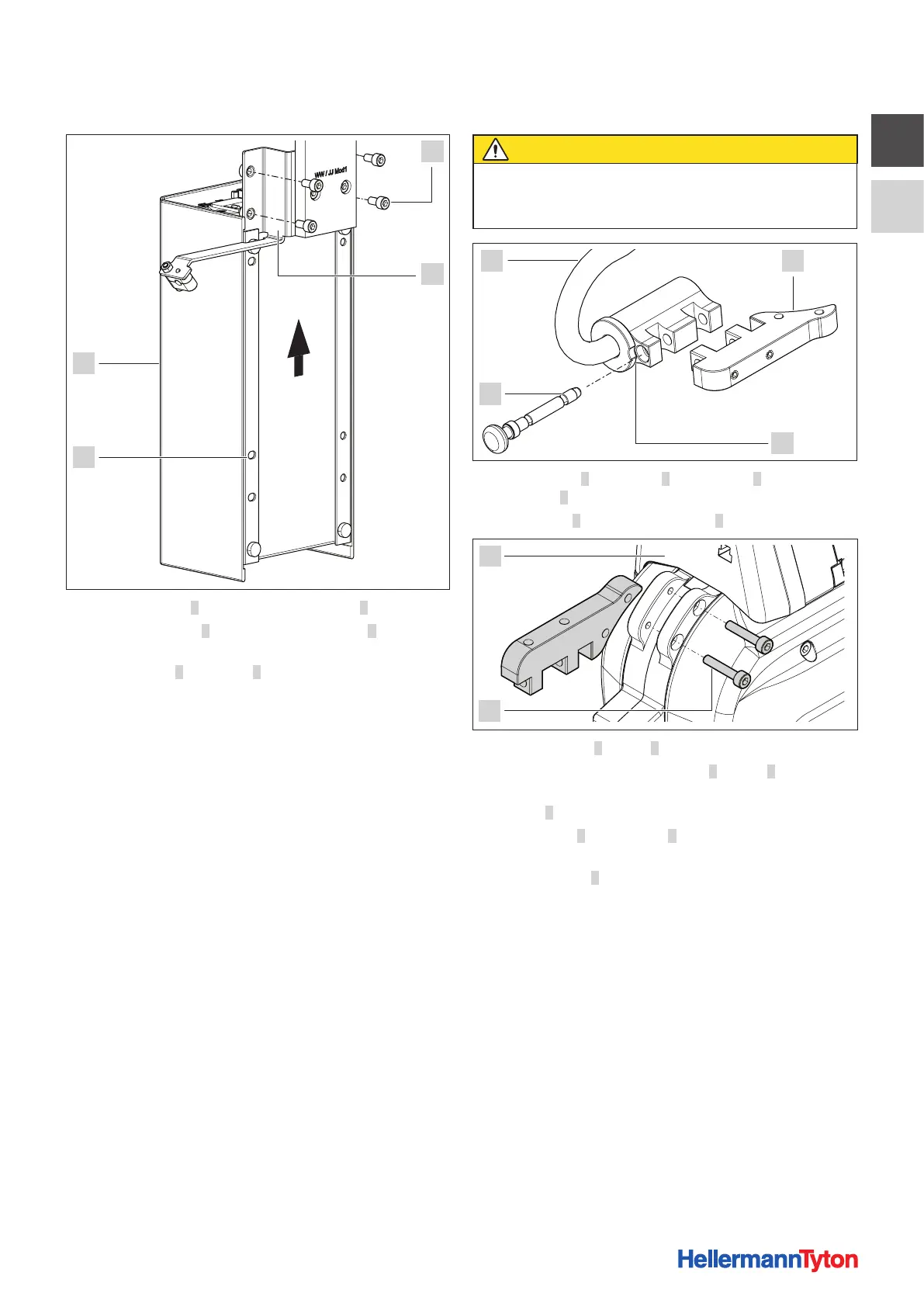
5.2.2 Installing the power pack with control box
1
4
3
2
f Remove screws 1 from power-pack holder 2.
f Slide power pack 4 over power-pack holder 2 from
below.
f Insert screws 1 into holes 3 and tighten.
5.2.3 Inserting the tool
CAUTION
Crush hazard when jaws close.
f Always keep the power pack CPK switched OFF
while installation is in progress.
1 2
3
4
f Turn adapter 2 on hanger 1 until groove 3 in the collar
clears pin 4.
f Pull out pin 4 and remove adapter 2.
5
6
f Slacken screws 6 in tool 5.
f Use the screws to secure adapter 2 to tool 5.
f Insert the tool with the adapter into the mount on
hanger 1.
f Turn hanger 1 until groove 3 in the collar clears the
opening for the pin.
f Fully insert pin 4.
; In operating condition the collar of the hanger prevents
the pin from slipping out.



 To Next Page