User manual
Manual EN V2.00 / 06-2009 20
5.4 Entering the Patient Identification
The patient identification needs to be entered before starting the analysis.
This can be done as follows:
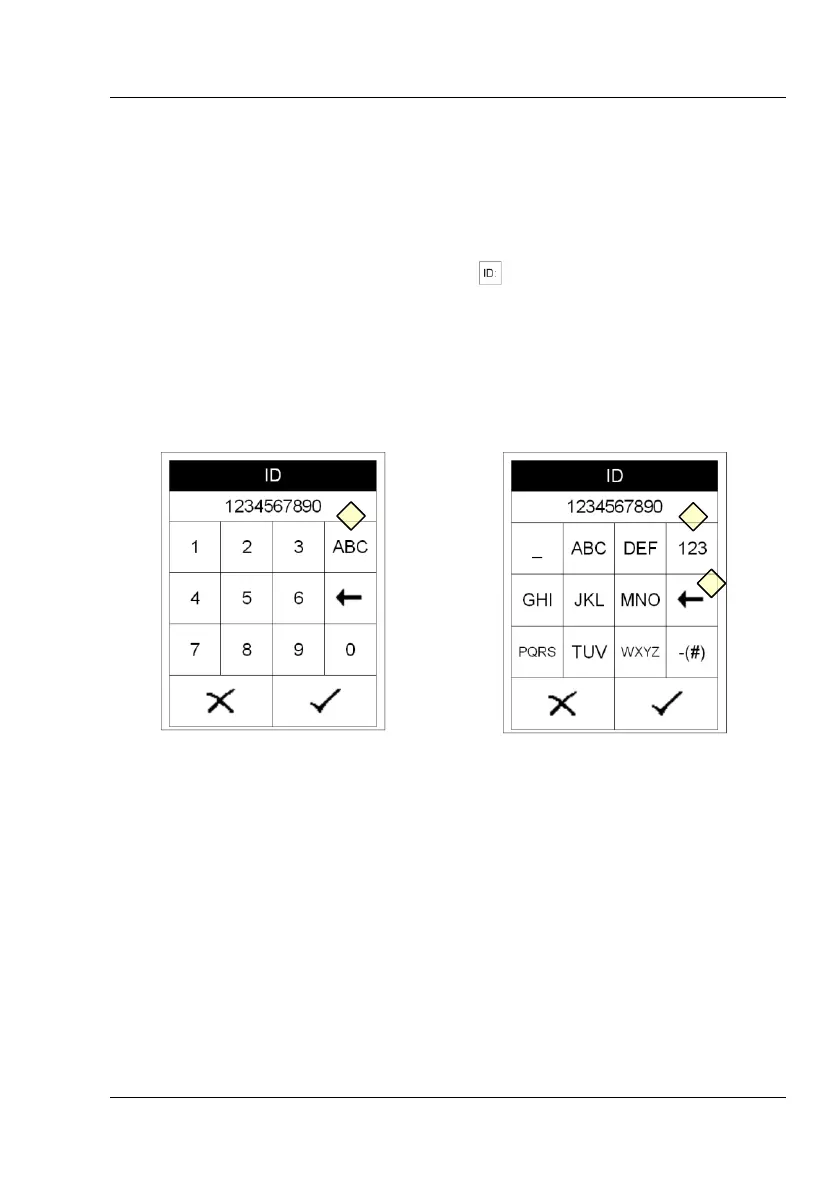
Directly on the equipment: Pressing in the start menu brings up an
alphanumeric keypad. Enter the ID using the keys. To enter characters
(i.e. “Miller”) press (Display 5-1) to change the character entry.
Repeated pressing on the same field within 0.5 seconds switches
through the characters displayed on the key. Wrong entries may be
erased by pressing (Display 6-2).
Display 5 : Entering ID (numerics)
Display 6 : Entering ID (letter)
Using a standard PC-keyboard: Connect the keyboard to the PS/2 jack
in the backside of the instrument. User inputs on the keyboard will
automatically be interpreted as Patient Identifications.
Using a bar code reader: Connect the barcode reader to the PS/2 jack
in the backside of the instrument. Barcode readings will automatically
be interpreted as Patient Identifications.
After entering the patient identification start the measurement. The Patient
Identification is saved together with the diagnostic findings.



 To Next Page