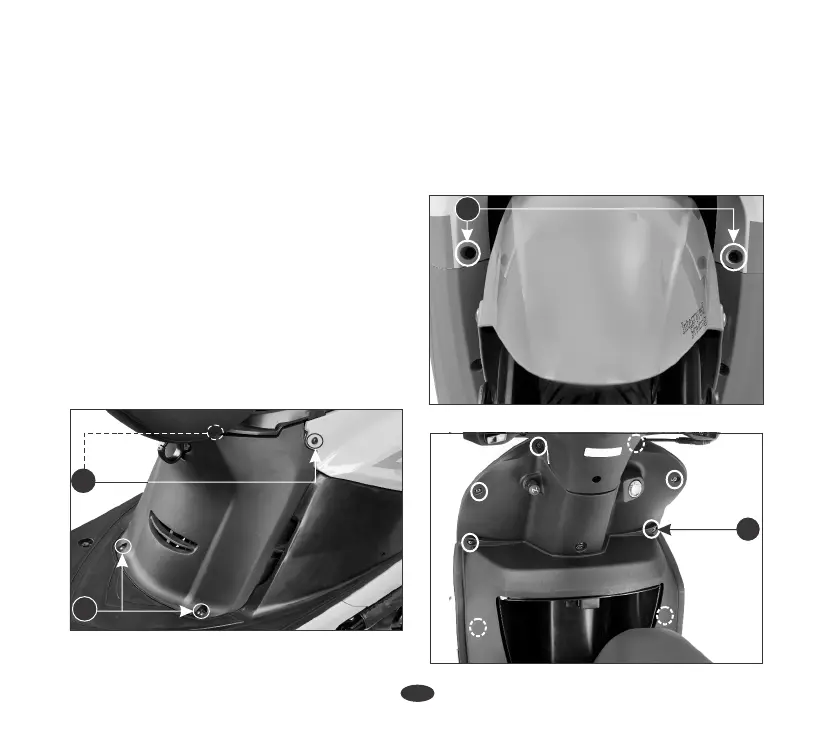
(1) Body cover screws/washers
(2) Center cover screws
32
1
2
(1) Screws/washers
1
(2) Screws/washers
3. Remove screws (2) from center cover.
Center cover
4. Remove the center cover.
Installation is in the reverse order of removal.
2. Remove screws/washers (1) from left
and right side body cover.
Installation
Removal
1. Open the seat (page 26)
1. Remove screws/washers (1) from the
front end of the scooter.
Front upper cover
2. Remove screws/washers (2) from the
front inner box side and from the inner
side of the box.
Removal
Installation
Park the scooter on its main stand when
servicing the scooter with the body cover
removed.
NOTE
Installation can be done in the reverse
order of removal.
2



 To Next Page