26
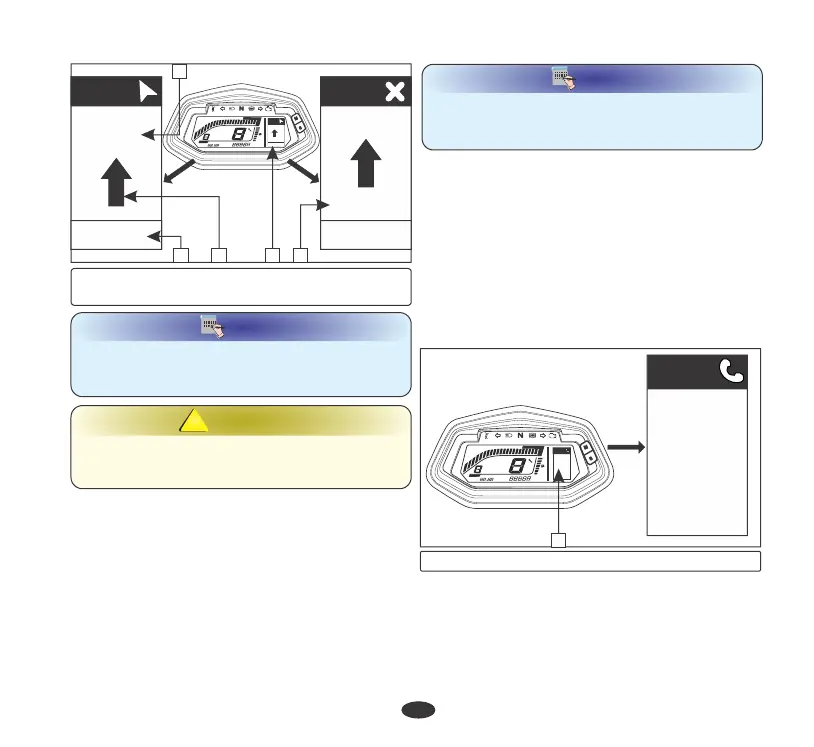
Incoming call alert
If your smartphone is paired with the meter
console of your vehicle via bluetooth (page
23), then you will get all the incoming calls
alerts on the meter console. It will display the
name of the caller if it is stored in your
compatible smartphone. For example: If
caller’s number is stored in your compatible
smartphone by name of Vijay, then your
meter console will display Vijay calling (1).
If the number is not saved in your device by
name or your device is an iOS, then it will
display “unknown calling” (2).
Autopairing
Your vehicle is equipped with autopairing
feature by which if you turn ''OFF'' vehicle's
ignition switch after successful pairing with
hero navigation application, it will reconnect
automatically once ignition switch is turned
''ON''.
NOTE
NOTE
Always keep your smartphone close to your
vehicle during the course of pairing,
autopairing and navigation.
NOTE
NOTE
At any point, if Navigation system loses signal,
then it displays "No Signal" (8) on meter
console when vehicle is in navigation mode.
Navigation system assists you to reach your
destination, don't be distracted while driving.
Drive safely and always obey traffic rules.
WARNING
!!
(4) Navigation mode (5) Direction (6) ETA
(7) Distance for next move (8) No signal
x 000I
F
FF
E
EE
km/h
RPM
Gear
ODO
ODOODO
km
0
00
I
II
2
22
3
33
4
44
5
55
6
66
7
77
8
88
9
99
IO
IOIO
II
IIII
Nav
1.2 km
12h : 20min
Nav
1.2 km
7 : 32 pm
1.2 km
Nav
7 : 32 pm
1.2 km
Nav
7 : 32 pm
No Signal
4
56
8
7
(1) Incoming call alert by name
M
S
Vijay
Calling
Call
x 000I
F
FF
E
EE
km/h
RPM
Gear
ODO
ODOODO
km
0
00
I
II
2
22
3
33
4
44
5
55
6
66
7
77
8
88
9
99
IO
IOIO
II
IIII
M
S
Vijay
Calling......
Call
1






 To Next Page